PUP.Max Uninstaller
Threat Scorecard
EnigmaSoft Threat Scorecard
EnigmaSoft Threat Scorecards are assessment reports for different malware threats which have been collected and analyzed by our research team. EnigmaSoft Threat Scorecards evaluate and rank threats using several metrics including real-world and potential risk factors, trends, frequency, prevalence, and persistence. EnigmaSoft Threat Scorecards are updated regularly based on our research data and metrics and are useful for a wide range of computer users, from end users seeking solutions to remove malware from their systems to security experts analyzing threats.
EnigmaSoft Threat Scorecards display a variety of useful information, including:
Popularity Rank: The ranking of a particular threat in EnigmaSoft’s Threat Database.
Severity Level: The determined severity level of an object, represented numerically, based on our risk modeling process and research, as explained in our Threat Assessment Criteria.
Infected Computers: The number of confirmed and suspected cases of a particular threat detected on infected computers as reported by SpyHunter.
See also Threat Assessment Criteria.
| Popularity Rank: | 8,689 |
| Threat Level: | 10 % (Normal) |
| Infected Computers: | 2,288 |
| First Seen: | March 31, 2019 |
| Last Seen: | September 24, 2026 |
| OS(es) Affected: | Windows |
Your system has been detected to have a potentially unwanted program (PUP) known as PUP.Max Uninstaller. This detection indicates that your computer may be affected by a program that is not necessarily malicious but can cause unwanted behavior and potentially lead to security risks. It's essential to understand the nature of this detection and take appropriate steps to remove it from your system to ensure your computer's security and performance.
Table of Contents
What Is PUP.Max Uninstaller?
PUP.Max Uninstaller refers to a type of potentially unwanted program that may have been installed on your computer without your full knowledge or consent. These types of programs are often bundled with other software or downloaded from the internet and can perform a variety of functions, including uninstalling programs, but may also exhibit unwanted behavior such as displaying advertisements, collecting user data, or installing additional unwanted software.
How PUP.Max Uninstaller Operates
PUPs like PUP.Max Uninstaller typically operate by installing themselves on a system and then performing their intended functions, which can range from useful utilities to outright malicious activities. They may install additional components, modify system settings, or run background processes that consume system resources. The primary concern with PUPs is that they can compromise system security, lead to performance issues, and potentially open the door for more severe malware infections.
Symptoms of Infection
Symptoms of a PUP.Max Uninstaller infection can vary but may include unwanted pop-ups or advertisements, unexpected changes to your browser homepage or search engine, the installation of unknown programs, or a general slowdown in system performance. In some cases, you might notice that programs are being uninstalled without your consent, or you might find unfamiliar icons on your desktop or in your system tray.
- Unwanted advertisements or pop-ups
- Changes to browser settings
- Installation of unknown programs
- System performance issues
- Unexplained uninstallation of programs
How to Remove PUP.Max Uninstaller
- Boot your computer in Safe Mode with Networking to prevent PUP.Max Uninstaller from loading and to give you better control over the removal process.
- Use a reputable anti-malware tool, such as SpyHunter, to perform a full scan of your system. This can help identify and remove all components related to the PUP.
- Manually uninstall any suspicious programs that you do not recognize or that were installed around the time you noticed the symptoms.
- Reset your web browsers (Chrome, Firefox, Edge, etc.) to their default settings to remove any unwanted changes made by the PUP.
- Reboot your computer and perform another scan with your anti-malware tool to ensure that all components of PUP.Max Uninstaller have been removed.
Conclusion
Removing PUP.Max Uninstaller from your system is crucial to maintaining your computer's security and performance. By following the steps outlined above, you can effectively remove this potentially unwanted program and protect your system from potential risks. It's also important to practice safe computing habits, such as avoiding suspicious downloads and using reputable antivirus software, to prevent future infections. Regularly updating your operating system and other software can also help protect against vulnerabilities that PUPs and other malware might exploit.
SpyHunter Detects & Remove PUP.Max Uninstaller
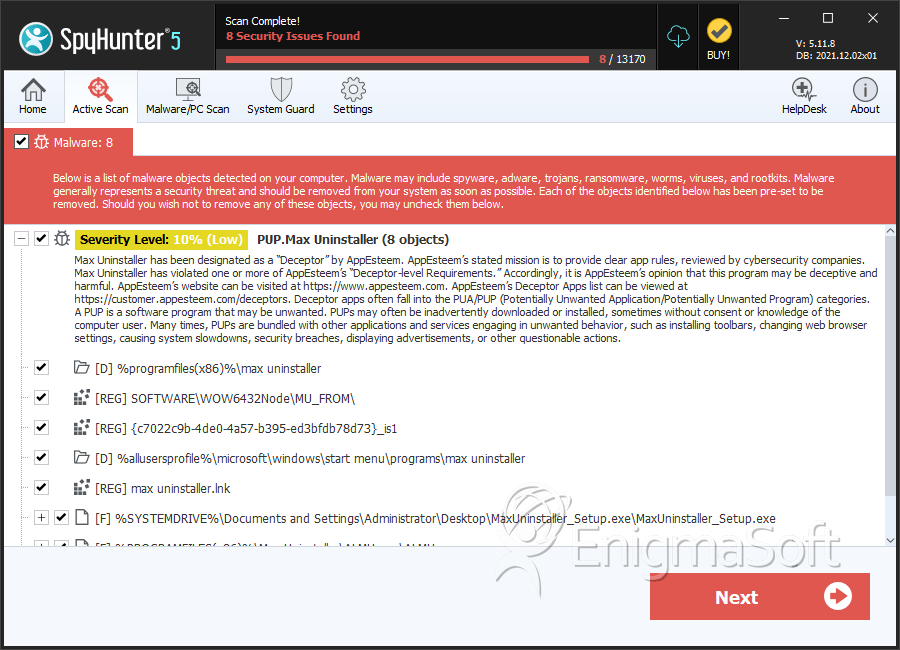
File System Details
| # | File Name | MD5 |
Detections
Detections: The number of confirmed and suspected cases of a particular threat detected on
infected computers as reported by SpyHunter.
|
|---|---|---|---|
| 1. | MaxUninstaller_Setup.exe | e617e5874add4ba24d3dfc04fb03fbb3 | 270 |
| 2. | ALMU.exe | f7203d7283963ed24c78d586cc8cd0c4 | 249 |
Registry Details
Directories
PUP.Max Uninstaller may create the following directory or directories:
| %allusersprofile%\microsoft\windows\start menu\programs\max uninstaller |
| %programfiles%\max uninstaller |
| %programfiles(x86)%\max uninstaller |
Analysis Report
General information
| Family Name: | PUP.Max Uninstaller |
|---|---|
| Signature status: | Root Not Trusted |
Known Samples
Known Samples
This section lists other file samples believed to be associated with this family.|
MD5:
431afe23e821425181d64e75f6a72640
SHA1:
cf1c366b09d364482052f1c01acdf149310f0d37
SHA256:
F7562E228B561FB73F2C067FEA3C1C4A2980D1141AE24B593CDA2444FBD12E9B
File Size:
245.98 KB, 245976 bytes
|
|
MD5:
f1eb483d47bd1ec27cd312cf7a7762af
SHA1:
9896c412d952f7c5d17ef63e8e539d3f94ee6a8b
SHA256:
94C5CC2C613134CC3C910D957F7D88201612B464FEE26909C2976E205168005A
File Size:
6.65 MB, 6652760 bytes
|
Windows Portable Executable Attributes
- File doesn't have "Rich" header
- File doesn't have debug information
- File doesn't have exports table
- File doesn't have relocations information
- File has exports table
- File has TLS information
- File is 32-bit executable
- File is either console or GUI application
- File is GUI application (IMAGE_SUBSYSTEM_WINDOWS_GUI)
- File is Native application (NOT .NET application)
Show More
- File is not packed
- IMAGE_FILE_DLL is not set inside PE header (Executable)
- IMAGE_FILE_EXECUTABLE_IMAGE is set inside PE header (Executable Image)
File Icons
File Icons
This section displays icon resources found within family samples. Malware often replicates icons commonly associated with legitimate software to mislead users into believing the malware is safe.


Windows PE Version Information
Windows PE Version Information
This section displays values and attributes that have been set in the Windows file version information data structure for samples within this family. To mislead users, malware actors often add fake version information mimicking legitimate software.| Name | Value |
|---|---|
| Comments | This installation was built with Inno Setup. |
| Company Name |
|
| File Description |
|
| File Version |
|
| Internal Name | CR.dll |
| Legal Copyright |
|
| Original Filename | CR.dll |
| Product Name | Advanced Fix 2013 |
| Product Version |
|
Digital Signatures
Digital Signatures
This section lists digital signatures that are attached to samples within this family. When analyzing and verifying digital signatures, it is important to confirm that the signature’s root authority is a well-known and trustworthy entity and that the status of the signature is good. Malware is often signed with non-trustworthy “Self Signed” digital signatures (which can be easily created by a malware author with no verification). Malware may also be signed by legitimate signatures that have an invalid status, and by signatures from questionable root authorities with fake or misleading “Signer” names.| Signer | Root | Status |
|---|---|---|
| Ideakee Inc | UTN-USERFirst-Object | Root Not Trusted |
Files Modified
Files Modified
This section lists files that were created, modified, moved and/or deleted by samples in this family. File system activity can provide valuable insight into how malware functions on the operating system.| File | Attributes |
|---|---|
| c:\users\user\appdata\local\temp\is-e47i6.tmp\9896c412d952f7c5d17ef63e8e539d3f94ee6a8b_0006652760.tmp | Generic Write,Read Attributes |
| c:\users\user\appdata\local\temp\is-vk7ep.tmp\_isetup\_setup64.tmp | Generic Read,Write Data,Write Attributes,Write extended,Append data |
| c:\users\user\appdata\local\temp\is-vk7ep.tmp\_isetup\_shfoldr.dll | Generic Read,Write Data,Write Attributes,Write extended,Append data |
Windows API Usage
Windows API Usage
This section lists Windows API calls that are used by the samples in this family. Windows API usage analysis is a valuable tool that can help identify malicious activity, such as keylogging, security privilege escalation, data encryption, data exfiltration, interference with antivirus software, and network request manipulation.| Category | API |
|---|---|
| Syscall Use |
Show More
|
| Process Manipulation Evasion |
|
| Process Shell Execute |
|
| Anti Debug |
|
| User Data Access |
|
| Keyboard Access |
|
Shell Command Execution
Shell Command Execution
This section lists Windows shell commands that are run by the samples in this family. Windows Shell commands are often leveraged by malware for nefarious purposes and can be used to elevate security privileges, download and launch other malware, exploit vulnerabilities, collect and exfiltrate data, and hide malicious activity.
C:\WINDOWS\SysWOW64\rundll32.exe C:\WINDOWS\system32\rundll32.exe c:\users\user\downloads\cf1c366b09d364482052f1c01acdf149310f0d37_0000245976.,LiQMAxHB
|
"C:\Users\Wypsgkfe\AppData\Local\Temp\is-E47I6.tmp\9896c412d952f7c5d17ef63e8e539d3f94ee6a8b_0006652760.tmp" /SL5="$40324,6147887,153600,c:\users\user\downloads\9896c412d952f7c5d17ef63e8e539d3f94ee6a8b_0006652760"
|