PUP.EagleGet
Threat Scorecard
EnigmaSoft Threat Scorecard
EnigmaSoft Threat Scorecards are assessment reports for different malware threats which have been collected and analyzed by our research team. EnigmaSoft Threat Scorecards evaluate and rank threats using several metrics including real-world and potential risk factors, trends, frequency, prevalence, and persistence. EnigmaSoft Threat Scorecards are updated regularly based on our research data and metrics and are useful for a wide range of computer users, from end users seeking solutions to remove malware from their systems to security experts analyzing threats.
EnigmaSoft Threat Scorecards display a variety of useful information, including:
Popularity Rank: The ranking of a particular threat in EnigmaSoft’s Threat Database.
Severity Level: The determined severity level of an object, represented numerically, based on our risk modeling process and research, as explained in our Threat Assessment Criteria.
Infected Computers: The number of confirmed and suspected cases of a particular threat detected on infected computers as reported by SpyHunter.
See also Threat Assessment Criteria.
| Popularity Rank: | 4,020 |
| Threat Level: | 10 % (Normal) |
| Infected Computers: | 21,195 |
| First Seen: | January 13, 2022 |
| Last Seen: | October 15, 2026 |
| OS(es) Affected: | Windows |
The detection of PUP.EagleGet on your system indicates the presence of a potentially unwanted program (PUP) that may be causing issues with your computer's performance and security. It is essential to understand the nature of this threat and take necessary steps to remove it to prevent further problems.
Table of Contents
What Is PUP.EagleGet?
PUP.EagleGet is a type of malware that is classified as a potentially unwanted program. This means that it is not necessarily a virus or a Trojan, but rather a program that may be installed on your system without your knowledge or consent. PUPs can be bundled with other software, downloaded from the internet, or installed through exploits. They often have legitimate functions, but can also exhibit malicious behavior, such as displaying unwanted advertisements, collecting user data, or installing additional malware.
How PUP.EagleGet Operates
PUP.EagleGet, like other PUPs, can operate in various ways to achieve its goals. It may install itself as a browser extension, a desktop application, or a system service. Once installed, it can start displaying unwanted advertisements, such as pop-ups, banners, or sponsored search results. It may also collect user data, such as browsing history, search queries, or personal information, and transmit it to its creators or third-party advertisers. In some cases, PUP.EagleGet may also install additional malware or PUPs on your system, leading to further security and performance issues.
Symptoms of Infection
If your system is infected with PUP.EagleGet, you may notice various symptoms, including unwanted advertisements, slow system performance, and suspicious program installations. You may also experience browser redirects, where your web browser is redirected to unwanted websites or search engines. Additionally, you may notice that your system is slow to start up or shut down, or that your browser is slow to respond to your inputs. These symptoms can be frustrating and may indicate that your system is infected with PUP.EagleGet or other malware.
How to Remove PUP.EagleGet
- Boot your system in Safe Mode with Networking to prevent PUP.EagleGet from loading and to allow you to download and install removal tools.
- Download and install a reputable anti-malware tool, such as SpyHunter, and perform a full scan of your system to detect and remove PUP.EagleGet and other malware.
- Uninstall any suspicious programs or applications that you do not recognize or that you did not install intentionally.
- Reset your web browsers, such as Chrome, Firefox, or Edge, to their default settings to remove any malicious extensions or settings.
- Reboot your system and perform another scan with your anti-malware tool to ensure that PUP.EagleGet and other malware have been completely removed.
Conclusion
Removing PUP.EagleGet from your system requires careful attention to detail and a thorough understanding of the removal process. By following the steps outlined above, you can help to ensure that your system is free from PUP.EagleGet and other malware. It is essential to remain vigilant and to take proactive steps to protect your system from future infections, such as keeping your operating system and software up to date, using strong antivirus software, and being cautious when downloading and installing new programs. By taking these steps, you can help to keep your system secure and prevent future malware infections.
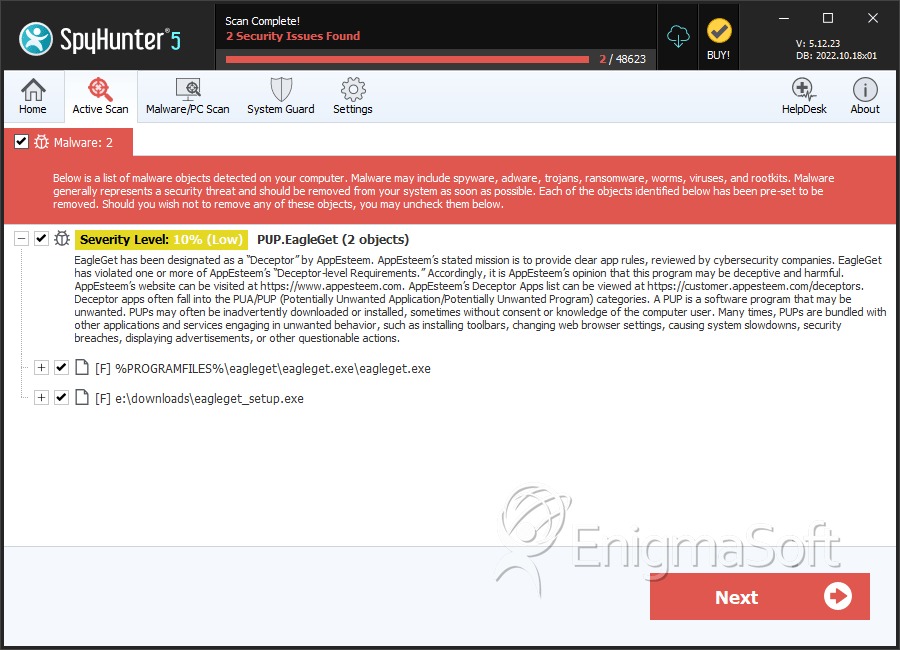
SpyHunter Detects & Remove PUP.EagleGet
File System Details
| # | File Name | MD5 |
Detections
Detections: The number of confirmed and suspected cases of a particular threat detected on
infected computers as reported by SpyHunter.
|
|---|---|---|---|
| 1. | eagleget.exe | 8d8aefc2b4d66894bd68ed2dbdc86fe4 | 12,179 |
| 2. | eagleget_setup.exe | 69f26e335a173717a64cd3b5458b9897 | 2,238 |
| 3. | non confermato 479988.crdownload | e96dd956bc2159ff1d073876ef5d4e58 | 95 |
Registry Details
Directories
PUP.EagleGet may create the following directory or directories:
| %appdata%\EagleGet |
Analysis Report
General information
| Family Name: | PUP.EagleGet |
|---|---|
| Packers: | UPX |
| Signature status: | No Signature |
Known Samples
Known Samples
This section lists other file samples believed to be associated with this family.|
MD5:
f9541d686ae777c5e50d2a8e57134721
SHA1:
39cef60065c6f4e0f5b027a8188edc33a79ab7d9
SHA256:
DB4CC0A6E771CD29B398C2B9D1755DE2BF42C661D202990F3D42CCDEE57EBFA7
File Size:
178.15 KB, 178152 bytes
|
|
MD5:
0ae9a7b3220b06637e36d388827a8d5a
SHA1:
75a4b24ed9fd928264b13ca79ef2be1a3c10f7d4
SHA256:
47927A799B11F7A3A3EC9511E124D58BB9BAF43176235F8BE0505E436655B0E4
File Size:
179.70 KB, 179704 bytes
|
|
MD5:
dfaa19c4c06169b73c29df6262ed6da8
SHA1:
6e723974f640505107bcf7e1c1e300eac103f5f6
SHA256:
75EB3259ECCCC1AFC4C5A1D8717CA179937D64CA29B43F750024C08294668695
File Size:
250.88 KB, 250880 bytes
|
|
MD5:
4b990f55978ff7272d5aacb9b39844c5
SHA1:
3aeb95ca96f948fb6c7d2ab98175e21c8a7a623f
SHA256:
87AE3F11DC21A33E02C1BA5D9FC5849B1696E9B5528416E0BBB6BEF25D4163F8
File Size:
4.19 MB, 4192766 bytes
|
Windows Portable Executable Attributes
- File doesn't have "Rich" header
- File doesn't have debug information
- File doesn't have exports table
- File doesn't have relocations information
- File doesn't have security information
- File has been packed
- File has exports table
- File has TLS information
- File is 32-bit executable
- File is console application (IMAGE_SUBSYSTEM_WINDOWS_CUI)
Show More
- File is either console or GUI application
- File is GUI application (IMAGE_SUBSYSTEM_WINDOWS_GUI)
- File is Native application (NOT .NET application)
- File is not packed
- IMAGE_FILE_DLL is not set inside PE header (Executable)
- IMAGE_FILE_EXECUTABLE_IMAGE is set inside PE header (Executable Image)
File Icons
File Icons
This section displays icon resources found within family samples. Malware often replicates icons commonly associated with legitimate software to mislead users into believing the malware is safe.


Windows PE Version Information
Windows PE Version Information
This section displays values and attributes that have been set in the Windows file version information data structure for samples within this family. To mislead users, malware actors often add fake version information mimicking legitimate software.| Name | Value |
|---|---|
| Company Name | EagleGet.com |
| File Description |
|
| File Version |
|
| Internal Name | IEGraberBHO.dll |
| Original Filename | EGGraber.exe |
| Product Name |
|
| Product Version |
|
Digital Signatures
Digital Signatures
This section lists digital signatures that are attached to samples within this family. When analyzing and verifying digital signatures, it is important to confirm that the signature’s root authority is a well-known and trustworthy entity and that the status of the signature is good. Malware is often signed with non-trustworthy “Self Signed” digital signatures (which can be easily created by a malware author with no verification). Malware may also be signed by legitimate signatures that have an invalid status, and by signatures from questionable root authorities with fake or misleading “Signer” names.| Signer | Root | Status |
|---|---|---|
| Beijing Pu Technology Limited | Go Daddy Secure Certificate Authority - G2 | Self Signed |
File Traits
- packed
- WinZip SFX
- x86
- ZIP (In Overlay)
- ZIPinO
Windows API Usage
Windows API Usage
This section lists Windows API calls that are used by the samples in this family. Windows API usage analysis is a valuable tool that can help identify malicious activity, such as keylogging, security privilege escalation, data encryption, data exfiltration, interference with antivirus software, and network request manipulation.| Category | API |
|---|---|
| Syscall Use |
Show More
|
| Process Manipulation Evasion |
|
| Process Shell Execute |
|
| Anti Debug |
|
Shell Command Execution
Shell Command Execution
This section lists Windows shell commands that are run by the samples in this family. Windows Shell commands are often leveraged by malware for nefarious purposes and can be used to elevate security privileges, download and launch other malware, exploit vulnerabilities, collect and exfiltrate data, and hide malicious activity.
C:\WINDOWS\SysWOW64\rundll32.exe C:\WINDOWS\system32\rundll32.exe c:\users\user\downloads\39cef60065c6f4e0f5b027a8188edc33a79ab7d9_0000178152.,LiQMAxHB
|
C:\WINDOWS\SysWOW64\rundll32.exe C:\WINDOWS\system32\rundll32.exe c:\users\user\downloads\75a4b24ed9fd928264b13ca79ef2be1a3c10f7d4_0000179704.,LiQMAxHB
|
C:\WINDOWS\SysWOW64\rundll32.exe C:\WINDOWS\system32\rundll32.exe c:\users\user\downloads\6e723974f640505107bcf7e1c1e300eac103f5f6_0000250880.,LiQMAxHB
|


