BrowserAir
Threat Scorecard
EnigmaSoft Threat Scorecard
EnigmaSoft Threat Scorecards are assessment reports for different malware threats which have been collected and analyzed by our research team. EnigmaSoft Threat Scorecards evaluate and rank threats using several metrics including real-world and potential risk factors, trends, frequency, prevalence, and persistence. EnigmaSoft Threat Scorecards are updated regularly based on our research data and metrics and are useful for a wide range of computer users, from end users seeking solutions to remove malware from their systems to security experts analyzing threats.
EnigmaSoft Threat Scorecards display a variety of useful information, including:
Popularity Rank: The ranking of a particular threat in EnigmaSoft’s Threat Database.
Severity Level: The determined severity level of an object, represented numerically, based on our risk modeling process and research, as explained in our Threat Assessment Criteria.
Infected Computers: The number of confirmed and suspected cases of a particular threat detected on infected computers as reported by SpyHunter.
See also Threat Assessment Criteria.
| Popularity Rank: | 16,424 |
| Threat Level: | 10 % (Normal) |
| Infected Computers: | 16,555 |
| First Seen: | July 16, 2015 |
| Last Seen: | March 10, 2026 |
| OS(es) Affected: | Windows |
The BrowserAir program is a new web browser based on the Chromium project that is used to create Google Chrome. The BrowserAir program is advertised to provide users with secure and private Internet browsing environment. These claims may prove to be true as long as you take advantage of the 'Incognito' mode of BrowserAir. However, the BrowserAir program is developed by Goobzo LTD that deployed the Object Browser and the YouTube Accelerator, and will help advertisers target you with customized ads. The BrowserAir program may appear as your default Internet browser after the installation of a freeware package via the 'Express' or 'Typical' option. The BrowserAir program will be installed in the hidden AppData folder of your account. The BrowserAir program will be registered with the Windows Registry, and you may be obstructed from setting another default Internet client. Additionally, the BrowserAir program can send your bookmarks, browsing history and cookies to its developers. The advertisers partnering with Goobzo can use the BrowserAir application to display promotional materials via pop-up windows and banners on non-affiliated web pages. Also, the BrowserAir program may block the native ads on Amazon, Walmart, and eBay and show you only ads by approved advertisers. The BrowserAir program has a built-in updater that may install third-party software such as the MyFunCards Toolbar that has a bad reputation without your approval. The functionality of BrowserAir mentioned above allows security authorities to classify the BrowserAir app as a Potentially Unwanted Program (PUP) with adware capabilities. Therefore, you might want to seek the service of a renowned anti-malware solution that can purge all components of the BrowserAir
Table of Contents
SpyHunter Detects & Remove BrowserAir
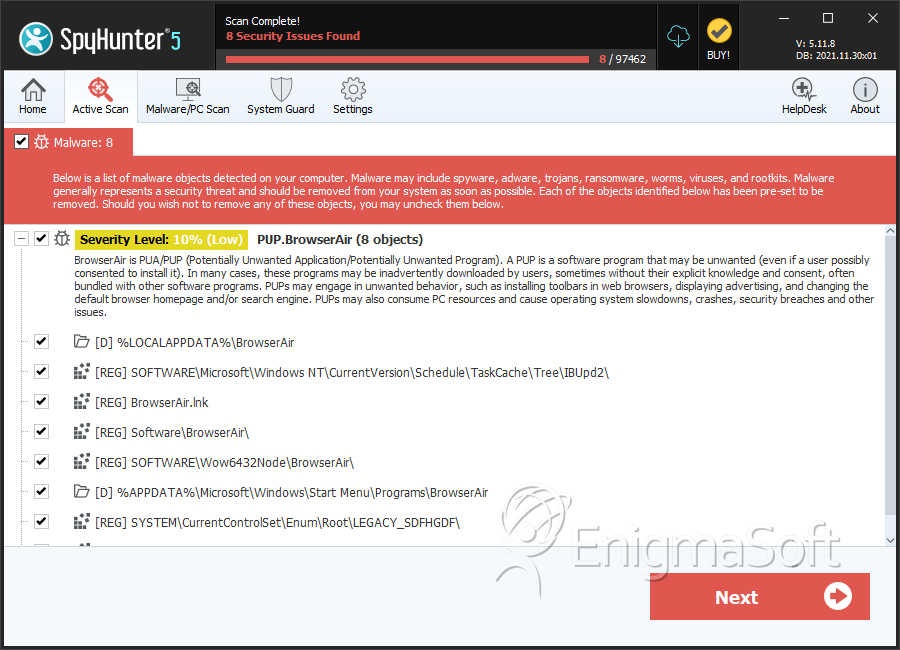
File System Details
| # | File Name | MD5 |
Detections
Detections: The number of confirmed and suspected cases of a particular threat detected on
infected computers as reported by SpyHunter.
|
|---|---|---|---|
| 1. | updater.exe.vir | c1131f4acec67c4c18b4f0a3228a54f3 | 1,809 |
| 2. | is-0PHTV.tmp | b96c1ae2ef0138fa50b6848b31665843 | 478 |
| 3. | BrowserAir.exe | 6b5e8f677d452ced4714fc3616c0f0c5 | 325 |
| 4. | updater.exe | 1abfa44cf2939681dac460b9e25326c1 | 307 |
| 5. | Uninstall.exe | da680305dca0718b4171a54de144428b | 72 |
| 6. | prtsvc.exe | 1734577abc3ddaccbaed6e65a854bb33 | 25 |
| 7. | sdfhgdf.sys | 5d8a755d139adb61242c0b33c2b9adfe | 8 |
| 8. | brsrv.exe | d7c9b727bc0b6f2bd671b4b5c25e9a0b | 8 |
| 9. | BrowserAirInst.exe | 06f7209c69a48a0a948505037e8aeb88 | 3 |
Registry Details
Directories
BrowserAir may create the following directory or directories:
| %APPDATA%\Microsoft\Windows\Start Menu\Programs\BrowserAir |
| %LOCALAPPDATA%\BrowserAir |
| %LOCALAPPDATA%\TECHP-BrowserAir |
| %UserProfile%\Local Settings\Application Data\BrowserAir |


