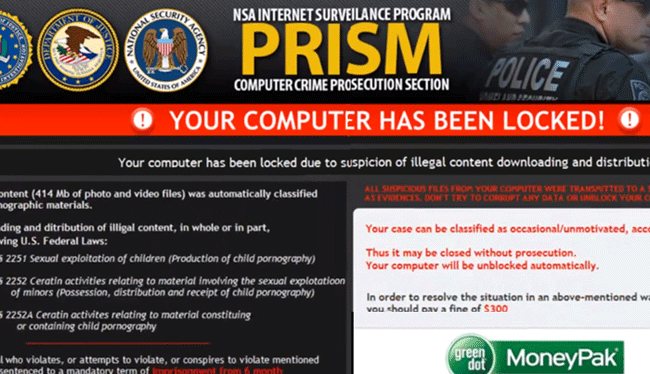
'Your Computer Has Been Locked' Technical Support Scam
The detection of 'Your Computer Has Been Locked' Technical Support Scam on your system indicates a potential threat to your computer's security and your personal data. This type of threat is designed to deceive users into believing their computer has been locked due to a serious issue, prompting them to contact fake technical support for assistance. In reality, the goal of this scam is to extort money from unsuspecting victims or to gain unauthorized access to their systems.
What Is 'Your Computer Has Been Locked' Technical Support Scam?
The 'Your Computer Has Been Locked' Technical Support Scam is a form of malware that employs social engineering tactics to trick users into thinking their computer is compromised or locked, often claiming it is due to illegal activities or a virus infection. This scam typically involves displaying fake warning messages or locking the computer screen, creating a sense of urgency and panic among users. The scammers then offer to fix the supposed issue for a fee, which can lead to financial loss and further compromise of personal data.
How 'Your Computer Has Been Locked' Technical Support Scam Operates
This scam operates by exploiting user fear and lack of technical knowledge. Once a computer is infected, the malware may display fake alerts or messages claiming the system has been locked due to a violation of laws or because it is infected with a dangerous virus. The message often includes a phone number or other contact information for the fake technical support team. The scammers may use high-pressure tactics to convince victims to pay for the removal of the nonexistent threat or to install additional malware under the guise of a fix.
Symptoms of Infection
Symptoms of infection by the 'Your Computer Has Been Locked' Technical Support Scam can include the sudden appearance of fake warning messages or alerts claiming your computer is locked or infected, unexpected changes to your computer settings, or the inability to access certain files or programs. You might also notice unusual network activity or find that your computer is running slower than usual. It's crucial to remain calm and not follow any instructions provided by the scam messages, as they are designed to deceive.
How to Remove 'Your Computer Has Been Locked' Technical Support Scam
- Boot your computer in Safe Mode with Networking to prevent the malware from loading and to gain access to the internet for downloading removal tools.
- Download and install a reputable anti-malware tool, such as SpyHunter, and perform a full scan of your system to detect and remove all traces of the malware.
- Uninstall any suspicious programs that you do not recognize or that were installed around the time the issue began.
- Reset your web browsers (Chrome, Firefox, Edge, etc.) to their default settings to remove any malicious extensions or settings changes made by the malware.
- Reboot your computer and perform another scan with your anti-malware tool to ensure all components of the malware have been removed.
Conclusion
Removing the 'Your Computer Has Been Locked' Technical Support Scam from your computer requires careful steps to ensure all components of the malware are eliminated. It's essential to stay vigilant and avoid engaging with the scam in any way. Regularly updating your operating system, using reputable antivirus software, and being cautious when clicking on links or downloading attachments can help prevent future infections. If you're unsure about any part of the removal process, consider seeking help from a professional to ensure your computer is thoroughly cleaned and secured.