Rootkit.TDSS
Threat Scorecard
EnigmaSoft Threat Scorecard
EnigmaSoft Threat Scorecards are assessment reports for different malware threats which have been collected and analyzed by our research team. EnigmaSoft Threat Scorecards evaluate and rank threats using several metrics including real-world and potential risk factors, trends, frequency, prevalence, and persistence. EnigmaSoft Threat Scorecards are updated regularly based on our research data and metrics and are useful for a wide range of computer users, from end users seeking solutions to remove malware from their systems to security experts analyzing threats.
EnigmaSoft Threat Scorecards display a variety of useful information, including:
Ranking: The ranking of a particular threat in EnigmaSoft’s Threat Database.
Severity Level: The determined severity level of an object, represented numerically, based on our risk modeling process and research, as explained in our Threat Assessment Criteria.
Infected Computers: The number of confirmed and suspected cases of a particular threat detected on infected computers as reported by SpyHunter.
See also Threat Assessment Criteria.
| Threat Level: | 80 % (High) |
| Infected Computers: | 399 |
| First Seen: | November 30, 2010 |
| OS(es) Affected: | Windows |
The TDSS Rootkit has become extremely widespread since TDSS Rootkit's beginnings in 2008. PC security analysts indicate that this rootkit presents exceptional difficulties for TDSS Rootkit's study and treatment because of TDSS Rootkit's very nature. The TDSS Rootkit infects drivers, meaning that TDSS Rootkit is loaded before the operating system itself. This implies an infection that is very deep and very challenging to remove. Usually, specialized tools are needed to detect and remove the TDSS Rootkit from an infected computer system.
Table of Contents
The History of the TDSS Rootkit
The first versions of the TDSS Rootkit are known as TDL-1 or Rootkit.Win32.Clbd.a, because of TDSS Rootkit's ability to infect the driver clbdriver-sys and the clbdll.dll DLL file. Some parts of the original TDSS Rootkit remain in today's newest versions of this extremely dangerous infection. TDL-1 has the capability of hiding itself and other files, executing high-level functions, and injecting malicious code. The TDSS Rootkit also protects itself by displaying an error message reading "STATUS_TOO_MANY_SECRETS" when trying to open the directories needed to remove this rootkit.
The next version of the TDSS Rootkit, TDL-2 made its appearance in spring of 2009. Its main feature is that the rootkit was encrypted to make it much harder for security researchers to analyze TDSS Rootkit. The hackers behind the TDSS Rootkit also included random segments from Shakespeare's Hamlet to confuse researchers further.
In the autumn of 2009, the next generation of the TDSS Rootkit started appearing. Security researchers indicate that the TDL-3 generation of the TDSS Rootkit is particularly malignant and especially hard to remove. The main trouble with TDL-3 is the fact the hackers behind it update TDSS Rootkit constantly. There is a constant arms race between the PC security experts and the hackers; with each advancement in anti-rootkit technology, the hackers release a new update to undo it.
The TDSS Rootkit and Online Scams
Hackers use the TDSS Rootkit to make money through affiliate marketing. While affiliate marketing can be a completely legal activity, the hackers' version of affiliate marketing involves attracting visitors and unwary victims to infected websites associated with various kinds of malware. The TDSS Rootkit is also strongly related to large botnets, typically with a number close to twenty thousand infected computers, which are sold or rented out to criminal organizations. The creators of the TDSS Rootkit are thought to be from the Russian Federation. The TDSS Rootkit botnets have been used for a wide range of criminal activities, from DDoS attacks to sending massive amounts of spam emails.
Aliases
15 security vendors flagged this file as malicious.
| Anti-Virus Software | Detection |
|---|---|
| Panda | Generic Trojan |
| AVG | Generic16.BRWH |
| Symantec | Hacktool.Rootkit |
| Sophos | Mal/Generic-A |
| TrendMicro | BKDR_TIDIES.SMA |
| AntiVir | TR/Agent.42496.27 |
| BitDefender | Trojan.Generic.3238155 |
| Avast | Win32:Jifas-DT |
| NOD32 | a variant of Win32/Olmarik.SR |
| CAT-QuickHeal | Trojan.Agent.ATV |
| McAfee+Artemis | DNSChanger!dd |
| eTrust-Vet | Win32/ASuspect.HGOJO |
| AntiVir | TR/Crypt.XPACK.Gen3 |
| NOD32 | Win32/Olmarik.XH |
| Avast | Win32:Rootkit-gen |
SpyHunter Detects & Remove Rootkit.TDSS
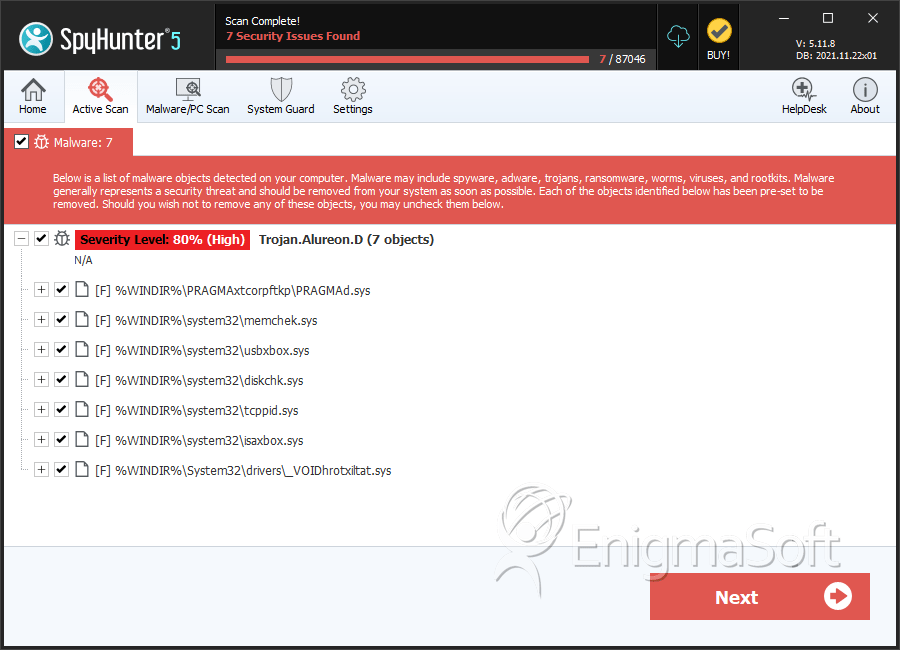
File System Details
| # | File Name | MD5 |
Detections
Detections: The number of confirmed and suspected cases of a particular threat detected on
infected computers as reported by SpyHunter.
|
|---|---|---|---|
| 1. | PRAGMAd.sys | 4fc1255817092de5c285440cf477035e | 98 |
| 2. | PRAGMAd.sys | afc6795bb909749f446f57e36f7b33e3 | 64 |
| 3. | PRAGMAd.sys | 4a2dccdd2a14acce0dc2bcfc01b01b15 | 46 |
| 4. | PRAGMAd.sys | 1d177f19440f4b4be104adcce3341685 | 30 |
| 5. | PRAGMAd.sys | fd8913513a87ed566c8c47f7cf2961c0 | 25 |
| 6. | PRAGMAd.sys | 421af6709d670e5b97a8c37e80144343 | 22 |
| 7. | memchek.sys | 1ca0d8ee82db8012de42b16f2ef69674 | 14 |
| 8. | usbxbox.sys | b3da42dfcd9851c24c9b09b8c188266d | 13 |
| 9. | diskchk.sys | e94d859753bb68f113b88e8b78607776 | 11 |
| 10. | PRAGMAd.sys | 4a672d94142ea8056ff589377fb8339b | 10 |
| 11. | PRAGMAd.sys | 0d72febb1914c0d7a379b9cc2f6bb8ff | 10 |
| 12. | PRAGMAd.sys | a3f92e9bf557198dc39d4045d2ec2144 | 8 |
| 13. | PRAGMAd.sys | 0aeb71ef75d921539e6e02dfa2c12e08 | 8 |
| 14. | tcppid.sys | c72311b8d604a3e3e9b36df733f30843 | 7 |
| 15. | PRAGMAd.sys | 184110fe4f5c6a4416b9decee90a2d9f | 6 |
| 16. | isaxbox.sys | 5a7eef7dcdae6912afe7f50983d5520f | 5 |
| 17. | PRAGMAd.sys | c907276d48943001a4745b6d4e254c13 | 3 |
| 18. | PRAGMAd.sys | 9d39fe1b36199d5717cae14ed3680e67 | 3 |
| 19. | PRAGMAd.sys | e671ab67d233cb4e87b1b679a92a0ed0 | 2 |
| 20. | PRAGMAd.sys | e2c5ffec5eb9612eea2d5ce22fdcfe09 | 2 |
| 21. | PRAGMAd.sys | b52194d21487e3cf2178950228552ac5 | 2 |
| 22. | PRAGMAd.sys | aca6e953ff8d2f536fd1d297e0486734 | 2 |
| 23. | PRAGMAd.sys | 2b5b356793a655697edd8c58b2964fe2 | 2 |
| 24. | PRAGMAd.sys | f4c09fd7833565264f8feb1349a558a1 | 1 |
| 25. | PRAGMAd.sys | 0cc76a2452fabfa4d6e98082d415201e | 1 |
| 26. | PRAGMAd.sys | 90046fd8e3bee623a26dfccb6a602746 | 1 |
| 27. | _VOIDhrotxiltat.sys | 89b56f6143f7c1ad44cd10f46700b9da | 1 |




