PUP.SmartPCFixer
Threat Scorecard
EnigmaSoft Threat Scorecard
EnigmaSoft Threat Scorecards are assessment reports for different malware threats which have been collected and analyzed by our research team. EnigmaSoft Threat Scorecards evaluate and rank threats using several metrics including real-world and potential risk factors, trends, frequency, prevalence, and persistence. EnigmaSoft Threat Scorecards are updated regularly based on our research data and metrics and are useful for a wide range of computer users, from end users seeking solutions to remove malware from their systems to security experts analyzing threats.
EnigmaSoft Threat Scorecards display a variety of useful information, including:
Popularity Rank: The ranking of a particular threat in EnigmaSoft’s Threat Database.
Severity Level: The determined severity level of an object, represented numerically, based on our risk modeling process and research, as explained in our Threat Assessment Criteria.
Infected Computers: The number of confirmed and suspected cases of a particular threat detected on infected computers as reported by SpyHunter.
See also Threat Assessment Criteria.
| Popularity Rank: | 13,591 |
| Threat Level: | 10 % (Normal) |
| Infected Computers: | 3,508 |
| First Seen: | March 27, 2019 |
| Last Seen: | September 27, 2026 |
| OS(es) Affected: | Windows |
The detection of PUP.SmartPCFixer on your system indicates the presence of a potentially unwanted program (PUP) that may be causing issues with your computer's performance and security. It is essential to understand the nature of this threat and take immediate action to remove it to prevent further damage.
Table of Contents
What Is PUP.SmartPCFixer?
PUP.SmartPCFixer is a type of malware that is classified as a potentially unwanted program. This means that while it may not be as malicious as other types of malware, such as viruses or Trojans, it can still cause problems with your system and compromise your personal data. PUPs are often installed on a system without the user's knowledge or consent, and they can be difficult to remove.
How PUP.SmartPCFixer Operates
PUP.SmartPCFixer, like other PUPs, operates by installing itself on a system and then proceeding to carry out various unwanted actions. These actions can include displaying unwanted advertisements, collecting personal data, and modifying system settings. PUPs can also install additional malware or unwanted software on a system, which can further compromise its security and performance.
PUPs often use deceptive tactics to install themselves on a system, such as bundling themselves with legitimate software or using fake alerts and warnings to trick users into installing them. Once installed, PUPs can be challenging to remove, as they often use rootkit technology to hide themselves and evade detection.
Symptoms of Infection
If your system is infected with PUP.SmartPCFixer, you may notice various symptoms, including slow system performance, unwanted advertisements and pop-ups, and unexpected changes to your system settings. You may also notice that your browser homepage has been changed or that you are being redirected to unwanted websites. Additionally, you may experience issues with your system's stability, such as crashes and freezes.
- Unwanted advertisements and pop-ups
- Slow system performance
- Unexpected changes to system settings
- Browser homepage changes
- Redirects to unwanted websites
- System crashes and freezes
How to Remove PUP.SmartPCFixer
- Boot your system in Safe Mode with Networking to prevent PUP.SmartPCFixer from loading and to allow you to download and install removal tools.
- Download and install a reputable anti-malware tool, such as SpyHunter, and perform a full scan of your system to detect and remove PUP.SmartPCFixer and any other malware that may be present.
- Uninstall any suspicious programs that may be related to PUP.SmartPCFixer, as these may be used to reinstall the PUP or install additional malware.
- Reset your browser settings, including Chrome, Firefox, and Edge, to their default values to remove any changes made by PUP.SmartPCFixer.
- Reboot your system and perform a follow-up scan with your anti-malware tool to ensure that PUP.SmartPCFixer and any other malware have been completely removed.
Conclusion
Removing PUP.SmartPCFixer from your system is essential to prevent further damage and protect your personal data. By following the steps outlined above, you can effectively remove this PUP and restore your system to its normal state. It is also crucial to take preventive measures to avoid installing PUPs in the future, such as being cautious when downloading software and avoiding suspicious links and emails. By staying vigilant and taking the necessary steps, you can help keep your system secure and protect yourself from the threats posed by PUPs like PUP.SmartPCFixer.
SpyHunter Detects & Remove PUP.SmartPCFixer
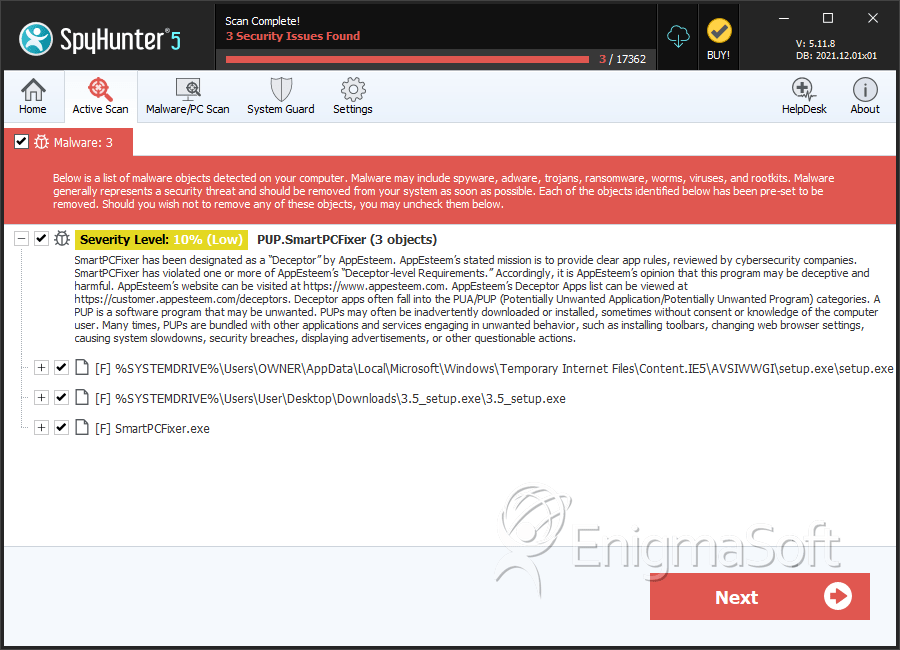
File System Details
| # | File Name | MD5 |
Detections
Detections: The number of confirmed and suspected cases of a particular threat detected on
infected computers as reported by SpyHunter.
|
|---|---|---|---|
| 1. | setup.exe | 75b9457bb7bb3f0dcd065c67823bf743 | 620 |
| 2. | 3.5_setup.exe | 10b56c4d49d0f655bfc3df562019ace9 | 65 |
| 3. | SmartPCFixer.exe | 37f7bee29e2efb1652b998b29bb4e6d8 | 34 |
Analysis Report
General information
| Family Name: | PUP.SmartPCFixer |
|---|---|
| Signature status: | Self Signed |
Known Samples
Known Samples
This section lists other file samples believed to be associated with this family.|
MD5:
819723a5fcb70441d29429ef1ead7571
SHA1:
ed097161a433767ee3e9cabd65ce90b8afea7ad8
SHA256:
AB43AEBB2CCC3F02957B62D4260999314E8F9D9C18824383711664088A76E0E5
File Size:
2.36 MB, 2355304 bytes
|
|
MD5:
e584906c370e65e7447945c3ac8cd8b1
SHA1:
4ea96e45affda61c4ed5bf1cf93736808c3f3396
SHA256:
82B0BD3DF7A2D032F0234924A4E66A7DF50D563E393BCF0BF876806D42AE47CF
File Size:
794.42 KB, 794424 bytes
|
|
MD5:
1e362d4f06795887b6a756d0bd5829c3
SHA1:
1e6253db96640f8ae66113cc1b1ee9ebdd82291c
SHA256:
9734783B66671FD823621E29C8374C6139704964283CF954F56E5CEB74AD4B6F
File Size:
2.35 MB, 2345984 bytes
|
|
MD5:
3830f8f82bc2d000d8528cf471594a76
SHA1:
677c84f69a427d5bf6429ec2946be068b78f96e5
SHA256:
66128DDD9307550F78DD539F63E7962C3A2E558C588C38C988EC057D91665109
File Size:
345.23 KB, 345232 bytes
|
|
MD5:
fd6091104af5082b3329a78d3451ae1e
SHA1:
bd64fbf2bbc7a2434fa9f0849c4c1f5f8dfc847c
SHA256:
F153D702955D69C96DE1DEA4003A7CC957869D5149582AFDE49EE3F23670E069
File Size:
4.58 MB, 4579760 bytes
|
Windows Portable Executable Attributes
- File doesn't have "Rich" header
- File doesn't have debug information
- File doesn't have exports table
- File doesn't have relocations information
- File has exports table
- File has TLS information
- File is 32-bit executable
- File is console application (IMAGE_SUBSYSTEM_WINDOWS_CUI)
- File is either console or GUI application
- File is GUI application (IMAGE_SUBSYSTEM_WINDOWS_GUI)
Show More
- File is Native application (NOT .NET application)
- File is not packed
- IMAGE_FILE_DLL is not set inside PE header (Executable)
- IMAGE_FILE_EXECUTABLE_IMAGE is set inside PE header (Executable Image)
File Icons
File Icons
This section displays icon resources found within family samples. Malware often replicates icons commonly associated with legitimate software to mislead users into believing the malware is safe.


Windows PE Version Information
Windows PE Version Information
This section displays values and attributes that have been set in the Windows file version information data structure for samples within this family. To mislead users, malware actors often add fake version information mimicking legitimate software.| Name | Value |
|---|---|
| Comments | This installation was built with Inno Setup. |
| Company Name |
|
| File Description |
Show More
|
| File Version |
|
| Internal Name |
|
| Legal Copyright |
Show More
|
| License | http://curl.haxx.se/docs/copyright.html |
| Original Filename |
|
| Product Name |
Show More
|
| Product Version |
|
Digital Signatures
Digital Signatures
This section lists digital signatures that are attached to samples within this family. When analyzing and verifying digital signatures, it is important to confirm that the signature’s root authority is a well-known and trustworthy entity and that the status of the signature is good. Malware is often signed with non-trustworthy “Self Signed” digital signatures (which can be easily created by a malware author with no verification). Malware may also be signed by legitimate signatures that have an invalid status, and by signatures from questionable root authorities with fake or misleading “Signer” names.| Signer | Root | Status |
|---|---|---|
| LionSea Software co., ltd | VeriSign Class 3 Code Signing 2010 CA | Hash Mismatch |
| LionSea Software co., ltd | VeriSign Class 3 Code Signing 2010 CA | Self Signed |
Files Modified
Files Modified
This section lists files that were created, modified, moved and/or deleted by samples in this family. File system activity can provide valuable insight into how malware functions on the operating system.| File | Attributes |
|---|---|
| \device\namedpipe\gmdasllogger | Generic Write,Read Attributes |
| c:\users\user\appdata\local\microsoft\windows\usrclass.dat{dba6b5ef-640a-11ed-9bcb-f677369d361c}.txr.0.regtrans-ms | Generic Read,Write Data,Write Attributes,Write extended,Append data |
| c:\users\user\appdata\local\microsoft\windows\usrclass.dat{dba6b5ef-640a-11ed-9bcb-f677369d361c}.txr.1.regtrans-ms | Generic Read,Write Data,Write Attributes,Write extended,Append data |
| c:\users\user\appdata\local\microsoft\windows\usrclass.dat{dba6b5ef-640a-11ed-9bcb-f677369d361c}.txr.2.regtrans-ms | Generic Read,Write Data,Write Attributes,Write extended,Append data |
| c:\users\user\appdata\local\temp\is-615l2.tmp\ed097161a433767ee3e9cabd65ce90b8afea7ad8_0002355304.tmp | Generic Write,Read Attributes |
| c:\users\user\appdata\local\temp\is-g2r4a.tmp\1e6253db96640f8ae66113cc1b1ee9ebdd82291c_0002345984.tmp | Generic Write,Read Attributes |
| c:\users\user\appdata\local\temp\is-lvmpo.tmp\bd64fbf2bbc7a2434fa9f0849c4c1f5f8dfc847c_0004579760.tmp | Generic Write,Read Attributes |
| c:\windows\dpinst.log | Generic Read,Write Data,Write Attributes,Write extended,Append data |
Windows API Usage
Windows API Usage
This section lists Windows API calls that are used by the samples in this family. Windows API usage analysis is a valuable tool that can help identify malicious activity, such as keylogging, security privilege escalation, data encryption, data exfiltration, interference with antivirus software, and network request manipulation.| Category | API |
|---|---|
| Process Manipulation Evasion |
|
| Process Shell Execute |
|
| User Data Access |
|
| Syscall Use |
Show More
|
| Anti Debug |
|
Shell Command Execution
Shell Command Execution
This section lists Windows shell commands that are run by the samples in this family. Windows Shell commands are often leveraged by malware for nefarious purposes and can be used to elevate security privileges, download and launch other malware, exploit vulnerabilities, collect and exfiltrate data, and hide malicious activity.
"C:\Users\Jmefkpsu\AppData\Local\Temp\is-615L2.tmp\ed097161a433767ee3e9cabd65ce90b8afea7ad8_0002355304.tmp" /SL5="$20258,1923470,140800,c:\users\user\downloads\ed097161a433767ee3e9cabd65ce90b8afea7ad8_0002355304"
|
"C:\Users\Ryxfajxd\AppData\Local\Temp\is-G2R4A.tmp\1e6253db96640f8ae66113cc1b1ee9ebdd82291c_0002345984.tmp" /SL5="$8035C,1911104,140800,c:\users\user\downloads\1e6253db96640f8ae66113cc1b1ee9ebdd82291c_0002345984"
|
C:\WINDOWS\SysWOW64\rundll32.exe C:\WINDOWS\system32\rundll32.exe c:\users\user\downloads\677c84f69a427d5bf6429ec2946be068b78f96e5_0000345232.,LiQMAxHB
|
"C:\Users\Byintnbq\AppData\Local\Temp\is-LVMPO.tmp\bd64fbf2bbc7a2434fa9f0849c4c1f5f8dfc847c_0004579760.tmp" /SL5="$50442,4096636,140800,c:\users\user\downloads\bd64fbf2bbc7a2434fa9f0849c4c1f5f8dfc847c_0004579760"
|


