PUP.Free Auto Clicker
Threat Scorecard
EnigmaSoft Threat Scorecard
EnigmaSoft Threat Scorecards are assessment reports for different malware threats which have been collected and analyzed by our research team. EnigmaSoft Threat Scorecards evaluate and rank threats using several metrics including real-world and potential risk factors, trends, frequency, prevalence, and persistence. EnigmaSoft Threat Scorecards are updated regularly based on our research data and metrics and are useful for a wide range of computer users, from end users seeking solutions to remove malware from their systems to security experts analyzing threats.
EnigmaSoft Threat Scorecards display a variety of useful information, including:
Popularity Rank: The ranking of a particular threat in EnigmaSoft’s Threat Database.
Severity Level: The determined severity level of an object, represented numerically, based on our risk modeling process and research, as explained in our Threat Assessment Criteria.
Infected Computers: The number of confirmed and suspected cases of a particular threat detected on infected computers as reported by SpyHunter.
See also Threat Assessment Criteria.
| Popularity Rank: | 16,289 |
| Threat Level: | 10 % (Normal) |
| Infected Computers: | 59 |
| First Seen: | January 31, 2024 |
| Last Seen: | September 2, 2026 |
| OS(es) Affected: | Windows |
AutoClicker (PUP.Free Auto Clicker) might sound like a convenient tool for automating mouse clicks on a computer screen, but its risks far outweigh its benefits. While some users may seek out AutoClicker for its functionality, the reality is that this application is often flagged as malicious by security vendors. Distributed through torrent sites and other questionable channels, AutoClicker is a potential threat to your device and personal information.
Table of Contents
AutoClicker and the Risks of Unwanted Applications
Applications like AutoClicker, aka PUP.Free Auto Clicker, are commonly classified as unwanted programs or adware, as they frequently come bundled with intrusive advertising features. These ads can disrupt your browsing experience with annoying pop-ups, banners, and redirect links. Worse, clicking on these ads may lead to malicious websites, phishing scams, or unintentional malware downloads.
Beyond intrusive ads, AutoClicker and similar programs can trick users into unwanted subscriptions or purchases, resulting in unexpected charges. They may also engage in data harvesting, collecting information such as browsing habits, system details, and potentially sensitive personal data. This data can be misused by the app’s developers or sold to third parties for profit.
Additionally, unwanted applications can strain system resources, leading to slower device performance. AutoClicker, for example, could hijack your web browser settings, making it difficult to revert changes and exposing you to even more security risks. Common signs of browser hijacking include being redirected to fake search engines or unreliable websites whenever you browse online.
How Does AutoClicker Get Installed?
AutoClicker is typically distributed via shady methods, making it easy to install unknowingly. Torrents and P2P networks are common sources, but it may also arrive through misleading advertisements, fake software updates, or third-party downloaders.
A tactic known as bundling is another widespread method. During the installation of free software, additional applications like AutoClicker may be pre-selected for installation. Many users fail to notice these options, inadvertently allowing the unwanted app onto their system.
Why You Should Remove AutoClicker
Once installed, AutoClicker can expose you to numerous threats, from privacy violations to financial losses. These risks make it crucial to remove the program promptly. However, removing adware like AutoClicker can be challenging, as it often uses persistence mechanisms to evade deletion.
If AutoClicker is on your device, it is highly recommended to use a trusted anti-malware tool to detect and eliminate it. Manual removal may not fully address all its components, leaving your system vulnerable to further exploitation.
Tips to Prevent Unwanted Applications
Protecting your devices from programs like AutoClicker requires proactive measures:
- Download from trusted sources: Stick to official app stores or legitimate developer websites to minimize risks. Avoid third-party platforms and torrent sites.
- Check reviews and ratings: Before downloading an app, research its reputation to identify potential red flags.
- Use caution during installations: Choose "Custom" or "Advanced" installation settings and deselect any optional software you don’t need.
- Be vigilant with online ads: Avoid interacting with pop-ups or ads on questionable websites, as these can lead to unintentional downloads.
- Install robust security software: A reliable antivirus or anti-malware program can help detect and block unwanted applications.
Although AutoClicker may seem like a harmless utility, its distribution methods and association with malicious activity make it a significant risk. From exposing you to scams and malware to compromising your personal information, this application represents more harm than benefit.
To protect your devices and data, avoid downloading questionable software and stay alert for the tactics used by unwanted applications. If you suspect your computer is already compromised, run a full system scan with updated anti-malware software to ensure a clean and secure system.
By staying informed and cautious, you can avoid the pitfalls of programs like AutoClicker and maintain a safer online experience.
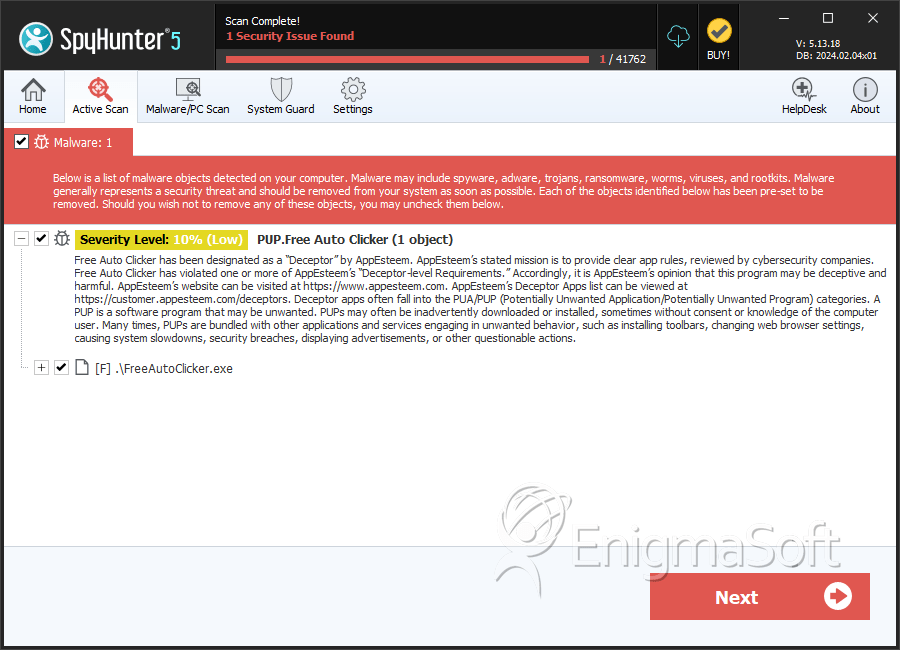
SpyHunter Detects & Remove PUP.Free Auto Clicker
PUP.Free Auto Clicker Video
Tip: Turn your sound ON and watch the video in Full Screen mode.
File System Details
| # | File Name | MD5 |
Detections
Detections: The number of confirmed and suspected cases of a particular threat detected on
infected computers as reported by SpyHunter.
|
|---|---|---|---|
| 1. | FreeAutoClicker.exe | c7ced6aef23fa1bfbbc31ff2419ad815 | 28 |