PUP.CravingExplorer
Threat Scorecard
EnigmaSoft Threat Scorecard
EnigmaSoft Threat Scorecards are assessment reports for different malware threats which have been collected and analyzed by our research team. EnigmaSoft Threat Scorecards evaluate and rank threats using several metrics including real-world and potential risk factors, trends, frequency, prevalence, and persistence. EnigmaSoft Threat Scorecards are updated regularly based on our research data and metrics and are useful for a wide range of computer users, from end users seeking solutions to remove malware from their systems to security experts analyzing threats.
EnigmaSoft Threat Scorecards display a variety of useful information, including:
Popularity Rank: The ranking of a particular threat in EnigmaSoft’s Threat Database.
Severity Level: The determined severity level of an object, represented numerically, based on our risk modeling process and research, as explained in our Threat Assessment Criteria.
Infected Computers: The number of confirmed and suspected cases of a particular threat detected on infected computers as reported by SpyHunter.
See also Threat Assessment Criteria.
| Threat Level: | 10 % (Normal) |
| Infected Computers: | 15 |
| First Seen: | July 8, 2026 |
| Last Seen: | October 10, 2026 |
| OS(es) Affected: | Windows |
Security researchers and anti-malware engines occasionally flag a specific piece of software or an associated component as PUP.CravingExplorer. The "PUP" prefix stands for Potentially Unwanted Program. This classification is used when an application exhibits behavior that users may find undesirable, intrusive, or deceptive, even if the software is not inherently malicious or destructive like a trojan or ransomware. Because no specific sandbox telemetry is available for this particular detection, this report focuses on the general characteristics of PUPs and standard mitigation strategies.
Table of Contents
What Is PUP.CravingExplorer?
PUP.CravingExplorer is a detection name used to identify software that often bundles itself with other free applications downloaded from the internet. Applications categorized as PUPs typically employ aggressive marketing or distribution tactics. They are rarely installed intentionally by the user. Instead, they rely on bundled installers, misleading prompts, or pre-checked consent boxes to gain access to a system. While a PUP is not classified as severe malware, security professionals flag these programs because they can degrade system performance, compromise user privacy, and create an unstable computing environment.
How PUP.CravingExplorer Operates
Unwanted programs categorized under this detection generally operate by modifying system or browser settings to achieve their underlying purpose, which often involves generating advertising revenue or tracking user behavior. They may alter browser configurations, inject unwanted content, or establish persistence mechanisms that make manual removal difficult. These programs frequently run background processes that consume system resources. They may also facilitate the installation of additional unwanted components by establishing a foothold in the operating system's startup sequence or scheduled tasks.
Symptoms of Infection
Users who have a program detected as PUP.CravingExplorer on their machine may notice several common symptoms associated with unwanted software. These indicators include:
- Unexpected changes to browser homepage, new tab, or default search engine settings.
- An increase in unsolicited pop-up advertisements, banners, or in-text links.
- Redirects to unfamiliar websites when attempting to navigate to legitimate web pages.
- Sluggish system performance, including slow boot times and general unresponsiveness.
- The presence of unfamiliar browser extensions, add-ons, or standalone programs in the system's application list.
How to Remove PUP.CravingExplorer
To effectively remove PUP.CravingExplorer and ensure no unwanted components remain active, follow this structured removal process:
- Boot the affected computer into Safe Mode with Networking. This limits the active processes to essential system drivers, preventing the unwanted program from running and blocking its removal.
- Run a full system scan with a reputable anti-malware tool such as SpyHunter. Allow the security software to identify and quarantine all associated files, folders, and registry modifications.
- Uninstall suspicious programs manually. Access the operating system's list of installed applications and remove any unfamiliar software, browser helpers, or recently added utilities that coincide with the onset of the symptoms.
- Reset the affected web browsers (Google Chrome, Mozilla Firefox, and Microsoft Edge). Restoring browsers to their default settings will clear out unwanted extensions, search providers, and startup pages.
- Reboot the computer normally into the standard Windows environment and run a second full scan with your anti-malware tool to verify that the detection has been completely cleared.
Conclusion
While PUP.CravingExplorer is not categorized as highly destructive malware, its presence on a system should not be ignored. Unwanted programs compromise the user experience, slow down system operations, and can introduce privacy risks. Removing the software using a reliable security solution and resetting affected browsers will restore system stability. To prevent future infections, users should always pay close attention to software installation prompts, opt for custom installation options, and decline any additional bundled software that is not explicitly required.
SpyHunter Detects & Remove PUP.CravingExplorer
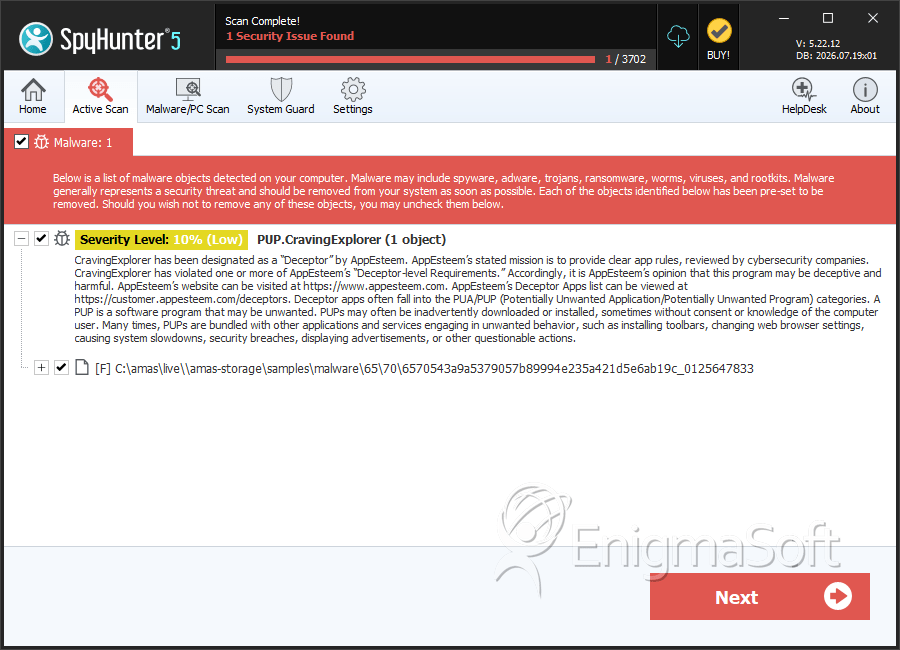
File System Details
| # | File Name | MD5 |
Detections
Detections: The number of confirmed and suspected cases of a particular threat detected on
infected computers as reported by SpyHunter.
|
|---|---|---|---|
| 1. | 6570543a9a5379057b89994e235a421d5e6ab19c_0125647833 | 8525c18e67c20d91e4c92dfb586934f8 | 12 |
| 2. | CravingExplorer-2-11-34_64bit.exe | 44aefdf34ef827d31f4289e81de65f66 | 2 |


