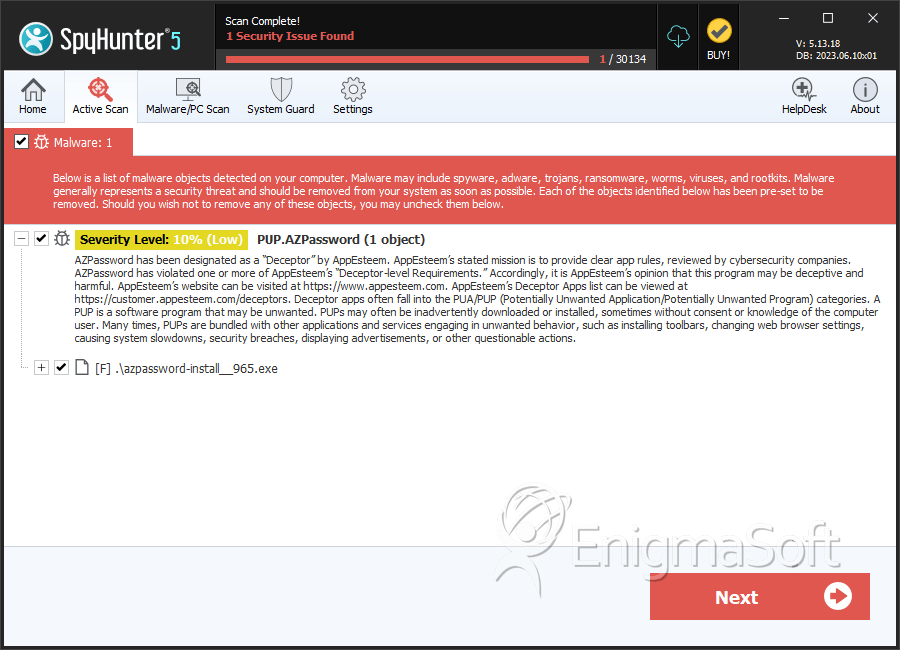
PUP.AZPassword
The detection of PUP.AZPassword on your system indicates the presence of a potentially unwanted program (PUP) that may be causing issues with your computer's performance and security. It is essential to understand the nature of this threat and take appropriate steps to remove it and prevent future infections.
Table of Contents
What Is PUP.AZPassword?
PUP.AZPassword is a type of potentially unwanted program that may have been installed on your system without your knowledge or consent. PUPs are often bundled with other software or downloaded from the internet, and they can cause a range of problems, including slowing down your computer, displaying unwanted ads, and potentially compromising your personal data. The name PUP.AZPassword suggests that this particular PUP may be related to password management or storage, but its exact nature and behavior can vary.
How PUP.AZPassword Operates
Once installed, PUP.AZPassword may operate in the background, potentially collecting and transmitting data about your browsing habits, search queries, or other online activities. It may also display unwanted ads, pop-ups, or banners, which can be annoying and disrupt your online experience. In some cases, PUPs like PUP.AZPassword may also modify your browser settings, homepage, or search engine, making it difficult to restore your preferred settings.
Symptoms of Infection
If your system is infected with PUP.AZPassword, you may notice several symptoms, including slow system performance, unwanted ads or pop-ups, unexpected changes to your browser settings, or suspicious programs running in the background. You may also experience issues with your internet connection, such as slow browsing speeds or frequent disconnections. In some cases, you may not notice any symptoms at all, which is why it's essential to regularly scan your system for potential threats.
- Unwanted ads or pop-ups
- Slow system performance
- Changes to browser settings or homepage
- Suspicious programs running in the background
- Issues with internet connection
How to Remove PUP.AZPassword
- Boot your system in Safe Mode with Networking to prevent PUP.AZPassword from loading and to allow for a more effective removal process.
- Use a reputable anti-malware tool, such as SpyHunter, to perform a full scan of your system and detect any related threats.
- Uninstall any suspicious programs or software that may be related to PUP.AZPassword.
- Reset your browser settings to their default values, including Chrome, Firefox, and Edge, to remove any unwanted changes made by the PUP.
- Reboot your system and perform another scan to ensure that PUP.AZPassword has been completely removed.
Conclusion
Removing PUP.AZPassword from your system is crucial to preventing potential security risks and performance issues. By following the steps outlined above, you can effectively remove this potentially unwanted program and restore your system to its optimal state. Remember to always be cautious when downloading software or clicking on links from unknown sources, and regularly scan your system for potential threats to ensure your online safety and security.
SpyHunter Detects & Remove PUP.AZPassword