Nano Ransomware
Threat Scorecard
EnigmaSoft Threat Scorecard
EnigmaSoft Threat Scorecards are assessment reports for different malware threats which have been collected and analyzed by our research team. EnigmaSoft Threat Scorecards evaluate and rank threats using several metrics including real-world and potential risk factors, trends, frequency, prevalence, and persistence. EnigmaSoft Threat Scorecards are updated regularly based on our research data and metrics and are useful for a wide range of computer users, from end users seeking solutions to remove malware from their systems to security experts analyzing threats.
EnigmaSoft Threat Scorecards display a variety of useful information, including:
Popularity Rank: The ranking of a particular threat in EnigmaSoft’s Threat Database.
Severity Level: The determined severity level of an object, represented numerically, based on our risk modeling process and research, as explained in our Threat Assessment Criteria.
Infected Computers: The number of confirmed and suspected cases of a particular threat detected on infected computers as reported by SpyHunter.
See also Threat Assessment Criteria.
| Threat Level: | 100 % (High) |
| Infected Computers: | 1 |
| First Seen: | November 27, 2018 |
| Last Seen: | November 28, 2018 |
| OS(es) Affected: | Windows |
The detection of Nano Ransomware on your system indicates a potentially severe security threat. Ransomware, in general, is a type of malware designed to encrypt or lock a victim's files, demanding a ransom in exchange for the decryption key. Understanding how this threat operates and taking immediate action to remove it is crucial to minimizing damage and preventing further compromise.
Table of Contents
What Is Nano Ransomware?
Nano Ransomware, as detected, suggests a ransomware infection, which typically involves malicious software that uses encryption to hold a victim's data hostage. The primary goal of such malware is to extort money from the victim by demanding payment in exchange for the decryption key needed to restore access to the encrypted data. The name "Nano Ransomware" itself does not directly imply a specific known malware family but indicates the presence of a ransomware threat that needs immediate attention.
How Nano Ransomware Operates
Ransomware, including the detected Nano Ransomware, usually operates by first gaining unauthorized access to a computer system, often through phishing emails, exploited vulnerabilities, or other means of social engineering. Once inside, it scans the system for target files, which can include documents, images, videos, and other types of data. These files are then encrypted, making them inaccessible to the user. The ransomware will typically display a ransom note, demanding payment in cryptocurrency for the decryption key. The operation of ransomware can vary, with some versions also attempting to spread to other machines on the network or even deleting backups to prevent recovery.
Symptoms of Infection
Symptoms of a ransomware infection can include the inability to access files, the presence of ransom notes or demands for payment, and significant changes in file extensions. In some cases, the malware may also cause system slowdowns or other performance issues. It's crucial to recognize these symptoms early to take prompt action and limit the damage.
- Files become inaccessible or are locked.
- Ransom demands or notes are displayed on the screen.
- File extensions are changed to unusual or unfamiliar types.
- System performance may degrade.
How to Remove Nano Ransomware
- Enter Safe Mode with Networking to limit the malware's ability to spread or interfere with the removal process.
- Perform a full scan of your system using a reputable anti-malware tool, such as SpyHunter, to detect and remove the malware.
- Uninstall suspicious programs that may be related to the infection, using the "Programs and Features" or "Apps & features" section in your system's Control Panel or Settings.
- Reset your web browsers, including Chrome, Firefox, and Edge, to their default settings to remove any malicious extensions or settings that may have been altered by the malware.
- After completing the above steps, reboot your system and perform another scan to ensure that the malware has been fully removed.
Conclusion
Dealing with a ransomware infection like Nano Ransomware requires immediate and careful action to prevent further damage and potential data loss. By understanding the nature of the threat and following a systematic approach to removal, users can effectively eliminate the malware and restore their system's security. It's also essential to take preventive measures, such as regularly backing up important data, using strong antivirus software, and being cautious with emails and downloads, to avoid future infections.
SpyHunter Detects & Remove Nano Ransomware
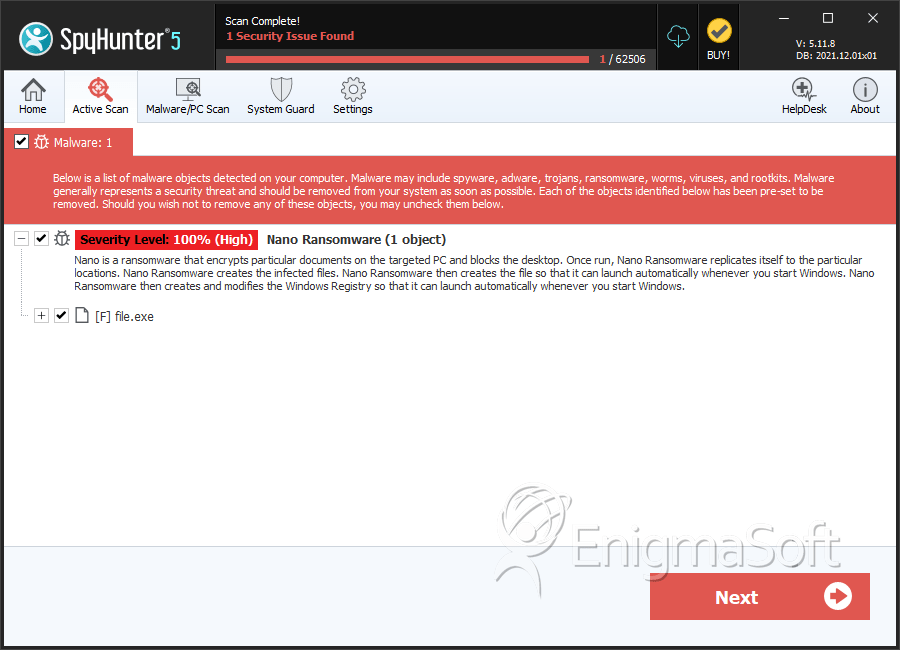
File System Details
| # | File Name | MD5 |
Detections
Detections: The number of confirmed and suspected cases of a particular threat detected on
infected computers as reported by SpyHunter.
|
|---|---|---|---|
| 1. | file.exe | db35f2cbc8fd4411e78ea6c6a8b50aa3 | 0 |


