Mass Sea Ads
Threat Scorecard
EnigmaSoft Threat Scorecard
EnigmaSoft Threat Scorecards are assessment reports for different malware threats which have been collected and analyzed by our research team. EnigmaSoft Threat Scorecards evaluate and rank threats using several metrics including real-world and potential risk factors, trends, frequency, prevalence, and persistence. EnigmaSoft Threat Scorecards are updated regularly based on our research data and metrics and are useful for a wide range of computer users, from end users seeking solutions to remove malware from their systems to security experts analyzing threats.
EnigmaSoft Threat Scorecards display a variety of useful information, including:
Ranking: The ranking of a particular threat in EnigmaSoft’s Threat Database.
Severity Level: The determined severity level of an object, represented numerically, based on our risk modeling process and research, as explained in our Threat Assessment Criteria.
Infected Computers: The number of confirmed and suspected cases of a particular threat detected on infected computers as reported by SpyHunter.
See also Threat Assessment Criteria.
| Threat Level: | 20 % (Normal) |
| Infected Computers: | 56 |
| First Seen: | June 14, 2016 |
| Last Seen: | July 28, 2022 |
| OS(es) Affected: | Windows |
Computer users that need to compile an extensive report on a topic may be interested in installing the Mass Sea browser extension. The Mass Sea app is supposed to add search options to your online queries and help you receive smart suggestions. The Mass Sea extension may change your default search provider to a custom version of Ask.com and redirect you to Ask.com whenever you attempt to load Google, Bing and Yahoo. That may not be welcomed by most Web surfers that value the services provided by Yahoo, Microsoft and Google. Security analysts add that the Mass Sea extension is digitally signed and does not provide information related to its developer and publisher. The Mass Sea extension may travel with badware like BatBrowse, and users may want to reconsider installing Mass Sea. Moreover, the Mass Sea browser extension cannot be found in the Chrome Web store and is not whitelisted. The Mass Sea browser extension may show pop-up ads, banners, and load video commercials that cannot be paused or closed.
Extensions like Ghostery and Adblock might prove ineffective in stopping the ads by Mass Sea. The Mass Sea extension is classified as an adware that may redirect users to untrusted online stores and recommend users to buy faulty electronic devices. Needless to say, you should not expect refunds from stores that are connected to the Mass Sea adware. Google Chrome has mechanisms to prevent installation of unsigned extensions and users may be presented with a UAC prompt when installing the Mass Sea extension. You should not allow the Mass Sea adware to interact with your browser because Mass Sea may send data like your Internet history and downloads log to advertisers without your consent. The Mass Sea adware may have installed its files in the Temp folder and users may have trouble using the Extensions Manager to remove the Mass Sea manually. You should use a credible anti-spyware tool to eliminate the Mass Sea adware effortlessly.
Table of Contents
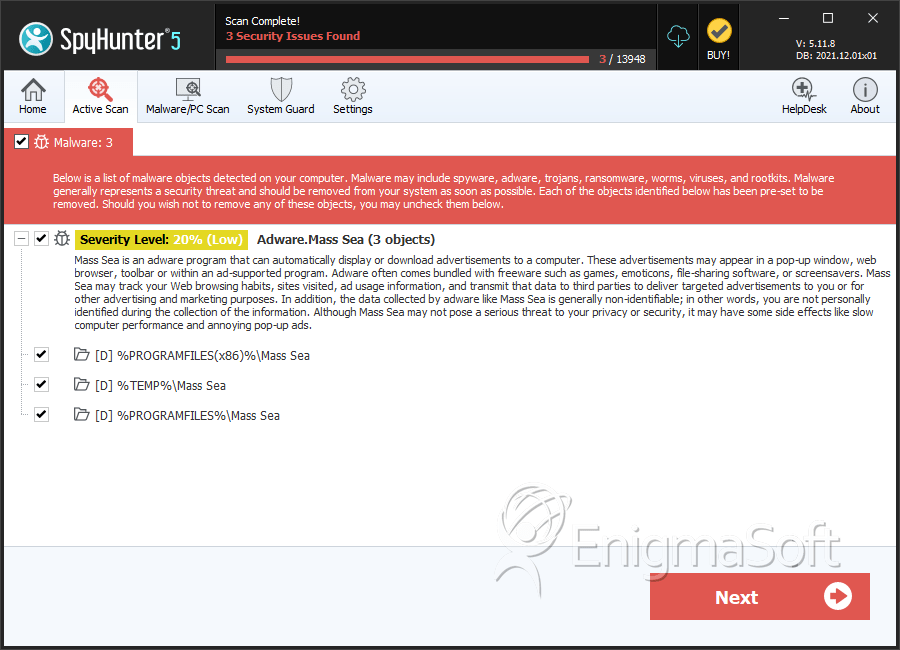
SpyHunter Detects & Remove Mass Sea Ads
Directories
Mass Sea Ads may create the following directory or directories:
| %PROGRAMFILES%\Mass Sea |
| %PROGRAMFILES(x86)%\Mass Sea |
| %TEMP%\Mass Sea |
URLs
Mass Sea Ads may call the following URLs:
| www.masssea.com |





Submit Comment
Please DO NOT use this comment system for support or billing questions. For SpyHunter technical support requests, please contact our technical support team directly by opening a customer support ticket via your SpyHunter. For billing issues, please refer to our "Billing Questions or Problems?" page. For general inquiries (complaints, legal, press, marketing, copyright), visit our "Inquiries and Feedback" page.