encS Ransomware
The encS Ransomware is a new ransomware threat that is targeting users online. Ransomware threats are a very popular malware type, as it enables cybercriminals to generate cash rather quickly.
The encS ransomware is a cryptovirus that encrypts files on a computer. The virus encrypts all kinds of files, including documents, pictures, videos, and audio files. By encrypting data like this, the virus leaves you no choice but to pay the ransom demanded by the threat actors.
This ransomware is the latest version of the DeathHiddenTear ransomware. Like most viruses of this type, it changes the file extension of infected files to either encS or encL. The new file extension is placed at the end of the file name after the original file extension. A picture file called “1.gif” would be renamed to “1.gif.encS,” for example.
It’s impossible to access altered files while the virus has changed their code. It’s hard to tell which files are the most important to you unless you already know. What makes the encS ransomware so dangerous is the use of blackmail and ransom demands. Users could find their computers are permanently damaged, or they lose out on money because the hackers don’t provide the promised decryption key. It’s essential to remain calm and attempt to solve the problem without getting the hackers involved.
What to do if Your Computer is Infected by encS
Not only does encS infect common file types, but it also changes the settings on your computer. These changes mean that you are unable to access antivirus and data recovery features on your device, making it harder to undo the damage caused by the virus. A ransom note – titled “Decrypt Instructions.tx” – is dropped on to the desktop. The note – shown below – details how you can contact the virus creator and get your data back.
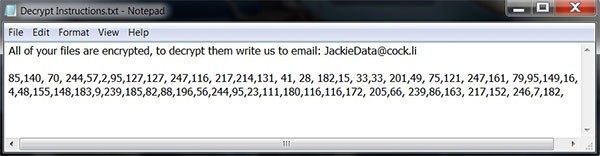
All of your files are encrypted, to decrypt them write us to email: JackieData@cock.li
85,140, 70, 244,57,2,95,127,127, 247,116, 217,214,131, 41, 28, 182,15, 33,33, 201,49, 75,121, 247,161, 79,95,149,16,18
4,48,155,148,183,9,239,185,82,88,196,56,244,95,23,111,180,116,116,172, 205,66, 239,86,163, 217,152, 246,7,182.
Security experts recommend that you never get in contact with the criminals. These criminals only care about getting their money and spreading encS as much as possible. There’s no telling how big the ransom is until the criminal tells you. Ransom payments are to be made in bitcoin and can be up to several thousand dollars.
Your best bet with encS is to use an antivirus tool to remove the infection and then restore the damaged files using a data backup. Having backups of your data is essential for this very occasion. Unfortunately, not everyone keeps backups of their data and so their options are limited when it comes to viruses like this. Keep in mind that prevention is always better than the cure, so take steps to avoid encS in the first place.
Ignoring the ransom note will ensure, at the very least, you don’t get infected by other ransomware sent to you by the attacker. You may be able to save some of your data by acting fast and removing the virus. With how quickly a cryptovirus like this works, however, it may already be too late by the time you see the ransom note on your desktop.
You should take steps to remove the virus as soon as possible from your computer. Eliminate the virus itself and any associated applications and programs so that the virus can’t come back. This could mean having to take a few extra steps, but it’s better to be safe than sorry. You don’t want to restore all your data only for it to get encrypted again. Make sure that your computer is entirely rid of encS ransomware before restoring lost files and data.
Safe Mode and System Restore can help you to clean your computer and restore your lost data. Don’t rely on these tools too much, however, as ransomware deletes Shadow Volume copies of data. These Shadow Volume copies are what the computer uses to restore data. Without them, you will need an external backup to work from.
Protect Your Computer From encS Ransomware
The best thing you can do for your computer is reevaluating how you use it. Practice proper online safety and hygiene by avoiding malicious downloads and email scams. Take steps to prevent your computer from being infected in the first place, and dealing with viruses such as encS ransomware becomes less of an issue.




