Trojan.Triosir
Threat Scorecard
EnigmaSoft Threat Scorecard
EnigmaSoft Threat Scorecards are assessment reports for different malware threats which have been collected and analyzed by our research team. EnigmaSoft Threat Scorecards evaluate and rank threats using several metrics including real-world and potential risk factors, trends, frequency, prevalence, and persistence. EnigmaSoft Threat Scorecards are updated regularly based on our research data and metrics and are useful for a wide range of computer users, from end users seeking solutions to remove malware from their systems to security experts analyzing threats.
EnigmaSoft Threat Scorecards display a variety of useful information, including:
Popularity Rank: The ranking of a particular threat in EnigmaSoft’s Threat Database.
Severity Level: The determined severity level of an object, represented numerically, based on our risk modeling process and research, as explained in our Threat Assessment Criteria.
Infected Computers: The number of confirmed and suspected cases of a particular threat detected on infected computers as reported by SpyHunter.
See also Threat Assessment Criteria.
| Threat Level: | 80 % (High) |
| Infected Computers: | 707 |
| First Seen: | July 9, 2016 |
| Last Seen: | November 25, 2025 |
| OS(es) Affected: | Windows |
The detection of Trojan.Triosir on your system indicates a potential security threat that requires immediate attention. This Trojan-type threat can compromise the integrity of your computer, leading to unauthorized access, data theft, and other malicious activities. It is essential to understand the nature of this threat and take prompt action to remove it and prevent future infections.
Table of Contents
What Is Trojan.Triosir?
Trojan.Triosir is a type of malware that disguises itself as a legitimate program or file, allowing it to bypass security measures and infiltrate your system. Once inside, it can perform various malicious functions, such as stealing sensitive information, installing additional malware, or providing unauthorized access to your computer. The name "Trojan.Triosir" suggests that it is a Trojan-type threat, but its exact characteristics and behavior may vary.
How Trojan.Triosir Operates
Malware like Trojan.Triosir typically operates by exploiting vulnerabilities in software or human error. It may spread through infected downloads, email attachments, or compromised websites. Once installed, it can communicate with its command and control servers to receive instructions, transmit stolen data, or download additional malware. The threat can also modify system settings, create new files or registry entries, and interact with other malicious programs to achieve its goals.
Symptoms of Infection
Identifying a Trojan.Triosir infection can be challenging, as it may not always exhibit obvious symptoms. However, some common signs of infection include slow system performance, unexpected pop-ups or ads, unfamiliar programs or icons, and unusual network activity. You may also notice that your browser homepage or search engine has changed, or that your computer is crashing or freezing frequently. If you suspect that your system is infected, it is crucial to take immediate action to prevent further damage.
How to Remove Trojan.Triosir
- Boot your computer in Safe Mode with Networking to prevent the malware from loading and to allow for easier removal.
- Perform a full scan of your system using a reputable anti-malware tool, such as SpyHunter, to detect and remove all instances of the threat.
- Uninstall any suspicious programs or applications that may be related to the infection.
- Reset your web browsers, including Chrome, Firefox, and Edge, to their default settings to remove any malicious extensions or add-ons.
- Reboot your computer and run another full scan to ensure that the threat has been completely removed.
Conclusion
Removing Trojan.Triosir from your system requires a combination of technical expertise and caution. By following the steps outlined above and taking proactive measures to protect your computer, you can minimize the risk of reinfection and prevent future security threats. It is essential to remain vigilant and keep your operating system, software, and security tools up to date to stay ahead of emerging threats. Remember that prevention is key, and being aware of the potential risks and taking steps to mitigate them can help you maintain a secure and healthy computing environment.
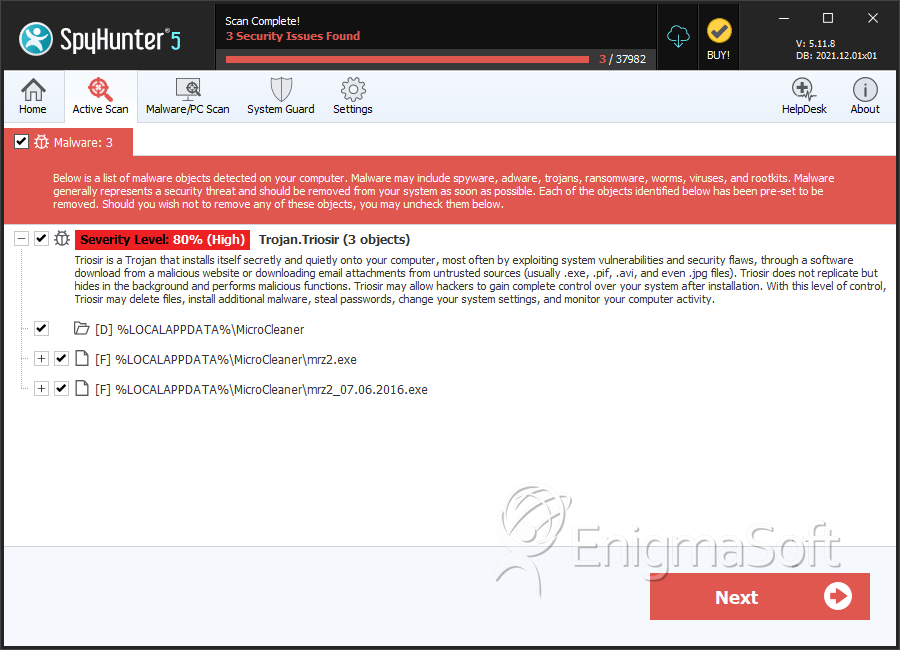
SpyHunter Detects & Remove Trojan.Triosir
File System Details
| # | File Name | MD5 |
Detections
Detections: The number of confirmed and suspected cases of a particular threat detected on
infected computers as reported by SpyHunter.
|
|---|---|---|---|
| 1. | mrz2.exe | ae9c628238ccbb34a4be2f32880a1217 | 81 |
| 2. | mrz2_07.06.2016.exe | 6f01fa359a0b6c5e424e8e46ccba53f3 | 27 |
Directories
Trojan.Triosir may create the following directory or directories:
| %LOCALAPPDATA%\MicroCleaner |
Analysis Report
General information
| Family Name: | Trojan.Triosir |
|---|---|
| Signature status: | Root Not Trusted |
Known Samples
Known Samples
This section lists other file samples believed to be associated with this family.|
MD5:
7fec4596271a0bb8138d44e3a6c660f3
SHA1:
dcc75956bc54024acd751a8ac123dde6a82a206e
SHA256:
EF116E103173B17D00BD04C854E8C71B97B77EABC198D33907426232B3A69E6C
File Size:
255.94 KB, 255944 bytes
|
Windows Portable Executable Attributes
- File doesn't have "Rich" header
- File doesn't have debug information
- File doesn't have exports table
- File is 32-bit executable
- File is either console or GUI application
- File is GUI application (IMAGE_SUBSYSTEM_WINDOWS_GUI)
- File is Native application (NOT .NET application)
- File is not packed
- IMAGE_FILE_DLL is not set inside PE header (Executable)
- IMAGE_FILE_EXECUTABLE_IMAGE is set inside PE header (Executable Image)
Windows PE Version Information
Windows PE Version Information
This section displays values and attributes that have been set in the Windows file version information data structure for samples within this family. To mislead users, malware actors often add fake version information mimicking legitimate software.| Name | Value |
|---|---|
| File Description | Installer |
| File Version | 2.0.0.1 |
| Internal Name | Installer.exe |
| Legal Copyright | Copyright (C) 2014 |
| Original Filename | Installer.exe |
| Product Name | Installer |
| Product Version | 2.0.0.1 |
Digital Signatures
Digital Signatures
This section lists digital signatures that are attached to samples within this family. When analyzing and verifying digital signatures, it is important to confirm that the signature’s root authority is a well-known and trustworthy entity and that the status of the signature is good. Malware is often signed with non-trustworthy “Self Signed” digital signatures (which can be easily created by a malware author with no verification). Malware may also be signed by legitimate signatures that have an invalid status, and by signatures from questionable root authorities with fake or misleading “Signer” names.| Signer | Root | Status |
|---|---|---|
| TRIORIS LLC | UTN-USERFirst-Object | Root Not Trusted |


