Searchbunnie.com
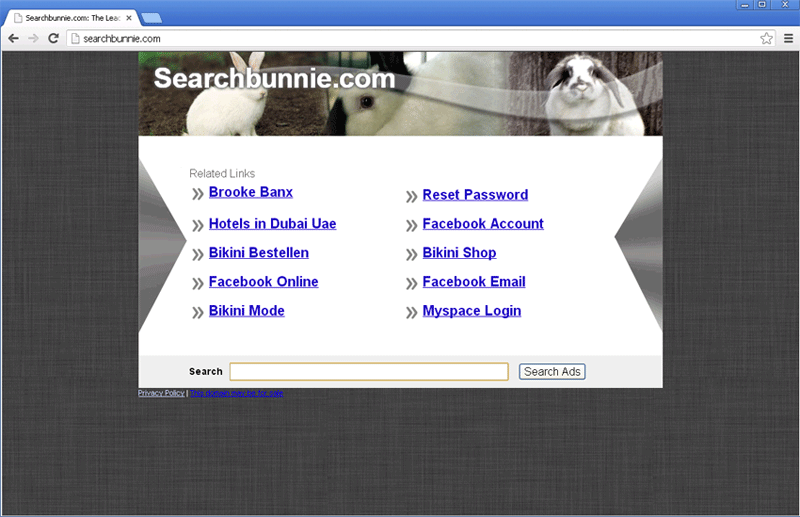
Searchbunnie.com Image
The Searchbunnie.com website is a very low quality search engine that seems to vary little from the many other versions of this type of website that have been observed previously. The Searchbunnie.com search engine itself contains a header with a picture of a cute rabbit; however, there is little cute about the rest of this website. The Searchbunnie.com website contains a search component and numerous affiliate marketing links that may lead to other known threats and sponsored advertisements. It is important to note that carrying out a search on Searchbunnie.com will usually be useless. This is because Searchbunnie.com search results are sponsored by marketing companies, meaning that the results will seldom be related to the computer user's query, merely meant to advertise certain products and online services. Searchbunnie.com redirects will commonly be caused by a Potentially Unwanted Program (PUP) that is often installed after the computer user installs a freeware program from a poorly regulated source. Because of this, the first step in stopping Searchbunnie.com redirects should usually be the immediate removal of any recently installed browser extensions or other typical PUPs from the infected computer.
Besides freeware bundling, there are other ways in which browser hijackers and adware associated with Searchbunnie.com are distributed. These types of components may be acquired through typical malware infection avenues such as email spam, malicious links distributed through social media, attack websites coupled with malicious redirect scripts and fake files distributed through file sharing networks. The occurrence of Searchbunnie.com redirects typically indicates that there is other, threats installed on the victim's computer. These types of infections may be installed along with fake security software and other similar scams.
Putting a Stop on Searchbunnie.com Redirects
Symptoms associated with Searchbunnie.com, such as browser redirects, can be stopped by removing the browser hijacker or Potentially Unwanted Program causing them. To achieve this, ESG security researchers strongly recommend uninstalling any recently installed browser extensions or applications. Once these have been uninstalled, a strong anti-malware program should be used to scan the entire computer to make sure that the Searchbunnie.com redirects have not exposed the victim's computer to malware. Since these types of unwanted applications will often make unauthorized changes to the infected computer, it may be necessary to undo any unwanted changes to the infected Web browser's settings manually.




Submit Comment
Please DO NOT use this comment system for support or billing questions. For SpyHunter technical support requests, please contact our technical support team directly by opening a customer support ticket via your SpyHunter. For billing issues, please refer to our "Billing Questions or Problems?" page. For general inquiries (complaints, legal, press, marketing, copyright), visit our "Inquiries and Feedback" page.