Related Program Ads
Threat Scorecard
EnigmaSoft Threat Scorecard
EnigmaSoft Threat Scorecards are assessment reports for different malware threats which have been collected and analyzed by our research team. EnigmaSoft Threat Scorecards evaluate and rank threats using several metrics including real-world and potential risk factors, trends, frequency, prevalence, and persistence. EnigmaSoft Threat Scorecards are updated regularly based on our research data and metrics and are useful for a wide range of computer users, from end users seeking solutions to remove malware from their systems to security experts analyzing threats.
EnigmaSoft Threat Scorecards display a variety of useful information, including:
Ranking: The ranking of a particular threat in EnigmaSoft’s Threat Database.
Severity Level: The determined severity level of an object, represented numerically, based on our risk modeling process and research, as explained in our Threat Assessment Criteria.
Infected Computers: The number of confirmed and suspected cases of a particular threat detected on infected computers as reported by SpyHunter.
See also Threat Assessment Criteria.
| Threat Level: | 20 % (Normal) |
| Infected Computers: | 212 |
| First Seen: | June 14, 2016 |
| Last Seen: | October 24, 2022 |
| OS(es) Affected: | Windows |
It is an adware that displays the ads by Related Program in your browser, which appear when you shop online using your PC. The ads powered by Related Program may be visualized as banners, pop-up windows, ad-boxes and tooltips. The Related Program adware is offered on Relatedprogram.com as a shopping enhancer that you might find bundled with programs such as EZDownloader and GoFastPC. Web surfers that like to see related deals from merchants may be pleased with the suggestions by the Related Program adware. However, you should be aware that adware applications are not safe, may convince users to purchase faulty devices, and provide their credit card details to untrusted sellers. The Related Program adware is not an exception and users may be invited to provide contact information like their email and physical address, post box and phone number. Marketers can use the data gathered by the Related Program adware to push custom-made promotions and use your browser as a free advertising platform.
The Related Program adware may use executable DLLs to avoid detection by security scanners and edit your registry to hide its files on the PC. The Related Program adware may use custom CSS-styles to alter the appearance of pages and embed advertisements. Needless to say, extensions like Greasemonkey and Tampermonkey may not function properly, and users may experience browser crashes. Also, users that installed Adblock, Ghostery, and Privacy Badger may notice that they are disabled because the Related Program adware is running. Computer users are not advised to interact with the content coming from Related Program and notifications that require users to input their email and phone number. The developers of the Related Program adware may sell your contact details to managers of spam bots, and you could receive corrupted files. The Related Program adware can be removed with the assistance of a reputable anti-malware application that can prevent similar threats from hijacking your browser.
Table of Contents
SpyHunter Detects & Remove Related Program Ads
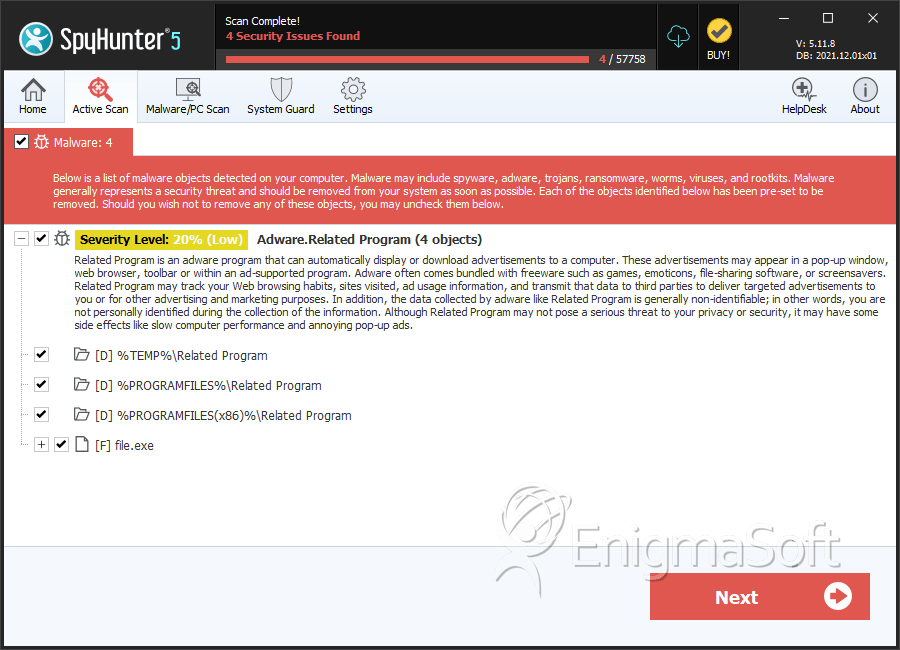
File System Details
| # | File Name | MD5 |
Detections
Detections: The number of confirmed and suspected cases of a particular threat detected on
infected computers as reported by SpyHunter.
|
|---|---|---|---|
| 1. | file.exe | 37869745a847edebe37619de2adb9614 | 0 |
Directories
Related Program Ads may create the following directory or directories:
| %PROGRAMFILES%\Related Program |
| %PROGRAMFILES(x86)%\Related Program |
| %TEMP%\Related Program |





Submit Comment
Please DO NOT use this comment system for support or billing questions. For SpyHunter technical support requests, please contact our technical support team directly by opening a customer support ticket via your SpyHunter. For billing issues, please refer to our "Billing Questions or Problems?" page. For general inquiries (complaints, legal, press, marketing, copyright), visit our "Inquiries and Feedback" page.