PUP.X-VPN
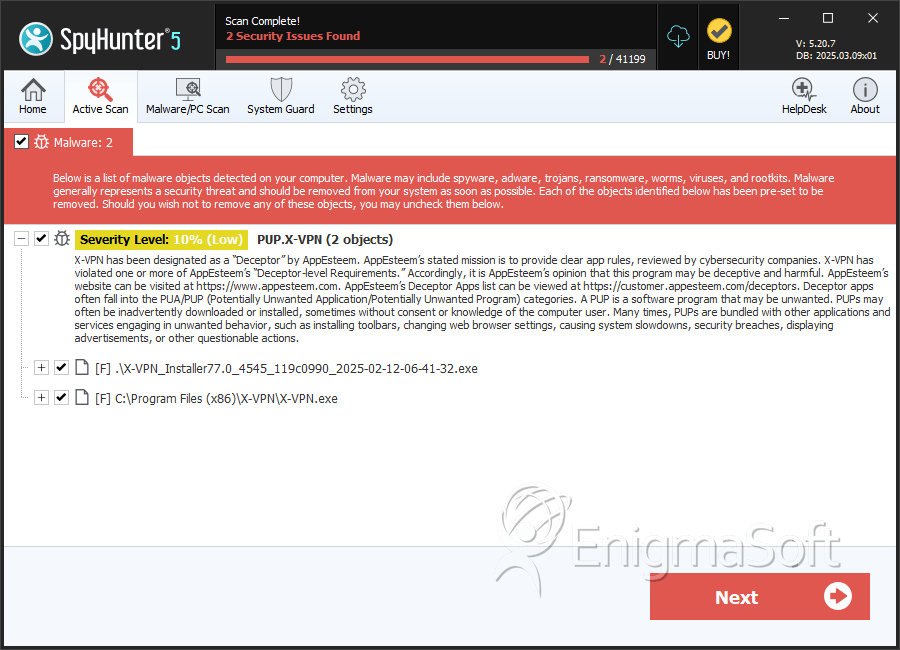
Your system has been detected with a potentially unwanted program (PUP) known as PUP.X-VPN. This detection indicates that your computer may be at risk due to the presence of this unwanted software. It is essential to understand the nature of this threat and take necessary steps to remove it to ensure the security and integrity of your system.
Table of Contents
What Is PUP.X-VPN?
PUP.X-VPN is classified as a potentially unwanted program, which means it is not necessarily malicious but can still cause issues with your system's performance, privacy, and security. PUPs are often installed alongside other software without the user's full knowledge or consent. They can range from annoying adware to more serious threats that compromise system security. The "X-VPN" part of the name might suggest it claims to offer VPN services, but its classification as a PUP indicates that its intentions or behaviors are not entirely benign.
How PUP.X-VPN Operates
PUPs like PUP.X-VPN typically operate by installing themselves on a system through bundled software downloads, deceptive advertisements, or exploits in software vulnerabilities. Once installed, they can perform a variety of unwanted actions, such as displaying advertisements, collecting user data without consent, slowing down the system, or even installing additional unwanted software. The specific behaviors of PUP.X-VPN can vary, but the common denominator is that they are unwanted and can pose a risk to your privacy and system security.
Symptoms of Infection
Symptoms of a PUP.X-VPN infection can include, but are not limited to, an increase in unwanted advertisements, unexpected changes in browser settings, slow system performance, and the presence of unfamiliar programs or toolbars in your web browsers. You might also notice that your system is connecting to the internet without your input, which could be a sign that the PUP is communicating with its command and control servers or downloading additional unwanted software.
How to Remove PUP.X-VPN
- Enter Safe Mode with Networking to prevent PUP.X-VPN from interfering with the removal process. This mode allows you to use the internet to download removal tools while limiting the functionality of malicious programs.
- Perform a full scan of your system using a reputable anti-malware tool, such as SpyHunter. Ensure the tool is updated to the latest version to effectively detect and remove PUP.X-VPN.
- Uninstall suspicious programs from your system. Go through the list of installed programs and remove any that you do not recognize or no longer need.
- Reset your web browsers, including Chrome, Firefox, and Edge, to their default settings. This step will remove any unwanted extensions, home pages, and search engines that PUP.X-VPN might have installed.
- Reboot your system and perform another scan with your anti-malware tool to ensure that PUP.X-VPN has been completely removed. Re-scanning after a reboot helps in detecting any remnants that might have been missed during the initial scan.
Conclusion
Removing PUP.X-VPN from your system is crucial to prevent potential harm and maintain your privacy and security. By following the steps outlined above, you should be able to successfully remove this potentially unwanted program. Remember, prevention is key: always be cautious when downloading software, read user agreements carefully, and keep your operating system and security software up to date to protect against future threats.
SpyHunter Detects & Remove PUP.X-VPN