PUP.PGWare Bundler
Threat Scorecard
EnigmaSoft Threat Scorecard
EnigmaSoft Threat Scorecards are assessment reports for different malware threats which have been collected and analyzed by our research team. EnigmaSoft Threat Scorecards evaluate and rank threats using several metrics including real-world and potential risk factors, trends, frequency, prevalence, and persistence. EnigmaSoft Threat Scorecards are updated regularly based on our research data and metrics and are useful for a wide range of computer users, from end users seeking solutions to remove malware from their systems to security experts analyzing threats.
EnigmaSoft Threat Scorecards display a variety of useful information, including:
Popularity Rank: The ranking of a particular threat in EnigmaSoft’s Threat Database.
Severity Level: The determined severity level of an object, represented numerically, based on our risk modeling process and research, as explained in our Threat Assessment Criteria.
Infected Computers: The number of confirmed and suspected cases of a particular threat detected on infected computers as reported by SpyHunter.
See also Threat Assessment Criteria.
| Popularity Rank: | 4,090 |
| Threat Level: | 10 % (Normal) |
| Infected Computers: | 1,295 |
| First Seen: | November 13, 2020 |
| Last Seen: | October 4, 2026 |
| OS(es) Affected: | Windows |
The detection of PUP.PGWare Bundler on your system indicates the presence of a potentially unwanted program (PUP) that may have been installed without your full knowledge or consent. This type of software can often be bundled with other programs or applications, and its presence can lead to a range of issues, from annoying advertisements to potential security risks. Understanding what PUP.PGWare Bundler is, how it operates, and the symptoms it may cause is crucial in taking the appropriate steps to remove it from your system.
Table of Contents
What Is PUP.PGWare Bundler?
PUP.PGWare Bundler refers to a type of potentially unwanted program that is often bundled with other software. These programs are not necessarily malicious but can cause inconvenience and potential security risks. They may collect user data, display unwanted advertisements, or change browser settings without permission. The term "PUP" indicates that while the program is not malware in the traditional sense, it is still unwanted and can negatively impact the performance and security of your computer.
How PUP.PGWare Bundler Operates
PUP.PGWare Bundler operates by bundling itself with other software, often free applications or tools downloaded from the internet. When you install the primary program, the PUP is also installed, sometimes without clear notification. Once installed, it can start collecting data, displaying ads, or altering system settings. This software might also download additional unwanted programs or updates, further compromising your system's security and performance.
Symptoms of Infection
Symptoms of a PUP.PGWare Bundler infection can vary but commonly include an increase in unwanted advertisements, changes in browser settings such as the homepage or default search engine, and the installation of additional unwanted software. Your computer may also run slower than usual, and you might notice unfamiliar programs or toolbars in your browser. These symptoms can indicate the presence of a PUP and the need for removal to restore your system's integrity and performance.
How to Remove PUP.PGWare Bundler
- Enter Safe Mode with Networking to prevent the PUP from interfering with the removal process. This mode allows you to use the internet to download removal tools while limiting the PUP's ability to run.
- Perform a full scan of your system using a reputable anti-malware tool such as SpyHunter. These tools are designed to detect and remove PUPs and other types of malware, ensuring a thorough cleaning of your system.
- Uninstall any suspicious programs that you do not recognize or that were installed around the time you noticed the symptoms. Be cautious and only uninstall programs you are sure are safe to remove.
- Reset your browsers (Chrome, Firefox, Edge) to their default settings. This step can help remove any unwanted changes made by the PUP, such as altered homepages or search engines.
- Reboot your computer and perform another scan with your anti-malware tool to ensure that all components of the PUP have been removed. This final scan is crucial in verifying that your system is clean and free from any remaining threats.
Conclusion
Removing PUP.PGWare Bundler from your system is essential to maintaining your computer's performance, security, and privacy. By understanding the nature of PUPs and following the steps outlined for removal, you can effectively eliminate this unwanted software and prevent future infections. It's also important to adopt safe computing practices, such as carefully reading installation prompts and avoiding downloads from untrusted sources, to minimize the risk of PUPs and other malware in the future. Regularly updating your operating system, browser, and security software can also provide additional layers of protection against emerging threats.
SpyHunter Detects & Remove PUP.PGWare Bundler
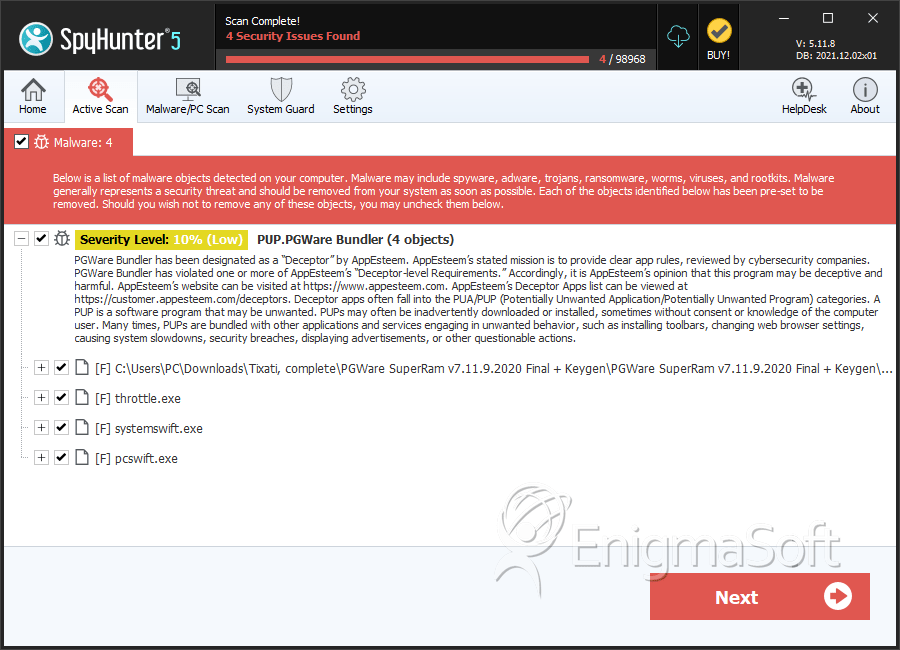
File System Details
| # | File Name | MD5 |
Detections
Detections: The number of confirmed and suspected cases of a particular threat detected on
infected computers as reported by SpyHunter.
|
|---|---|---|---|
| 1. | superram.exe | 4142eb7bda9a9500ece8774d1cd3755e | 30 |
| 2. | Throttle-Setup.exe | 4c8aedd802bce61def4600369f4b16bd | 29 |
| 3. | systemswift.exe | f705a33f426f8a2fb60fb5baebf86f5c | 25 |
| 4. | pcswift.exe | b1fac6873aa14cd9dba8af99be94b7de | 19 |
Analysis Report
General information
| Family Name: | PUP.PGWare Bundler |
|---|---|
| Signature status: | No Signature |
Known Samples
Known Samples
This section lists other file samples believed to be associated with this family.|
MD5:
c4789dc0202e2a740223163ebba8b1ad
SHA1:
6616931925c73b91d05a7d7fcdac1b546770a47a
SHA256:
4883A734EE0C21B5F62761C36FFA83999D82839B30392BA983D1EAAEBEAE270F
File Size:
6.00 MB, 5998494 bytes
|
|
MD5:
b3ff5f7067e502c4ad936bd421535614
SHA1:
fb071a7ce4e9e5c81f45d0626b334b6b32057558
SHA256:
FC97FF8D260B96957796191B7B9001AEE97E7D43C8FE32DCEE9FCE177FA13C8D
File Size:
3.28 MB, 3280640 bytes
|
|
MD5:
978ef09c65b91f962a8aa2a9e8a18175
SHA1:
f41dd1d4de7f89dc56530044f9caed2785cecb9c
SHA256:
0E4D1C6AE6D6F4488C12BDAF0F53A8C4B43D59605753C4CFE669BD3BDC280A99
File Size:
1.64 MB, 1642496 bytes
|
Windows Portable Executable Attributes
- File doesn't have "Rich" header
- File doesn't have debug information
- File doesn't have exports table
- File doesn't have relocations information
- File doesn't have security information
- File has exports table
- File has TLS information
- File is 32-bit executable
- File is either console or GUI application
- File is GUI application (IMAGE_SUBSYSTEM_WINDOWS_GUI)
Show More
- File is Native application (NOT .NET application)
- File is not packed
- IMAGE_FILE_DLL is not set inside PE header (Executable)
- IMAGE_FILE_EXECUTABLE_IMAGE is set inside PE header (Executable Image)
File Icons
File Icons
This section displays icon resources found within family samples. Malware often replicates icons commonly associated with legitimate software to mislead users into believing the malware is safe.


Windows PE Version Information
Windows PE Version Information
This section displays values and attributes that have been set in the Windows file version information data structure for samples within this family. To mislead users, malware actors often add fake version information mimicking legitimate software.| Name | Value |
|---|---|
| Comments | This installation was built with Inno Setup. |
| Company Name | PGWARE LLC |
| File Description |
|
| File Version | 1.0.0.1 |
| Legal Copyright |
|
| Product Name |
|
| Product Version |
|
Digital Signatures
Digital Signatures
This section lists digital signatures that are attached to samples within this family. When analyzing and verifying digital signatures, it is important to confirm that the signature’s root authority is a well-known and trustworthy entity and that the status of the signature is good. Malware is often signed with non-trustworthy “Self Signed” digital signatures (which can be easily created by a malware author with no verification). Malware may also be signed by legitimate signatures that have an invalid status, and by signatures from questionable root authorities with fake or misleading “Signer” names.| Signer | Root | Status |
|---|---|---|
| PGWARE LLC | PGWARE LLC | Self Signed |
File Traits
- 2+ executable sections
- Inno
- InnoSetup Installer
- Installer Manifest
- Installer Version
- VirtualQueryEx
- x86
Files Modified
Files Modified
This section lists files that were created, modified, moved and/or deleted by samples in this family. File system activity can provide valuable insight into how malware functions on the operating system.| File | Attributes |
|---|---|
| c:\users\user\appdata\local\temp\is-aifrc.tmp\_isetup\_setup64.tmp | Generic Read,Write Data,Write Attributes,Write extended,Append data |
| c:\users\user\appdata\local\temp\is-cs9td.tmp\fb071a7ce4e9e5c81f45d0626b334b6b32057558_0003280640.tmp | Generic Write,Read Attributes |
| c:\users\user\appdata\local\temp\is-j4re2.tmp\6616931925c73b91d05a7d7fcdac1b546770a47a_0005998494.tmp | Generic Write,Read Attributes |
Windows API Usage
Windows API Usage
This section lists Windows API calls that are used by the samples in this family. Windows API usage analysis is a valuable tool that can help identify malicious activity, such as keylogging, security privilege escalation, data encryption, data exfiltration, interference with antivirus software, and network request manipulation.| Category | API |
|---|---|
| Process Manipulation Evasion |
|
| Process Shell Execute |
|
| User Data Access |
|
| Keyboard Access |
|
Shell Command Execution
Shell Command Execution
This section lists Windows shell commands that are run by the samples in this family. Windows Shell commands are often leveraged by malware for nefarious purposes and can be used to elevate security privileges, download and launch other malware, exploit vulnerabilities, collect and exfiltrate data, and hide malicious activity.
"C:\Users\Thjzwesc\AppData\Local\Temp\is-J4RE2.tmp\6616931925c73b91d05a7d7fcdac1b546770a47a_0005998494.tmp" /SL5="$40328,5037972,845824,c:\users\user\downloads\6616931925c73b91d05a7d7fcdac1b546770a47a_0005998494"
|
"C:\Users\Nfwvalju\AppData\Local\Temp\is-CS9TD.tmp\fb071a7ce4e9e5c81f45d0626b334b6b32057558_0003280640.tmp" /SL5="$70482,2775972,226816,c:\users\user\downloads\fb071a7ce4e9e5c81f45d0626b334b6b32057558_0003280640"
|