PUP.Bittorrent Classic
The detection of PUP.Bittorrent Classic on your system indicates the presence of a potentially unwanted program (PUP) that may be causing issues with your computer's performance and security. It's essential to understand the nature of this detection and take appropriate steps to remove it and prevent future occurrences.
Table of Contents
What Is PUP.Bittorrent Classic?
PUP.Bittorrent Classic is a type of potentially unwanted program that may have been installed on your system without your knowledge or consent. PUPs are software applications that may not be malicious in nature but can still cause problems with your computer's performance, stability, and security. They often come bundled with other software or are downloaded from untrusted sources, and can be difficult to remove without proper guidance.
How PUP.Bittorrent Classic Operates
PUPs like PUP.Bittorrent Classic can operate in various ways, including displaying unwanted advertisements, collecting user data, and modifying system settings. They may also consume system resources, slowing down your computer and causing other applications to malfunction. In some cases, PUPs can also create security vulnerabilities, making your system more susceptible to malware infections and other types of cyber threats.
Symptoms of Infection
If your system is infected with PUP.Bittorrent Classic, you may experience a range of symptoms, including slow system performance, unwanted pop-ups and advertisements, and unexpected changes to your system settings. You may also notice that your browser is being redirected to unwanted websites or that your search results are being manipulated. In some cases, you may not notice any symptoms at all, which is why it's essential to regularly scan your system for PUPs and other types of malware.
How to Remove PUP.Bittorrent Classic
- Boot your computer in Safe Mode with Networking to prevent PUP.Bittorrent Classic from loading and to give you more control over the removal process.
- Use a reputable anti-malware tool, such as SpyHunter, to perform a full scan of your system and detect any malicious or unwanted files associated with PUP.Bittorrent Classic.
- Uninstall any suspicious programs or applications that may be related to PUP.Bittorrent Classic. Be cautious when uninstalling programs, as some may be legitimate or required by your system.
- Reset your web browsers, including Chrome, Firefox, and Edge, to their default settings to remove any unwanted extensions or add-ons that may be associated with PUP.Bittorrent Classic.
- Reboot your computer and perform another scan with your anti-malware tool to ensure that PUP.Bittorrent Classic has been completely removed.
Conclusion
Removing PUP.Bittorrent Classic from your system requires careful attention to detail and a thorough understanding of the removal process. By following the steps outlined above, you can help ensure that your system is free from this potentially unwanted program and any associated malware. Remember to always be cautious when downloading software from the internet and to regularly scan your system for PUPs and other types of malware to prevent future infections. Additionally, keeping your operating system and software up to date can help prevent vulnerabilities that PUPs and malware often exploit. By taking these precautions, you can help protect your system and your personal data from potential threats.
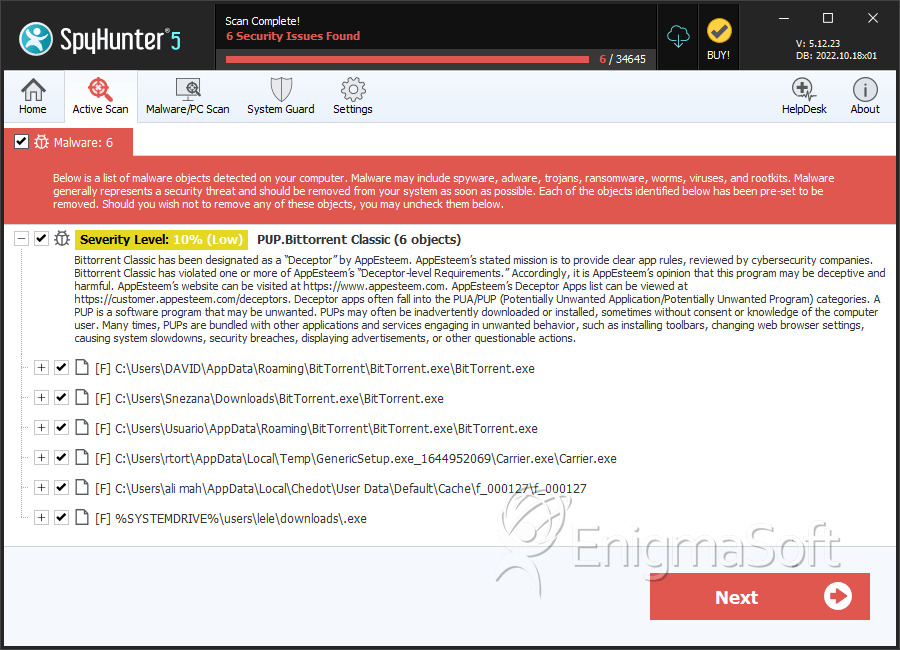
SpyHunter Detects & Remove PUP.Bittorrent Classic
Analysis Report
General information
| Family Name: | PUP.Bittorrent Classic |
|---|---|
| Signature status: | No Signature |
Known Samples
Known Samples
This section lists other file samples believed to be associated with this family.|
MD5:
db90a1ef38c7f4be04470424c229ba2c
SHA1:
1ce366703e6df90ecbc8320b91c5a6590fc39c14
SHA256:
E0A7EEB4AFFB9C76453A47DE97EC58F596F118AFFEDD424F6F2D40D54EC2632D
File Size:
281.10 KB, 281096 bytes
|
|
MD5:
9ce6227d77346ed5f8807898813aeaf6
SHA1:
f7aa715e4188dde35852abb564c579c65e369603
SHA256:
D8F462910BFB15798826C7A1DF46718817DB13546CA5FAA521C886036C44FBDA
File Size:
1.42 MB, 1424952 bytes
|
Windows Portable Executable Attributes
- File doesn't have "Rich" header
- File doesn't have debug information
- File doesn't have exports table
- File doesn't have relocations information
- File doesn't have security information
- File is 32-bit executable
- File is either console or GUI application
- File is GUI application (IMAGE_SUBSYSTEM_WINDOWS_GUI)
- File is Native application (NOT .NET application)
- File is not packed
Show More
- IMAGE_FILE_DLL is not set inside PE header (Executable)
- IMAGE_FILE_EXECUTABLE_IMAGE is set inside PE header (Executable Image)
File Icons
File Icons
This section displays icon resources found within family samples. Malware often replicates icons commonly associated with legitimate software to mislead users into believing the malware is safe.


Windows PE Version Information
Windows PE Version Information
This section displays values and attributes that have been set in the Windows file version information data structure for samples within this family. To mislead users, malware actors often add fake version information mimicking legitimate software.| Name | Value |
|---|---|
| Company Name | BitTorrent Limited |
| File Description | BitTorrent Web |
| File Version |
|
| Internal Name | utweb |
| Legal Copyright | (c) 2025 BitTorrent Limited All Rights Reserved. |
| Product Name | BitTorrent Web |
| Product Version |
|
Digital Signatures
Digital Signatures
This section lists digital signatures that are attached to samples within this family. When analyzing and verifying digital signatures, it is important to confirm that the signature’s root authority is a well-known and trustworthy entity and that the status of the signature is good. Malware is often signed with non-trustworthy “Self Signed” digital signatures (which can be easily created by a malware author with no verification). Malware may also be signed by legitimate signatures that have an invalid status, and by signatures from questionable root authorities with fake or misleading “Signer” names.| Signer | Root | Status |
|---|---|---|
| BitTorrent Inc | DigiCert Trusted Root G4 | Root Not Trusted |
File Traits
- Installer Manifest
- nosig nsis
- Nullsoft Installer
- x86
Files Modified
Files Modified
This section lists files that were created, modified, moved and/or deleted by samples in this family. File system activity can provide valuable insight into how malware functions on the operating system.| File | Attributes |
|---|---|
| c:\users\user\appdata\local\temp\nsr3c1b.tmp\modern-wizard.bmp | Generic Write,Read Attributes |
| c:\users\user\appdata\local\temp\nsr3c1b.tmp\nsdialogs.dll | Generic Write,Read Attributes |
| c:\users\user\appdata\local\temp\nsr3c1b.tmp\system.dll | Generic Write,Read Attributes |
| c:\users\user\appdata\local\temp\nsr3c1b.tmp\uac.dll | Generic Write,Read Attributes |
| c:\users\user\appdata\local\temp\~nsua.tmp\un_a.exe | Generic Read,Write Data,Write Attributes,Write extended,Append data,Delete,LEFT 262144 |
Registry Modifications
Registry Modifications
This section lists registry keys and values that were created, modified and/or deleted by samples in this family. Windows Registry activity can provide valuable insight into malware functionality. Additionally, malware often creates registry values to allow itself to automatically start and indefinitely persist after an initial infection has compromised the system.| Key::Value | Data | API Name |
|---|---|---|
| HKLM\system\controlset001\control\session manager::pendingfilerenameoperations | \??\C:\Users\Msbsdoxg\AppData\Local\Temp\~nsuA.tmp\Un_A.exe | RegNtPreCreateKey |
| HKLM\system\controlset001\control\session manager::pendingfilerenameoperations | \??\C:\Users\Msbsdoxg\AppData\Local\Temp\~nsuA.tmp\Un_A.exe\??\C:\Users\Msbsdoxg\AppData\Local\Temp\~nsuA.tmp | RegNtPreCreateKey |
Windows API Usage
Windows API Usage
This section lists Windows API calls that are used by the samples in this family. Windows API usage analysis is a valuable tool that can help identify malicious activity, such as keylogging, security privilege escalation, data encryption, data exfiltration, interference with antivirus software, and network request manipulation.| Category | API |
|---|---|
| Anti Debug |
|
| User Data Access |
|
| Process Shell Execute |
|
Shell Command Execution
Shell Command Execution
This section lists Windows shell commands that are run by the samples in this family. Windows Shell commands are often leveraged by malware for nefarious purposes and can be used to elevate security privileges, download and launch other malware, exploit vulnerabilities, collect and exfiltrate data, and hide malicious activity.
"C:\Users\Msbsdoxg\AppData\Local\Temp\~nsuA.tmp\Un_A.exe" _?=c:\users\user\downloads\
|


