Minergate
Threat Scorecard
EnigmaSoft Threat Scorecard
EnigmaSoft Threat Scorecards are assessment reports for different malware threats which have been collected and analyzed by our research team. EnigmaSoft Threat Scorecards evaluate and rank threats using several metrics including real-world and potential risk factors, trends, frequency, prevalence, and persistence. EnigmaSoft Threat Scorecards are updated regularly based on our research data and metrics and are useful for a wide range of computer users, from end users seeking solutions to remove malware from their systems to security experts analyzing threats.
EnigmaSoft Threat Scorecards display a variety of useful information, including:
Popularity Rank: The ranking of a particular threat in EnigmaSoft’s Threat Database.
Severity Level: The determined severity level of an object, represented numerically, based on our risk modeling process and research, as explained in our Threat Assessment Criteria.
Infected Computers: The number of confirmed and suspected cases of a particular threat detected on infected computers as reported by SpyHunter.
See also Threat Assessment Criteria.
| Popularity Rank: | 9,661 |
| Threat Level: | 10 % (Normal) |
| Infected Computers: | 32,057 |
| First Seen: | October 17, 2017 |
| Last Seen: | October 17, 2026 |
| OS(es) Affected: | Windows |
Minergate is a generic detection name used in reference to a large family of cryptocurrency miners released in the last week of November 2017. The Minergate mining tools are programs based on the XMRig Trojan, which we covered in September 2017 and continued to record new variants in the following months. The Minergate mining software is delivered to PC users via fake software updates to Java, Adobe Flash, the Windows fonts repository, Google Chrome and Mozilla Firefox. We have recorded more than forty variants of the Minergate mining Trojans as of December 4th, 2017. Computer security analysts say that the rise in price for cryptocurrencies like Bitcoin, Monero, and Ethirium is likely to be a catalyst for the continuous development of Mining Trojans in 2018.
The strains of Minergate are slightly modified versions of the original program. The Minergate Trojans are designed to perform complex calculations and verify payments performed with Bitcoin, Monero, Dogecoin, Litecoin and Ethirium. The range of digital coins supported by Minergate may expand considering it is comparatively easy to obtain a copy of XMRig and modify it. AV companies are known to flag the objects associated with the Minergate wave of mining tools using detection names like — Trojan:Win64/CoinMiner, Trojan.Win32.Generic!BT, TR/CoinMiner.ME, JS:Miner-C, Win64:Rootkit-gen [Rtk], HEUR/Malware.QVM18.Gen, Win32:GenMalicious-HFA [Trj], PUP/Win64.BitCoinMiner.R190714, Unwanted-Program ( 004fc8691 ) and Trojan.Amonetize. The following process names might be displayed in the Task Manager of compromised systems:
Affada.exe, AppxadsulP.exe, Bot.exe, Cppredistx86.exe, Cpucheck.exe, DirectX11b.exe, Helper.exe, Image.exe, Install6.exe, Mess.exe, Msvc.exe, Musallat.exe, NVIDIA.exe, Nheqminer.exe, Nsgpucnminer.exe, Optimizer.exe, Sc.exe, Test.exe, Update_new.exe, VideoCardUpd, Vlngp1.exe, Windows-upt.exe, Wupdate.exe, XMgrenim.exe, Zcash.exe, minergate.exe, runhosts.exe, slmgr32.exe, svchostr.exe, synctask.exe, sysConfig.bat, uninstaller.exe, vnlgp.exe, winin1t.exe, Up.exe, Wniheuzori.exe, slove.exe, wuauclt.exe, Xmriig.exe, Vlngp1.exe, Platforms.exe, Xm86.exeVshub.exe, Svshost.exe, Zqeyx aaxo.exe, Nvdisplay.exe, Anydeskapp.exe, GEN.exe, Hjhdgshjef.exe, Svchose.exe, Qc64.exe, Duckgo.exe, Iconrdb.exe
You should note that the BlackHat hackers behind the Minergate Trojans are using file names associated with legitimate products like Nvidia Experience, CPU Check, svchost.exe, and Windows Update to minimize the risk of being detected by VAV tools. Even experienced users may not distinguish a fake one from a legitimate process when searching for the Minergate program. Tools like the Minergate, which are used to hijack system resources on remote computers can cause system instability, increased electricity bills and increased heat in the computer case. PC users are advised to use a trusted anti-malware scanner to find and eliminate the Minergate variants safely. The following folders are created by the Minergate malware, but they may be used by legitimate apps as well so that you should exercise caution:
C:\Program Files\G89CXYP6N9\
C:\Program Files\Internet Explorer\BCDNJTWLUX
C:\Program Files\jetstrmedia\netmedia
C:\ProgramData\AppxadsulP
C:\ProgramData\CupCheck
C:\ProgramData\DirectX11b
C:\ProgramData\Microsoft\DhcQ
C:\ProgramData\Natihial
C:\Users\\App Data\Local Low\Microsoft\
C:\Users\\App Data\Local Low\Microsoft\
C:\Users\\App Data\Local Low\Microsoft\Windows\System32\Recovery
C:\Users\\App Data\Local Low\Microsoft\directx11b
C:\Users\\App Data\Local Low\Microsoft\framework
C:\Users\\App Data\Local Low\Microsoft\microsoftcom
C:\Users\\App Data\Local Low\Microsoft\natihial
C:\Users\\App Data\Local Low\Microsoft\windowssql
C:\Users\\App Data\Local Low\SLMgr
C:\Users\\App Data\Local Low\wupdate
C:\Users\\App Data\Local\Optimizer
C:\Users\\App Data\Local\Temp
C:\Users\\App Data\Local\Temp\1400.tmp
C:\Users\\App Data\Microsoft\Windows
C:\Users\\App Data\Roaming\FastCh
C:\Users\\App Data\Roaming\Server\
C:\Users\\App Data\Roaming\Windows_x64_nhqeminer-5c
C:\Users\\App Data\Roaming\bodor
C:\Users\\App Data\Roaming\images
C:\Users\\App Data\Roaming\vnlgp\vnlgp
C:\Users\\App Data\Roaming\xmgcach
C:\Users\\App Data\Roaming\xmgcash
C:\Users\\App Data\VideoCardUpdater\
C:\Windows\Temp\6E34.tmp\
C:\Windows\slove\
C:\Winsys\
C:\Program Files\29044DMFYR\
C:\Program Files\ALQNKUM7O1
C:\Program Files\Client\
C:\Program Files\HPLion
C:\Program Files\Microleaves\Online Application\Version 2.6.0\
C:\Users||AppData\Roaming\HWmonitorApp
C:\Windows\Microsoft\Svchost.exe.update
C:\Windows\Windows\9473a2fafe204da49741664f96907b44
C:\Windows\dsp
AppData\AnyDeskApp
AppData\CloudPrinter
AppData\Codec
AppData\Interl Management
AppData\Local\GenericTools
AppData\Local\Programs\Gen
AppData\Local\Temp\is-2PMDK.tmp
AppData\Roaming\AGData\bin
AppData\Roaming\HWmonitorApp
AppData\Ronzap
C:\Windows
C:\Windows\Microsoft\Svchost.exe.update
C:\Windows\Windows\9473a2fafe204da49741664f96907b44
C:\Windows\aadhdgh
C:\Windows\dsp
Program Files (x86)\KvUg2SbQotRx
Program Files\29044DMFYR\
Program Files\ALQNKUM7O1
Program Files\Client\
Program Files\HPLion
Program Files\Microleaves\Online Application\Version 2.6.0\
ProgramData\WindowsVolume
Table of Contents
SpyHunter Detects & Remove Minergate
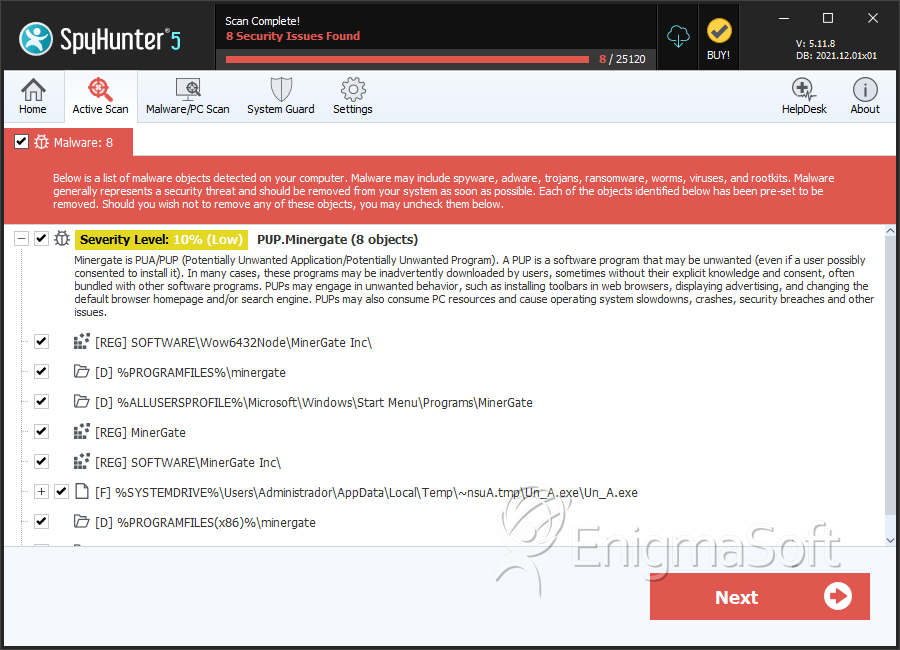
File System Details
| # | File Name | MD5 |
Detections
Detections: The number of confirmed and suspected cases of a particular threat detected on
infected computers as reported by SpyHunter.
|
|---|---|---|---|
| 1. | Un_A.exe | 9a0b44145a0a53bbdc372c0110eaec7a | 953 |
| 2. | minergate.exe | 257f2db1bbd7d3cc7134584d339e671c | 349 |
Registry Details
Directories
Minergate may create the following directory or directories:
| %ALLUSERSPROFILE%\Microsoft\Windows\Start Menu\Programs\MinerGate |
| %ALLUSERSPROFILE%\Start Menu\Programs\MinerGate |
| %PROGRAMFILES%\minergate |
| %PROGRAMFILES(x86)%\minergate |


