Fix My PC
Threat Scorecard
EnigmaSoft Threat Scorecard
EnigmaSoft Threat Scorecards are assessment reports for different malware threats which have been collected and analyzed by our research team. EnigmaSoft Threat Scorecards evaluate and rank threats using several metrics including real-world and potential risk factors, trends, frequency, prevalence, and persistence. EnigmaSoft Threat Scorecards are updated regularly based on our research data and metrics and are useful for a wide range of computer users, from end users seeking solutions to remove malware from their systems to security experts analyzing threats.
EnigmaSoft Threat Scorecards display a variety of useful information, including:
Ranking: The ranking of a particular threat in EnigmaSoft’s Threat Database.
Severity Level: The determined severity level of an object, represented numerically, based on our risk modeling process and research, as explained in our Threat Assessment Criteria.
Infected Computers: The number of confirmed and suspected cases of a particular threat detected on infected computers as reported by SpyHunter.
See also Threat Assessment Criteria.
| Threat Level: | 10 % (Normal) |
| Infected Computers: | 53 |
| First Seen: | March 27, 2015 |
| Last Seen: | May 12, 2023 |
| OS(es) Affected: | Windows |
The Fix My PC program is another system optimization utility by A1 PCCleaner Software Private Limited that claims to boost your computer, stop malware, and fix system errors. That may sound too good to be true because it is not. The Fix My PC app employs techniques to convince users to purchase a premium license that may prove troublesome for many users. The Fix My PC app is deemed as Potentially Unwanted Program (PUP) that would display notifications about critical system errors and invite you to pay for their repair. Additionally, the Fix My PC application may present you with an alert during your OS boot-up that may suggest that your system is not operating correctly. The Fix My PC tool can insert a registry key in Windows to launch at system boot-up and may use a background service to display error messages at set intervals of time. Many users may not welcome the pesky behavior of the Fix My PC program and the potential damages it can cause to your system's registry. Computer users may install the Fix My PC program as an additional component part of a freeware bundle and download Fix My PC from its official web page.
Table of Contents
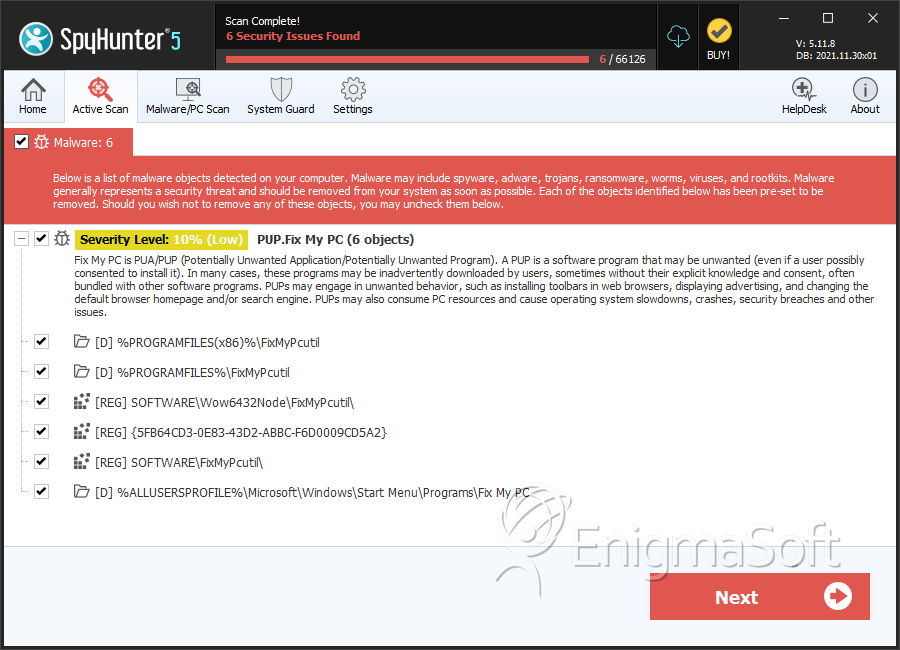
SpyHunter Detects & Remove Fix My PC
Registry Details
Directories
Fix My PC may create the following directory or directories:
| %ALLUSERSPROFILE%\Microsoft\Windows\Start Menu\Programs\Fix My PC |
| %PROGRAMFILES%\FixMyPcutil |
| %PROGRAMFILES(x86)%\FixMyPcutil |





Submit Comment
Please DO NOT use this comment system for support or billing questions. For SpyHunter technical support requests, please contact our technical support team directly by opening a customer support ticket via your SpyHunter. For billing issues, please refer to our "Billing Questions or Problems?" page. For general inquiries (complaints, legal, press, marketing, copyright), visit our "Inquiries and Feedback" page.