Babylon Search/Toolbar
Threat Scorecard
EnigmaSoft Threat Scorecard
EnigmaSoft Threat Scorecards are assessment reports for different malware threats which have been collected and analyzed by our research team. EnigmaSoft Threat Scorecards evaluate and rank threats using several metrics including real-world and potential risk factors, trends, frequency, prevalence, and persistence. EnigmaSoft Threat Scorecards are updated regularly based on our research data and metrics and are useful for a wide range of computer users, from end users seeking solutions to remove malware from their systems to security experts analyzing threats.
EnigmaSoft Threat Scorecards display a variety of useful information, including:
Popularity Rank: The ranking of a particular threat in EnigmaSoft’s Threat Database.
Severity Level: The determined severity level of an object, represented numerically, based on our risk modeling process and research, as explained in our Threat Assessment Criteria.
Infected Computers: The number of confirmed and suspected cases of a particular threat detected on infected computers as reported by SpyHunter.
See also Threat Assessment Criteria.
| Popularity Rank: | 994 |
| Threat Level: | 50 % (Medium) |
| Infected Computers: | 283,366 |
| First Seen: | October 6, 2010 |
| Last Seen: | October 28, 2026 |
| OS(es) Affected: | Windows |
The detection of Babylon Search/Toolbar on your system indicates a potential threat that may compromise your online security and browsing experience. This detection name suggests that the threat is related to a toolbar or search engine modification, which can be a sign of a larger issue. In this report, we will provide an overview of what Babylon Search/Toolbar is, how it operates, and the symptoms of infection, as well as guidance on how to remove it from your system.
Table of Contents
What Is Babylon Search/Toolbar?
Babylon Search/Toolbar is a type of threat that can modify your browser settings and redirect your searches to unwanted websites. It can also collect your browsing data and send it to third-party servers, which can be used for malicious purposes. This type of threat can be installed on your system through various means, such as bundled software, infected downloads, or exploited vulnerabilities.
How Babylon Search/Toolbar Operates
Babylon Search/Toolbar operates by modifying your browser settings, such as changing your default search engine or homepage. It can also install additional toolbars or extensions that can collect your browsing data and send it to third-party servers. This type of threat can be difficult to detect, as it can masquerade as a legitimate program or toolbar. However, its behavior can be identified by monitoring your system for suspicious activity, such as unusual network traffic or changes to your browser settings.
Symptoms of Infection
The symptoms of Babylon Search/Toolbar infection can vary, but common signs include unwanted changes to your browser settings, such as a new toolbar or search engine. You may also experience redirects to unwanted websites, or see pop-up ads and banners on your browser. Additionally, your system may slow down or become unresponsive due to the malicious activity. If you suspect that your system is infected with Babylon Search/Toolbar, it is essential to take immediate action to remove it.
How to Remove Babylon Search/Toolbar
- Boot your system in Safe Mode with Networking to prevent the threat from loading and to allow for a more effective removal process.
- Perform a full scan of your system using a reputable anti-malware tool, such as SpyHunter, to detect and remove any malicious files and registry entries associated with Babylon Search/Toolbar.
- Uninstall any suspicious programs or toolbars that may be related to the threat. Be cautious when uninstalling programs, as some may be legitimate or required by your system.
- Reset your browser settings to their default values, including Chrome, Firefox, and Edge. This will help remove any modifications made by the threat and restore your browser to its original state.
- Reboot your system and perform another full scan to ensure that the threat has been completely removed. This will help detect any remaining malicious files or registry entries that may have been missed during the initial scan.
Conclusion
In conclusion, Babylon Search/Toolbar is a potential threat that can compromise your online security and browsing experience. By understanding what it is, how it operates, and the symptoms of infection, you can take the necessary steps to remove it from your system. Remember to always use reputable anti-malware tools and to be cautious when uninstalling programs or modifying your browser settings. By following the guidance outlined in this report, you can help protect your system and restore your browser to its original state.
Aliases
2 security vendors flagged this file as malicious.
| Antivirus Vendor | Detection |
|---|---|
| CAT-QuickHeal | (Suspicious) - DNAScan |
| NOD32 | probably a variant of Win32/Toolbar.Babylon |
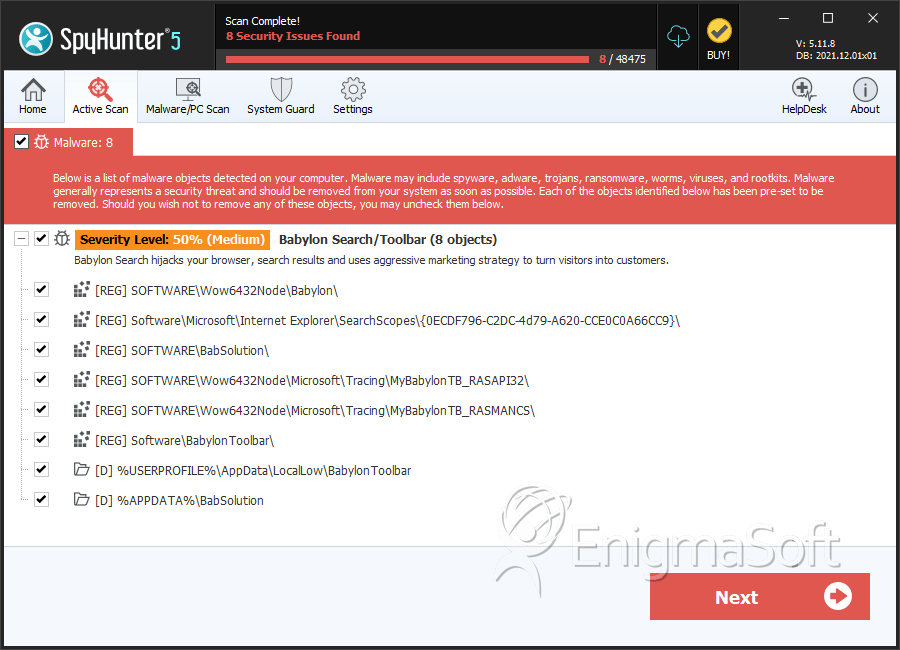
SpyHunter Detects & Remove Babylon Search/Toolbar
File System Details
| # | File Name | MD5 |
Detections
Detections: The number of confirmed and suspected cases of a particular threat detected on
infected computers as reported by SpyHunter.
|
|---|---|---|---|
| 1. | ~BabylonToolbarsrv.exe | daa8044dbeb1ed22add5b849b325c41b | 2,267 |
| 2. | Babylon.exe | 5c1ba00a9384b30addea45890814ed2a | 2,206 |
| 3. | Setup.exe | 66b95612ec087ab7840b3c3b707210b6 | 2,164 |
| 4. | A0028596.exe | 000a83380536df86efe77d020d812f96 | 2,055 |
| 5. | A0005709.exe | fd168568d2e6237d9518c1f7c6ba54b5 | 2,031 |
| 6. | A0005705.dll | 6fa16e1d6e2bd1dcd1186f38fe47cdac | 2,026 |
| 7. | ~BabylonToolbar.dll | ddfa1fc5db7adc0c8fa137047e1432eb | 1,941 |
| 8. | BabylonToolbar.dll.vir | 15649e30f8fc5cf90d2469a48429ca01 | 1,780 |
| 9. | MyBabylonTB.exe | ac3129819faa20a776239f48e57d2b35 | 1,460 |
| 10. | NTRedirect.dll | a934ff2a498261ba8c18a7a5ce06cb05 | 952 |
| 11. | BabylonToolbar.exe | ddee6f5527ddd4a8b3e143c1f340eace | 838 |
| 12. | BabMaint.exe.vir | e7831e33c81eb10a8f7ba3b608383724 | 559 |
| 13. | enhancedNT.dll | bb829f5bf7b2ac3bb9d21eca9ebf730a | 502 |
| 14. | Updater.exe | dea3132c462938caddc91d1fc5857b30 | 454 |
| 15. | BabMaint.x | 7500b7cdf541616d2d64e83b7f8ec896 | 190 |
| 16. | enhancedNT.dll.vir | e015a11d6002c3498cd92b2cdff64433 | 137 |
| 17. | MSGRRU32.dll | 6ca07b1d5b99da831d1a44319734fd7c | 85 |
| 18. | AdSubawareRes.dll | 8bc26c11d7a06032158876c5604f1296 | 40 |
| 19. | BabMaint.exe | 8a036a0c87533284e1a53a54f8a6204e | 22 |
| 20. | cfgNetM.dll | 42f9e833a6b2563e2846ab5dbb41a4d4 | 19 |
| 21. | AgentBabSolution.exe | 5a60826873e342a0f9a1c24ffc2b7a39 | 6 |
| 22. | CtrlBabSolution.exe | 4664d963f2985799031db2fbfb362989 | 6 |
| 23. | StartBabSolution.exe | e71f3ae803ef34c7df9bc20450d8799e | 6 |
| 24. | uwauewta.dll | 67e32d31f9e7abe4ac7bf1e0038c53df | 2 |
| 25. | wutpcsyu.dll | 2b3f62cbaee826a99f115d31230383ce | 2 |
| 26. | frobanue.dll | ab23bd030204e97933d4c794a312082d | 2 |
Registry Details
Directories
Babylon Search/Toolbar may create the following directory or directories:
| %APPDATA%\BabSolution |
| %PROGRAMFILES%\Babylon Toolbar |
| %PROGRAMFILES%\BabylonToolbar |
| %PROGRAMFILES(x86)%\Babylon Toolbar |
| %PROGRAMFILES(x86)%\BabylonToolbar |
| %TEMP%\mt_ffx\BabylonToolbar |
| %USERPROFILE%\AppData\LocalLow\BabylonToolbar |
URLs
Babylon Search/Toolbar may call the following URLs:
| BabylonToolbar |
| isearch.babylon.com |
Analysis Report
General information
| Family Name: | Babylon Search/Toolbar |
|---|---|
| Signature status: | No Signature |
Known Samples
Known Samples
This section lists other file samples believed to be associated with this family.|
MD5:
ba41287c1b521564b8fa7f65069846b1
SHA1:
48ad4120e70f4e1f1e2f1716f35638210df765b2
SHA256:
7757E8D9982CD086064A2DB69020B4A718AFDA1FA5CC8397D3BF1807DDDCBD78
File Size:
2.95 MB, 2954784 bytes
|
|
MD5:
7601c94359f05d00a28f1c4af07716a0
SHA1:
bb5ef616c7da10a6beef35f86fd87b8d5cc8bdc0
SHA256:
E06BD029E6F7B4E2D480C0DF57FE27879C14EB921B5101CFF26A481F0FC28A37
File Size:
1.94 MB, 1938512 bytes
|
|
MD5:
bb5a66db7924d3f91b4d7937981437a1
SHA1:
775b68f8b33fc94ec4a85cdbae211f96ff36dd77
SHA256:
AD61A8A257AC00A399F34155BAD783EB9350191C03356EEF0F92A5364EE0ED94
File Size:
1.82 MB, 1824408 bytes
|
|
MD5:
33b9c64bbb66af65cd9ca4190fa14b81
SHA1:
b8e0e6f4d90ff49e3ffc37a00f0ba5335a152314
SHA256:
B67F4A880909A7E50D0DB0E0A5AD219D07886C0A87D6CC4104745279A58C1977
File Size:
1.31 MB, 1310208 bytes
|
|
MD5:
246fe59b25214f3a4bbdfe80f8d64832
SHA1:
600b6098a94e5abcf282babf4862c90ee2fccb95
SHA256:
93B6D6D7D9B762682A8ED3BE2E5698C2E89DCD2E74ED750B5D2BBB5F7DC82501
File Size:
7.73 MB, 7729482 bytes
|
Show 1 more
|
MD5:
511761632628e0774ad2303d986775ce
SHA1:
e78688076e3f32215ddf09587c7a2adc9de1f9e7
SHA256:
8681C8DCE0D23647BDE5923A3CB92BA632E908E3DE1E6E451860E12CDA0690AB
File Size:
2.37 MB, 2369536 bytes
|
Windows Portable Executable Attributes
- File doesn't have "Rich" header
- File doesn't have debug information
- File doesn't have exports table
- File doesn't have relocations information
- File doesn't have security information
- File is 32-bit executable
- File is either console or GUI application
- File is GUI application (IMAGE_SUBSYSTEM_WINDOWS_GUI)
- File is Native application (NOT .NET application)
- File is not packed
Show 2 more
- IMAGE_FILE_DLL is not set inside PE header (Executable)
- IMAGE_FILE_EXECUTABLE_IMAGE is set inside PE header (Executable Image)
File Icons
File Icons
This section displays icon resources found within family samples. Malware often replicates icons commonly associated with legitimate software to mislead users into believing the malware is safe.


Windows PE Version Information
Windows PE Version Information
This section displays values and attributes that have been set in the Windows file version information data structure for samples within this family. To mislead users, malware actors often add fake version information mimicking legitimate software.| Name | Value |
|---|---|
| Author | SalaR |
| Company Name |
|
| File Description |
|
| File Version |
|
| Internal Name |
|
| Legal Copyright |
|
| Original Filename |
|
| Product Name |
|
| Product Version |
|
Digital Signatures
Digital Signatures
This section lists digital signatures that are attached to samples within this family. When analyzing and verifying digital signatures, it is important to confirm that the signature’s root authority is a well-known and trustworthy entity and that the status of the signature is good. Malware is often signed with non-trustworthy “Self Signed” digital signatures (which can be easily created by a malware author with no verification). Malware may also be signed by legitimate signatures that have an invalid status, and by signatures from questionable root authorities with fake or misleading “Signer” names.| Signer | Root | Status |
|---|---|---|
| Babylon Ltd. | Thawte Code Signing CA | Self Signed |
| Babylon Ltd. | Thawte Code Signing CA - G2 | Hash Mismatch |
| Babylon Ltd. | Thawte Code Signing CA - G2 | Self Signed |
File Traits
- big overlay
- HighEntropy
- Installer Version
- ntdll
- x86
Block Information
Block Information
During analysis, EnigmaSoft breaks file samples into logical blocks for classification and comparison with other samples. Blocks can be used to generate malware detection rules and to group file samples into families based on shared source code, functionality and other distinguishing attributes and characteristics. This section lists a summary of this block data, as well as its classification by EnigmaSoft. A visual representation of the block data is also displayed, where available.| Total Blocks: | 5,587 |
|---|---|
| Potentially Malicious Blocks: | 12 |
| Whitelisted Blocks: | 5,426 |
| Unknown Blocks: | 149 |
Visual Map
... Data truncated? - Unknown Block
x - Potentially Malicious Block
Similar Families
Similar Families
This section lists other families that share similarities with this family, based on EnigmaSoft’s analysis. Many malware families are created from the same malware toolkits and use the same packing and encryption techniques but uniquely extend functionality. Similar families may also share source code, attributes, icons, subcomponents, compromised and/or invalid digital signatures, and network characteristics. Researchers leverage these similarities to rapidly and effectively triage file samples and extend malware detection rules.- Montiera.D
Files Modified
Files Modified
This section lists files that were created, modified, moved and/or deleted by samples in this family. File system activity can provide valuable insight into how malware functions on the operating system.| File | Attributes |
|---|---|
| \device\namedpipe\gmdasllogger | Generic Write,Read Attributes |
| c:\users\user\appdata\roaming\babylon\log_file.txt | Generic Write,Read Attributes |
| c:\users\user\appdata\roaming\babylon\sudump.dmp | Generic Read,Write Data,Write Attributes,Write extended,Append data |
Windows API Usage
Windows API Usage
This section lists Windows API calls that are used by the samples in this family. Windows API usage analysis is a valuable tool that can help identify malicious activity, such as keylogging, security privilege escalation, data encryption, data exfiltration, interference with antivirus software, and network request manipulation.| Category | API |
|---|---|
| User Data Access |
|
| Network Wininet |
|
| Network Info Queried |
|