Adware.HQPureQual
Threat Scorecard
EnigmaSoft Threat Scorecard
EnigmaSoft Threat Scorecards are assessment reports for different malware threats which have been collected and analyzed by our research team. EnigmaSoft Threat Scorecards evaluate and rank threats using several metrics including real-world and potential risk factors, trends, frequency, prevalence, and persistence. EnigmaSoft Threat Scorecards are updated regularly based on our research data and metrics and are useful for a wide range of computer users, from end users seeking solutions to remove malware from their systems to security experts analyzing threats.
EnigmaSoft Threat Scorecards display a variety of useful information, including:
Popularity Rank: The ranking of a particular threat in EnigmaSoft’s Threat Database.
Severity Level: The determined severity level of an object, represented numerically, based on our risk modeling process and research, as explained in our Threat Assessment Criteria.
Infected Computers: The number of confirmed and suspected cases of a particular threat detected on infected computers as reported by SpyHunter.
See also Threat Assessment Criteria.
| Threat Level: | 20 % (Normal) |
| Infected Computers: | 44 |
| First Seen: | July 28, 2014 |
| Last Seen: | October 31, 2025 |
| OS(es) Affected: | Windows |
The detection of Adware.HQPureQual on your system indicates the presence of unwanted software that may be compromising your online experience and potentially exposing you to more serious threats. Adware, by its nature, is designed to display unwanted advertisements, collect user data without consent, and sometimes redirect users to malicious websites. Understanding what Adware.HQPureQual is and how it operates is crucial in taking the necessary steps to remove it from your computer and protect your personal information.
Table of Contents
What Is Adware.HQPureQual?
Adware.HQPureQual refers to a specific type of adware that has been identified as a potential threat to computer security and user privacy. While the specifics of this particular adware may not be widely documented, adware in general is known for its ability to infiltrate a system, often through bundled software downloads or by exploiting vulnerabilities in web browsers. Once installed, adware can modify browser settings, track user behavior, and display a plethora of advertisements, ranging from pop-ups and banners to more intrusive forms like video ads and sponsored content.
How Adware.HQPureQual Operates
Adware.HQPureQual, like other adware programs, operates by integrating itself into your web browsing experience, usually without your explicit consent. It may attach itself to your browser as an extension or modify system settings to ensure it runs every time you start your computer. The primary goal of such adware is to generate revenue for its creators by displaying advertisements and, in some cases, by selling user data to third-party entities. This can lead to a significant decrease in system performance, increased risk of exposure to more severe malware, and potential privacy violations.
Symptoms of Infection
Symptoms of an Adware.HQPureQual infection can vary but commonly include an unexpected increase in the number of advertisements displayed while browsing the internet, sudden redirects to unfamiliar websites, and changes in browser settings such as a new homepage or default search engine. Your computer may also exhibit slower performance, as the adware consumes system resources to run its processes. Furthermore, you might notice that your browser crashes more frequently or that certain applications do not function as expected due to the adware's interference.
How to Remove Adware.HQPureQual
- Boot your computer in Safe Mode with Networking to prevent the adware from loading and to give you a cleaner environment to perform the removal process.
- Use a reputable anti-malware tool, such as SpyHunter, to perform a full scan of your system. This can help identify and remove all components of the Adware.HQPureQual.
- Manually uninstall any suspicious programs that you do not recognize or that were installed around the time you first noticed the adware symptoms.
- Reset your web browsers (Google Chrome, Mozilla Firefox, Microsoft Edge, etc.) to their default settings. This will remove any unwanted extensions, plugins, and changes made by the adware.
- Reboot your computer and perform another scan with your anti-malware tool to ensure that all traces of the adware have been removed.
Conclusion
Removing Adware.HQPureQual from your computer requires a combination of technical knowledge and the right tools. By following the steps outlined above and maintaining vigilance in your online activities, you can protect your system from adware and other types of malware. Regularly updating your operating system, browsers, and security software, as well as being cautious when downloading software from the internet, can significantly reduce the risk of future infections. Remember, staying informed and proactive is key to ensuring your digital security and privacy in today's interconnected world.
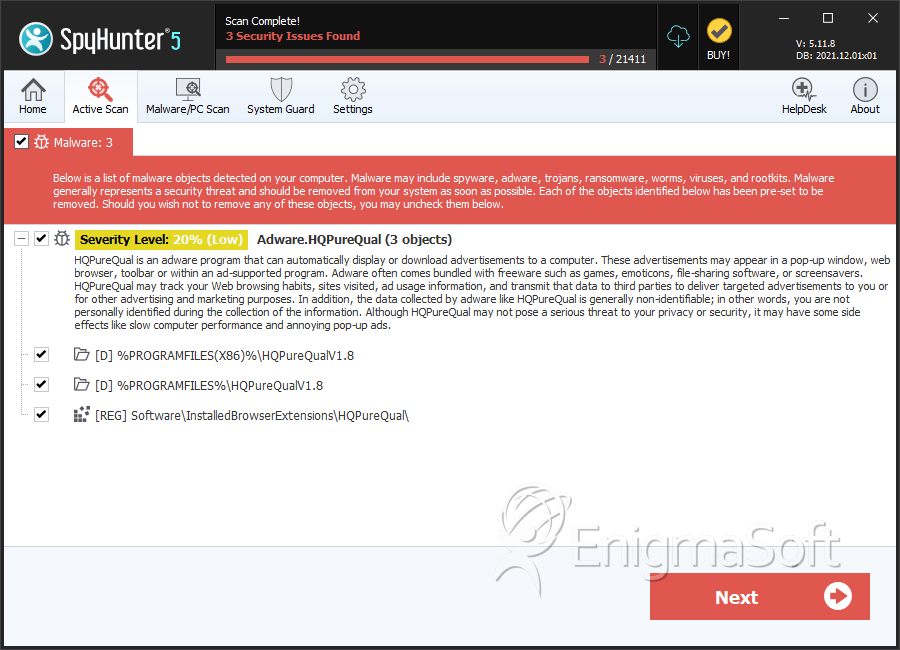
SpyHunter Detects & Remove Adware.HQPureQual
Registry Details
Directories
Adware.HQPureQual may create the following directory or directories:
| %PROGRAMFILES%\HQPureQualV1.8 |
| %PROGRAMFILES(X86)%\HQPureQualV1.8 |