Adware.Gosavenow
Threat Scorecard
EnigmaSoft Threat Scorecard
EnigmaSoft Threat Scorecards are assessment reports for different malware threats which have been collected and analyzed by our research team. EnigmaSoft Threat Scorecards evaluate and rank threats using several metrics including real-world and potential risk factors, trends, frequency, prevalence, and persistence. EnigmaSoft Threat Scorecards are updated regularly based on our research data and metrics and are useful for a wide range of computer users, from end users seeking solutions to remove malware from their systems to security experts analyzing threats.
EnigmaSoft Threat Scorecards display a variety of useful information, including:
Popularity Rank: The ranking of a particular threat in EnigmaSoft’s Threat Database.
Severity Level: The determined severity level of an object, represented numerically, based on our risk modeling process and research, as explained in our Threat Assessment Criteria.
Infected Computers: The number of confirmed and suspected cases of a particular threat detected on infected computers as reported by SpyHunter.
See also Threat Assessment Criteria.
| Threat Level: | 20 % (Normal) |
| Infected Computers: | 199 |
| First Seen: | September 11, 2014 |
| Last Seen: | September 20, 2022 |
| OS(es) Affected: | Windows |
The detection of Adware.Gosavenow on your system indicates the presence of unwanted software that may be compromising your online experience and potentially exposing you to more severe security threats. Understanding what this detection means and how to address it is crucial for maintaining the integrity and performance of your computer.
Table of Contents
What Is Adware.Gosavenow?
Adware.Gosavenow refers to a type of adware, which is software designed to display unwanted advertisements on your computer, often in the form of pop-ups, banners, or sponsored content within web pages. Unlike viruses, adware typically does not aim to damage your system directly but can significantly disrupt your browsing experience and may collect your personal data for targeted advertising. The name Adware.Gosavenow itself suggests its primary function but does not necessarily indicate a specific malware family without further context.
How Adware.Gosavenow Operates
Adware like Adware.Gosavenow usually enters a system through bundled software downloads, where it is included alongside legitimate programs. Once installed, it can modify browser settings, registry entries, and may even install additional software to facilitate its operations. Its primary goal is to generate revenue for its developers through the advertisements it displays, which can range from benign but annoying ads to more malicious content that could lead to further infections or scams.
Symptoms of Infection
The symptoms of an Adware.Gosavenow infection can vary but commonly include an increase in unwanted advertisements appearing on your browser or desktop, unexpected changes in your browser's homepage or search engine, and potentially, a slowdown in your system's performance due to the resource consumption by the adware. You might also notice that your browser is being redirected to unwanted websites or that you are receiving pop-up ads even when your browser is closed.
How to Remove Adware.Gosavenow
- Enter Safe Mode with Networking to limit the adware's ability to interfere with the removal process. This mode allows you to use the internet to download removal tools while disabling most background applications.
- Download and run a full scan with a reputable anti-malware tool such as SpyHunter. These tools are designed to detect and remove adware and other types of malware.
- Uninstall suspicious programs from your computer, especially those that were installed around the time you first noticed the adware symptoms. Be cautious and only uninstall programs you are certain are not necessary for your system's operation.
- Reset your browsers (Google Chrome, Mozilla Firefox, Microsoft Edge, etc.) to their default settings. This action will remove any changes made by the adware, including unwanted extensions and homepage changes.
- After completing the above steps, reboot your computer and then perform another scan with your anti-malware tool to ensure that all components of the adware have been removed.
Conclusion
Removing Adware.Gosavenow requires a combination of using the right tools, understanding how adware operates, and taking preventive measures to avoid future infections. By following the steps outlined above and maintaining good computing practices, such as regularly updating your software and being cautious with downloads, you can protect your system from adware and other types of malware. Remember, vigilance and the use of reputable security software are key to a safe and uninterrupted computing experience.
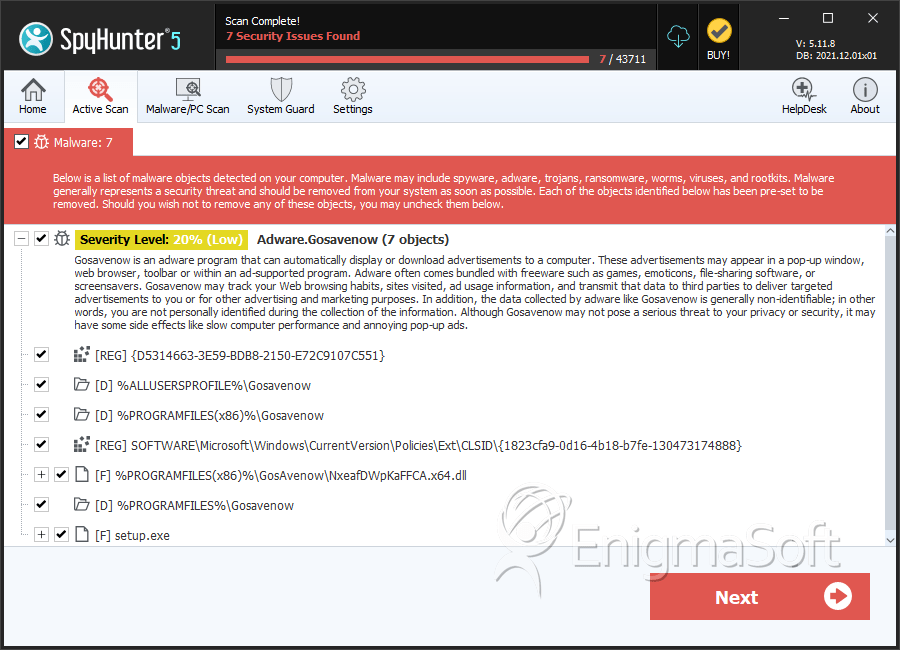
SpyHunter Detects & Remove Adware.Gosavenow
File System Details
| # | File Name | MD5 |
Detections
Detections: The number of confirmed and suspected cases of a particular threat detected on
infected computers as reported by SpyHunter.
|
|---|---|---|---|
| 1. | NxeafDWpKaFFCA.x64.dll | b57c347f59b1438db6d4433fa28629e8 | 3 |
| 2. | setup.exe | a4801acafcb54b5e5a372b6aff1b3a5b | 1 |
Registry Details
Directories
Adware.Gosavenow may create the following directory or directories:
| %ALLUSERSPROFILE%\Gosavenow |
| %PROGRAMFILES%\Gosavenow |
| %PROGRAMFILES(x86)%\Gosavenow |