Advance System Care
Threat Scorecard
EnigmaSoft Threat Scorecard
EnigmaSoft Threat Scorecards are assessment reports for different malware threats which have been collected and analyzed by our research team. EnigmaSoft Threat Scorecards evaluate and rank threats using several metrics including real-world and potential risk factors, trends, frequency, prevalence, and persistence. EnigmaSoft Threat Scorecards are updated regularly based on our research data and metrics and are useful for a wide range of computer users, from end users seeking solutions to remove malware from their systems to security experts analyzing threats.
EnigmaSoft Threat Scorecards display a variety of useful information, including:
Popularity Rank: The ranking of a particular threat in EnigmaSoft’s Threat Database.
Severity Level: The determined severity level of an object, represented numerically, based on our risk modeling process and research, as explained in our Threat Assessment Criteria.
Infected Computers: The number of confirmed and suspected cases of a particular threat detected on infected computers as reported by SpyHunter.
See also Threat Assessment Criteria.
| Popularity Rank: | 7,850 |
| Threat Level: | 10 % (Normal) |
| Infected Computers: | 15,822 |
| First Seen: | March 13, 2017 |
| Last Seen: | May 15, 2026 |
| OS(es) Affected: | Windows |
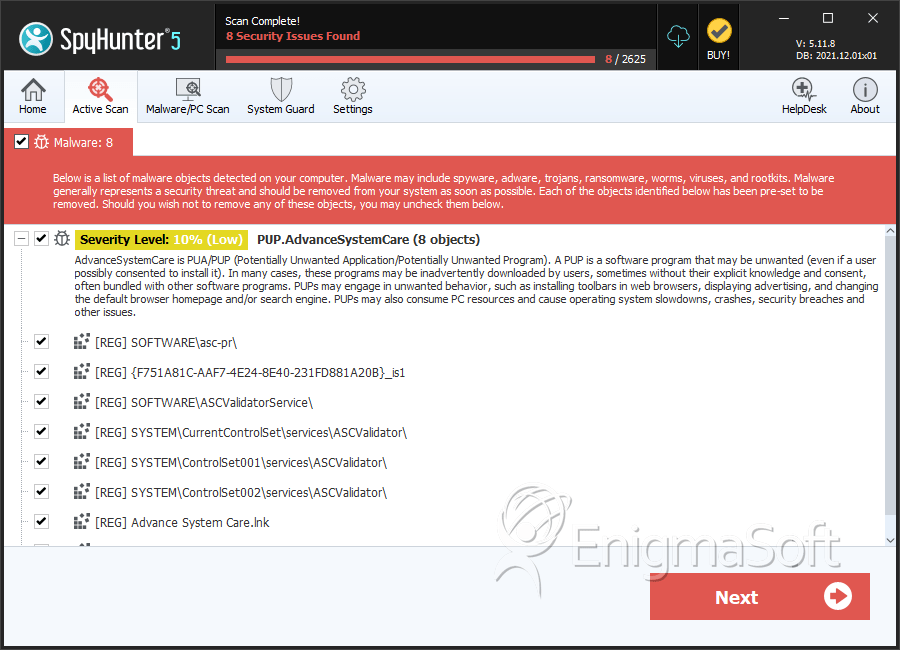
The Advance System Care at advancepctools.biz should not be mistaken for Advanced SystemCare by IObit Software even if that was the intention of the company behind the Advance System Care. The Advance System Care product is associated with advancepctools.biz that is not a top-level domain (TLD) and claims to offer system optimization features to the Windows OS users. The Advance System Care has a support line on +855-433-5747, which appears to be operated by support-geeks.com that is a free domain (as of March 14th, 2017) and does not host content. Apparently, support-geeks.com resembles Support.geeksquad.com, which offers technical support services to Best Buy customers.
The Advance System Care is said to help users clean, optimize, and speed up their PCs in the span of two clicks on 'Scan' and 'Fix problems.' Computer users are welcomed to install the trial version of the Advance System Care that allows them to determine the state of their OSes and receive reports for problems daily until the trial period ends in 30 days. You will need to pay a monthly subscription of 29.95 USD for the first six months and 14.97 USD every subsequent month if you intend to use the Advance System Care and address the problems it has found. You may want to avoid paying for services by the Advance System Care considering that it is a repacked and re-branded version of the Advanced PC Fixer and the Advanced PC Care that were released by Pcvark Software Pvt. Ltd. The company mentioned before is known to develop questionable system optimizers that tend to support the same array of functionality in the Task Scheduler, Disk Defragmenter, Disk Cleanup, Registry Editor, and Service.msc, which come in the Windows OS and you paid for. There is no proof that the Advance System Care performs better that the built-in tools on Windows and you might want to reconsider installing and buying the Advance System Care.
The Advance System Care is classified as a Potentially Unwanted Program (PUP) that is connected to questionable domains and misleading promotional materials to generate revenue. Pcvark Software Pvt. Ltd. is not recognized as a trusted service provider and their product, the Advance System Care, might not speed up your computer. If you experience difficulties removing the Advance System Care by Pcvark Software Pvt. Ltd. manually, you may want to use a credible security suite to purge the program from your machine. AV programs may flag the files related to the Advance System Care as:
- AdvPCTools
- Adware ( 004f83121 )
- Adware.Systemcare.5435872[h]
- PUP.Optional.AdvanceSystemCare
- Program.Unwanted.1884
- Risktool.Systemcare
- Riskware/SystemCare
- Trojan.Win32.Generic!BT
Table of Contents
SpyHunter Detects & Remove Advance System Care
File System Details
| # | File Name | MD5 |
Detections
Detections: The number of confirmed and suspected cases of a particular threat detected on
infected computers as reported by SpyHunter.
|
|---|---|---|---|
| 1. | scad.exe | 6c1992a64729a09520a9e9e5c76fd646 | 498 |
| 2. | trz7EB2.tmp | f6627753e9d8f6155d3f5cb6f5a0ed51 | 13 |
| 3. | ascsitesetup.exe | 70da88a719c711edc59212930defa810 | 1 |
Registry Details
Directories
Advance System Care may create the following directory or directories:
| %PROGRAMFILES%\Advance System Care |
Analysis Report
General information
| Family Name: | PUP.AdvanceSystemCare |
|---|---|
| Signature status: | Self Signed |
Known Samples
Known Samples
This section lists other file samples believed to be associated with this family.|
MD5:
49156aa2fe65853b608ff1c751a354bc
SHA1:
becca3d0d4830b3e93af9f496b894a94c51ff017
SHA256:
65439E4EE79981AFD2E6DE3B3BA18BAAEC196A1A73E07E541B214A8DEAF080C6
File Size:
235.15 KB, 235152 bytes
|
Windows Portable Executable Attributes
- File doesn't have "Rich" header
- File doesn't have exports table
- File is .NET application
- File is 32-bit executable
- File is console application (IMAGE_SUBSYSTEM_WINDOWS_CUI)
- File is either console or GUI application
- File is not packed
- IMAGE_FILE_DLL is not set inside PE header (Executable)
- IMAGE_FILE_EXECUTABLE_IMAGE is set inside PE header (Executable Image)
Windows PE Version Information
Windows PE Version Information
This section displays values and attributes that have been set in the Windows file version information data structure for samples within this family. To mislead users, malware actors often add fake version information mimicking legitimate software.| Name | Value |
|---|---|
| Assembly Version | 1.5.0.6 |
| Company Name | Open source hosted on CodePlex |
| File Description | HTML Renderer |
| File Version | 1.5.0.6 |
| Internal Name | HtmlRenderer.dll |
| Legal Copyright | Copyright © 2008 |
| Original Filename | HtmlRenderer.dll |
| Product Name | HTML Renderer |
| Product Version | 1.5.0.6 |
Digital Signatures
Digital Signatures
This section lists digital signatures that are attached to samples within this family. When analyzing and verifying digital signatures, it is important to confirm that the signature’s root authority is a well-known and trustworthy entity and that the status of the signature is good. Malware is often signed with non-trustworthy “Self Signed” digital signatures (which can be easily created by a malware author with no verification). Malware may also be signed by legitimate signatures that have an invalid status, and by signatures from questionable root authorities with fake or misleading “Signer” names.| Signer | Root | Status |
|---|---|---|
| PC BOOSTER UTILITIES | Sectigo RSA Code Signing CA | Self Signed |
| PC BOOSTER UTILITIES | Sectigo RSA Code Signing CA | Self Signed |
Block Information
Block Information
During analysis, EnigmaSoft breaks file samples into logical blocks for classification and comparison with other samples. Blocks can be used to generate malware detection rules and to group file samples into families based on shared source code, functionality and other distinguishing attributes and characteristics. This section lists a summary of this block data, as well as its classification by EnigmaSoft. A visual representation of the block data is also displayed, where available.| Total Blocks: | 657 |
|---|---|
| Potentially Malicious Blocks: | 238 |
| Whitelisted Blocks: | 226 |
| Unknown Blocks: | 193 |
Visual Map
? - Unknown Block
x - Potentially Malicious Block
Windows API Usage
Windows API Usage
This section lists Windows API calls that are used by the samples in this family. Windows API usage analysis is a valuable tool that can help identify malicious activity, such as keylogging, security privilege escalation, data encryption, data exfiltration, interference with antivirus software, and network request manipulation.| Category | API |
|---|---|
| Syscall Use |
Show More
|