Yzqe Ransomware
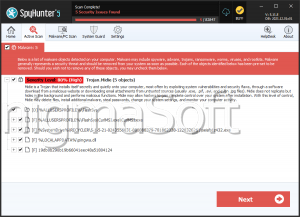
Analisys of the Yzqe malware threat has confirmed that it falls under the ransomware classification. Like all ransomware, Yzqe is engineered to encrypt files on a victim's computer, rendering them inaccessible. In the case of Yzqe, it attaches the '.yzqe' extension to the original filenames of encrypted files. For instance, a file named '1.jpg' would be transformed into '1.jpg.yzqe' after undergoing encryption by Yzqe. This threat is another perilous ransomware variant within the STOP/Djvu malware family.
Furthermore, Yzqe deposits a ransom note labeled '_readme.txt' in every directory containing encrypted files. This note notifies the victim that their files have been encrypted and that they must pay a ransom to obtain the decryption key. It is essential to note that STOP/Djvu Ransomware is frequently distributed alongside other types of malware, such as information stealers like RedLine and Vidar. Consequently, victims of Yzqe may have had their sensitive information collected in addition to their files being encrypted.
Table of Contents
The Yzqe Ransomware can Leave Victims Unable to Access Their Own Data and Files
Typically, the primary purpose of the delivered ransom note is to provide detailed instructions on how victims can contact the attackers and pay the demanded ransom. The file '_readme.txt' contains two email addresses - 'support@freshmail.top' and 'datarestorehelp@airmail.cc.'
The note places significant emphasis on the time-sensitive nature of the situation. It highlights that victims can obtain the supposed decryption tools at a discounted rate of $490 instead of the default $980 sum if they initiate contact with the attackers within a 72-hour timeframe. Furthermore, the note mentions a limited offer wherein victims can mail a single file to the attackers and have it decrypted for free as a demonstration of their capabilities before proceeding with any payment.
However, it is crucial to note that paying the ransom is strongly discouraged. There is no way to know if the victims will receive the necessary decryption tools even if they comply with the attackers' demands. Moreover, it is of utmost importance to take immediate action to remove the ransomware from affected operating systems. This step is critical in preventing further data loss and safeguarding computers connected to local networks from potential encryption attacks.
Don’t Take Chances with the Security of Your Devices and Data
Safeguarding your devices and data from the ever-present threat of ransomware attacks is of paramount importance in today's digital landscape. To fortify your defenses against this harmful menace, consider implementing the following comprehensive security measures:
- Install and Update Anti-malware Software:
- Deploy a trusted anti-malware solution and ensure it remains consistently updated. Such security programs are indispensable as they have the capability to identify and thwart known ransomware threats, acting as a first line of defense.
- Keep Operating Systems and Software Updated:
- Maintain the currency of your operating system and all installed software by regularly applying the latest security patches and updates. This proactive approach helps eliminate vulnerabilities that might otherwise be exploited by ransomware.
- Exercise Caution with Email Attachments and Links:
- Practice prudence when it comes to opening email attachments or clicking on links, particularly if they originate from unfamiliar or questionable sources. Ransomware frequently infiltrates systems via phishing emails, underscoring the importance of verifying the authenticity of the sender before engaging with any email content.
- Backup Data Regularly:
- Establish a robust data backup strategy that encompasses all vital information. Consistently back up your files to offline or cloud storage solutions, with a particular emphasis on offline backups. Since ransomware typically targets files accessible from the infected device, securing and routinely testing the restoration process of your backups is crucial.
- Educate and Train Employees:
- Empower your employees with comprehensive training in recognizing and handling potential threats, including phishing emails, suspicious attachments, and links. Encourage a culture of vigilance and prompt reporting of any suspicious activity or perceived security risks.
- Regularly Monitor and Update Firewall Settings:
- Vigilantly monitor and keep your firewalls properly configured and up to date. Firewalls act as vital gatekeepers, shielding your networks and devices from unauthorized access.
- Limit User Privileges:
- Adopt a policy of granting users the bare minimum of privileges necessary to perform their designated tasks. Restricting administrative privileges significantly reduces the likelihood of ransomware gaining control over critical system settings.
By diligently adhering to these multifaceted security measures, you can reduce the vulnerability of your devices and data to ransomware attacks dramatically. This proactive approach not only strengthens your defenses but also safeguards your valuable digital assets from encryption and extortion.
The ransom note left to the victims of the Yzqe Ransomware is:
ATTENTION!
Don't worry, you can return all your files!
All your files like pictures, databases, documents and other important are encrypted with strongest encryption and unique key.
The only method of recovering files is to purchase decrypt tool and unique key for you.
This software will decrypt all your encrypted files.
What guarantees you have?
You can send one of your encrypted file from your PC and we decrypt it for free.
But we can decrypt only 1 file for free. File must not contain valuable information.
You can get and look video overview decrypt tool:
hxxps://go.wetransfer.com/t-Z4jZBpJ1EK
Price of private key and decrypt software is $980.
Discount 50% available if you contact us first 72 hours, that's price for you is $490.
Please note that you'll never restore your data without payment.
Check your e-mail "Spam" or "Junk" folder if you don't get answer more than 6 hours.
To get this software you need write on our e-mail:
support@freshmail.top
Reserve e-mail address to contact us:
datarestorehelp@airmail.cc
Your personal ID:
Yzqe Ransomware Video
Tip: Turn your sound ON and watch the video in Full Screen mode.