Uncheckit
Threat Scorecard
EnigmaSoft Threat Scorecard
EnigmaSoft Threat Scorecards are assessment reports for different malware threats which have been collected and analyzed by our research team. EnigmaSoft Threat Scorecards evaluate and rank threats using several metrics including real-world and potential risk factors, trends, frequency, prevalence, and persistence. EnigmaSoft Threat Scorecards are updated regularly based on our research data and metrics and are useful for a wide range of computer users, from end users seeking solutions to remove malware from their systems to security experts analyzing threats.
EnigmaSoft Threat Scorecards display a variety of useful information, including:
Popularity Rank: The ranking of a particular threat in EnigmaSoft’s Threat Database.
Severity Level: The determined severity level of an object, represented numerically, based on our risk modeling process and research, as explained in our Threat Assessment Criteria.
Infected Computers: The number of confirmed and suspected cases of a particular threat detected on infected computers as reported by SpyHunter.
See also Threat Assessment Criteria.
| Popularity Rank: | 10,517 |
| Threat Level: | 10 % (Normal) |
| Infected Computers: | 25,014 |
| First Seen: | May 27, 2016 |
| Last Seen: | May 28, 2026 |
| OS(es) Affected: | Windows |
The Uncheckit software by Uncheckit Inc. that can be found at Uncheckit.com may attract the attention of users that want to make sure they do not install bloatware and potentially unwanted software. Uncheckit is supposed to stop unwanted apps to be installed by monitoring which software packages you install and block extra components from being installed automatically. The Uncheckit program acts as a 'bouncer' for your OS and may require little to none manual configuration. You should take into consideration that the development of the Uncheckit application is supported by advertisements being displayed in your browser. The Uncheckit application may install a plug-in to your browser to make sure users help its developer and continue to use Uncheckit for free.
The Uncheckit plication might urge users to turn off any extensions that block ads by Uncheckit to help support its development. The Uncheckit program may show pop-up windows with video commercials and use JavaScript to prevent users from closing the ad immediately. Computer users that block the ads by Uncheckit are likely to experience program crashes and make their free license void. The Uncheckit application may be perceived as a Potentially Unwanted Program due to its activity and users may not be pleased with the idea of having their OS monitored by an ad-supported application. The Uncheckit may run in your system background and may not add an icon to your tray area to enable users to make manual modifications to its functionality. You could use a reliable anti-spyware tool to remove the Uncheckit application safely and prevent PUPs from showing ads on your screen.
Table of Contents
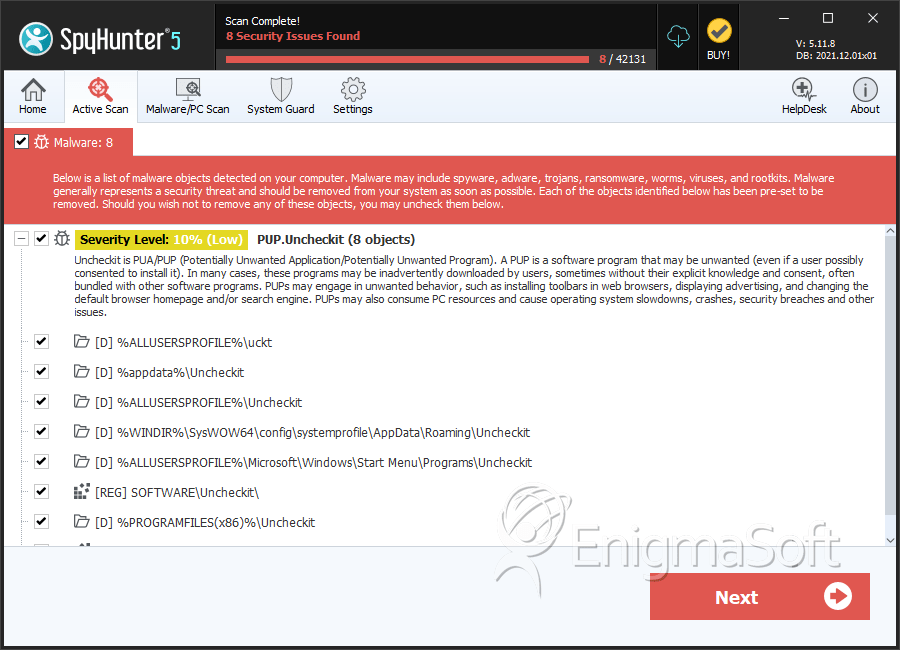
SpyHunter Detects & Remove Uncheckit
File System Details
| # | File Name | MD5 |
Detections
Detections: The number of confirmed and suspected cases of a particular threat detected on
infected computers as reported by SpyHunter.
|
|---|---|---|---|
| 1. | trzA91D.tmp | 4f68de7a17fc238023c03779810bfbea | 394 |
| 2. | CC289A69-D57A-F7E5-1BC9-7384E1036569_1d23d88eceeae2a | a8fab6dc582505217f78e9068cab2d23 | 276 |
| 3. | DF8F271D-887D-4142-4E82-D23D5C5239C0_1d212ac86d2f66a | 6f3c9f16cbcb73bb32adbafeba020aca | 245 |
| 4. | 202DF4DB-D24F-BE57-1925-4B9FEE5A6890_1d23d88ece1fa77 | 055add9e7d58c9215e6728735e492217 | 212 |
| 5. | 2C19ADD4-E52F-A8F2-8580-8349F4E69731_1d212ac980bf971 | e3e5935a2d38a10b01f7f2f2df1f03f9 | 204 |
| 6. | UncheckitBsn.exe.vir | e3fd52ee38eb891cab4d917981ecb4bd | 190 |
| 7. | E3F95215-2D1B-8676-4CA0-66C4C4C1D86E_1d23ec0f10bf39d | 80b54335ecd12441d183b0c1107b1c91 | 166 |
| 8. | 35A55740-3B33-1E1E-D85D-092EE3F42C2D_1d23d88ecfdde1e | cbbbfd8d0b29c9a1a6a3721e155d7fe4 | 163 |
| 9. | cktsvc.exe | 38ae3c23f047281846843f1ac9ac7d0b | 100 |
| 10. | UncheckitSvc.exe | c9080d2100e578a706c2895fff1a83b3 | 85 |
| 11. | UncheckitBsn.exe | 98a3f3a588a6da47631caa430f0cd9bf | 53 |
| 12. | 6D1AF9E8-2D56-799A-DF34-91D51E392080_1d235f2361d3bdb | 7ba3d83730e81876c3ef92374afe8ba1 | 33 |
| 13. | Uncheckit.exe | 8477bae1fef7e9279c1c75613bed8807 | 12 |
| 14. | UncheckitHelper.exe | a621b9eed83d8bd02e310eb54cc4f33b | 10 |
| 15. | UncheckitUpdate.exe | 5d9f1d91ad01c07d8a0fe1098b7ee03a | 10 |
Registry Details
Directories
Uncheckit may create the following directory or directories:
| %ALLUSERSPROFILE%\Application Data\Uncheckit |
| %ALLUSERSPROFILE%\Application Data\uckt |
| %ALLUSERSPROFILE%\Microsoft\Windows\Start Menu\Programs\Uncheckit |
| %ALLUSERSPROFILE%\Uncheckit |
| %ALLUSERSPROFILE%\uckt |
| %PROGRAMFILES%\Uncheckit |
| %PROGRAMFILES(x86)%\Uncheckit |
| %WINDIR%\SysWOW64\config\systemprofile\AppData\Roaming\Uncheckit |
| %WINDIR%\system32\config\systemprofile\AppData\Roaming\Uncheckit |
| %appdata%\Uncheckit |


