Trojan.FakeDoc
Threat Scorecard
EnigmaSoft Threat Scorecard
EnigmaSoft Threat Scorecards are assessment reports for different malware threats which have been collected and analyzed by our research team. EnigmaSoft Threat Scorecards evaluate and rank threats using several metrics including real-world and potential risk factors, trends, frequency, prevalence, and persistence. EnigmaSoft Threat Scorecards are updated regularly based on our research data and metrics and are useful for a wide range of computer users, from end users seeking solutions to remove malware from their systems to security experts analyzing threats.
EnigmaSoft Threat Scorecards display a variety of useful information, including:
Popularity Rank: The ranking of a particular threat in EnigmaSoft’s Threat Database.
Severity Level: The determined severity level of an object, represented numerically, based on our risk modeling process and research, as explained in our Threat Assessment Criteria.
Infected Computers: The number of confirmed and suspected cases of a particular threat detected on infected computers as reported by SpyHunter.
See also Threat Assessment Criteria.
| Threat Level: | 80 % (High) |
| Infected Computers: | 243 |
| First Seen: | July 24, 2009 |
| Last Seen: | June 24, 2026 |
| OS(es) Affected: | Windows |
The detection of Trojan.FakeDoc on your system indicates a potential security threat that requires immediate attention. This report aims to provide you with a comprehensive understanding of the threat, its operational methods, symptoms of infection, and most importantly, steps to remove it from your system.
Table of Contents
What Is Trojan.FakeDoc?
Trojan.FakeDoc is identified as a Trojan-type threat, which means it is designed to deceive users into installing it on their systems by disguising itself as a legitimate program. Trojans are known for their ability to create backdoors on infected systems, allowing attackers to access and control the system remotely. The name "Trojan.FakeDoc" suggests that it may masquerade as a document or use document-related deception to infect systems, but without specific details, it's crucial to understand the general behavior of Trojan-type malware to effectively combat it.
How Trojan.FakeDoc Operates
Typically, Trojan-type malware operates by exploiting vulnerabilities in software or by tricking users into executing the malware. Once installed, it can perform a variety of malicious activities, including but not limited to, stealing sensitive information, installing additional malware, or even using the infected system as part of a botnet for distributed denial-of-service (DDoS) attacks. The exact method of operation for Trojan.FakeDoc would depend on its specific design and intent, which could range from financial theft to disruption of service.
Symptoms of Infection
Symptoms of a Trojan infection can be subtle and may not always be immediately apparent. Common signs include unexpected changes to system settings, unusual network activity, slow system performance, and the appearance of unwanted programs or toolbars in your web browser. Sometimes, infections can lead to more overt issues such as frequent system crashes, pop-ups, or the inability to access certain system functions. Being vigilant about these symptoms can help in early detection and removal of the threat.
How to Remove Trojan.FakeDoc
- Boot into Safe Mode with Networking: This will limit the malware's ability to interfere with the removal process. Safe Mode loads only the most essential drivers and services, making it easier to detect and remove malicious programs.
- Perform a Full Scan with a Reputable Tool: Utilize a trusted anti-malware tool, such as SpyHunter, to conduct a thorough scan of your system. These tools are designed to detect and remove malware, including Trojans like Trojan.FakeDoc.
- Uninstall Suspicious Programs: Go through your installed programs and uninstall any that you don't recognize or that were installed around the time of the infection. Be cautious and ensure you're not removing critical system components.
- Reset Your Web Browsers: Resetting browsers like Chrome, Firefox, and Edge can help remove any malicious extensions or settings that the Trojan may have installed. This is typically done through the browser's settings or options menu.
- Reboot and Re-scan: After taking the above steps, reboot your system to ensure all changes take effect, and then perform another full scan to verify that the threat has been successfully removed.
Conclusion
Removing Trojan.FakeDoc and preventing future infections require a combination of technical knowledge, the right tools, and vigilant user behavior. By understanding how Trojans operate and taking proactive steps to secure your system, you can significantly reduce the risk of infection. Regularly updating your operating system and software, using strong, unique passwords, and being cautious with emails and downloads are crucial in maintaining system security. If you're unsure about any aspect of the removal process, consider consulting with a cybersecurity professional to ensure your system is thoroughly cleaned and protected.
Aliases
5 security vendors flagged this file as malicious.
| Antivirus Vendor | Detection |
|---|---|
| Sophos | Mal/Behav-043 |
| Prevx1 | Generic.Malware |
| Panda | Suspicious file |
| F-Secure | Suspicious:W32/Malware!Gemini |
| ClamAV | Trojan.Fakedoc-2 |
SpyHunter Detects & Remove Trojan.FakeDoc
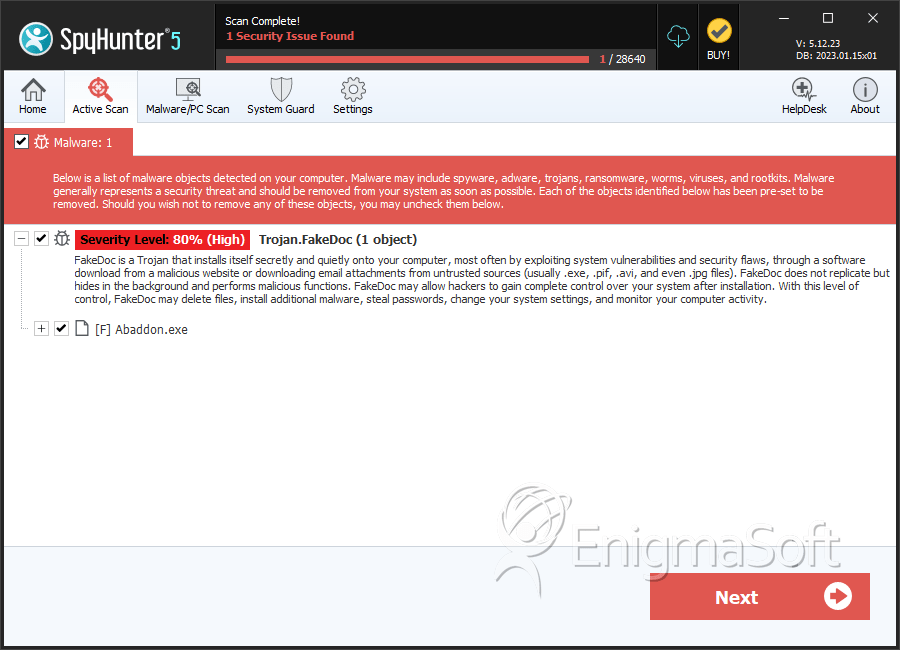
File System Details
| # | File Name | MD5 |
Detections
Detections: The number of confirmed and suspected cases of a particular threat detected on
infected computers as reported by SpyHunter.
|
|---|---|---|---|
| 1. | Abaddon.exe | 041d36b3de93f4d81408b6241f62a7b7 | 0 |
Registry Details
Analysis Report
General information
| Family Name: | Trojan.FakeDoc |
|---|---|
| Signature status: | No Signature |
Known Samples
Known Samples
This section lists other file samples believed to be associated with this family.|
MD5:
78ca816aa940f7aeac134269d8508097
SHA1:
dd2dc9017b90b233f877d665d2c37f20ed542461
SHA256:
4AD3E44D30A8A5F8E781694732859DB32D154999B653B19CE1160639049E6310
File Size:
8.32 MB, 8318741 bytes
|
|
MD5:
fb79b22dc1fca71a0805acdeb3b261c6
SHA1:
26e4bad26a734925f67e6d30631df92685a46224
SHA256:
F832F1430B4E7FB9BED761639CEC61626097613150E63CC0377C120AA8949E7C
File Size:
729.09 KB, 729088 bytes
|
|
MD5:
549c5586e11172ba8db3c5064ddca88b
SHA1:
7fa3ba3f215feddcad822874e51ecd5d16cb4594
SHA256:
680631E64CAFDEE0B8AC6F7E2071157AC54EB4D8C46FBF053C99E0D9E7848B24
File Size:
8.81 MB, 8814758 bytes
|
|
MD5:
b3a29faf4126f95be4cd48a6dcf41a4f
SHA1:
13ff8cecbde7a76611529742c4bcea3d95cb5ffb
SHA256:
37BE0A4AF9D79BF623C345153C6414BF2A302CA0BCEA037C21F8374D54E322AD
File Size:
1.63 MB, 1626112 bytes
|
|
MD5:
b7b1ddea78f22965b23cdcfff8533364
SHA1:
25d95d11b690230867e723af0e318bca84e4db6c
SHA256:
84196F83B562CF2A3D73CB5DFF5755CF7E95AAE4146576C7CBE68B9175E5440B
File Size:
6.37 MB, 6373472 bytes
|
Windows Portable Executable Attributes
- File doesn't have "Rich" header
- File doesn't have debug information
- File doesn't have exports table
- File doesn't have relocations information
- File doesn't have security information
- File is 32-bit executable
- File is either console or GUI application
- File is GUI application (IMAGE_SUBSYSTEM_WINDOWS_GUI)
- File is Native application (NOT .NET application)
- File is not packed
Show More
- IMAGE_FILE_DLL is not set inside PE header (Executable)
- IMAGE_FILE_EXECUTABLE_IMAGE is set inside PE header (Executable Image)
File Icons
File Icons
This section displays icon resources found within family samples. Malware often replicates icons commonly associated with legitimate software to mislead users into believing the malware is safe.


Windows PE Version Information
Windows PE Version Information
This section displays values and attributes that have been set in the Windows file version information data structure for samples within this family. To mislead users, malware actors often add fake version information mimicking legitimate software.| Name | Value |
|---|---|
| Company Name |
|
| File Description | Excel application converted by XLtoEXE utility. |
| File Version |
|
| Internal Name |
|
| Legal Copyright |
|
| Legal Trademarks | Microsoft® Excel® is a registered trademark of Microsoft Corporation. |
| Original Filename |
|
| Product Name |
|
| Product Version |
|
File Traits
- big overlay
- vb6
- x86
Files Modified
Files Modified
This section lists files that were created, modified, moved and/or deleted by samples in this family. File system activity can provide valuable insight into how malware functions on the operating system.| File | Attributes |
|---|---|
| c:\users\user\appdata\local\temp\~dfa1e83ba017190c87.tmp | Generic Read,Write Data,Write Attributes,Write extended,Append data |
Windows API Usage
Windows API Usage
This section lists Windows API calls that are used by the samples in this family. Windows API usage analysis is a valuable tool that can help identify malicious activity, such as keylogging, security privilege escalation, data encryption, data exfiltration, interference with antivirus software, and network request manipulation.| Category | API |
|---|---|
| Other Suspicious |
|


