Software Refresher Ads
Threat Scorecard
EnigmaSoft Threat Scorecard
EnigmaSoft Threat Scorecards are assessment reports for different malware threats which have been collected and analyzed by our research team. EnigmaSoft Threat Scorecards evaluate and rank threats using several metrics including real-world and potential risk factors, trends, frequency, prevalence, and persistence. EnigmaSoft Threat Scorecards are updated regularly based on our research data and metrics and are useful for a wide range of computer users, from end users seeking solutions to remove malware from their systems to security experts analyzing threats.
EnigmaSoft Threat Scorecards display a variety of useful information, including:
Popularity Rank: The ranking of a particular threat in EnigmaSoft’s Threat Database.
Severity Level: The determined severity level of an object, represented numerically, based on our risk modeling process and research, as explained in our Threat Assessment Criteria.
Infected Computers: The number of confirmed and suspected cases of a particular threat detected on infected computers as reported by SpyHunter.
See also Threat Assessment Criteria.
| Popularity Rank: | 15,260 |
| Threat Level: | 10 % (Normal) |
| Infected Computers: | 10,311 |
| First Seen: | November 17, 2014 |
| Last Seen: | March 6, 2026 |
| OS(es) Affected: | Windows |
The Software Refresher application is developed by Software Refresher, LP. as a free tool that will enhance the productivity of your system. Computer users should note that the Software Refresher app is ad-supported in order to provide system features free of charge. Software experts deem the Software Refresher application as Potentially Unwanted Program (PUP) because its ad providers use the program to push numerous advertisements in the user's web browser. Users with the Software Refresher app on their system may experience, pop-up windows with coupons, discounts, and special offers. The Software Refresher tool may provide you with appealing system features, and you may want to think carefully about whether to keep it or remove it with a trusted anti-malware utility.
Table of Contents
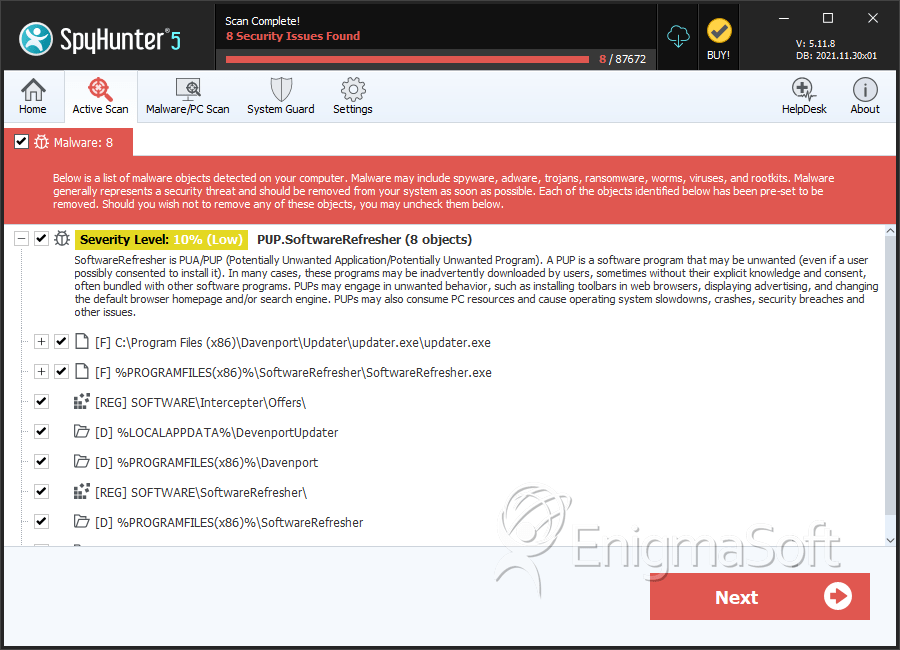
SpyHunter Detects & Remove Software Refresher Ads
File System Details
| # | File Name | MD5 |
Detections
Detections: The number of confirmed and suspected cases of a particular threat detected on
infected computers as reported by SpyHunter.
|
|---|---|---|---|
| 1. | updater.exe | a563b9f6d90ebddb76e33a81320b2b07 | 3,713 |
| 2. | SoftwareRefresher.exe | 874a021b7622291969b57ca5e6ac3ca4 | 3,464 |
| 3. | intercepter-x86.exe | b825f007e88a83431bc669f6ff91a8f3 | 402 |
| 4. | intercepter-x86.exe.vir | f114009850ecc9b12431570d09c4e353 | 219 |
| 5. | intercepter-x64.exe#72AEFC604CAABEA9 | db35eb077c45224826393c66dc919a33 | 79 |
| 6. | intercepter-x64.exe | 4bac97713c361ee6ebbf621a95f067b7 | 66 |
| 7. |
C:\Users\ |
||
| 8. | common.js | ||
| 9. | client_zone_id.js | ||
| 10. |
C:\Users\ |
Registry Details
Directories
Software Refresher Ads may create the following directory or directories:
| %APPDATA%\Microsoft\Windows\Start Menu\Programs\Software Refresher |
| %LOCALAPPDATA%\DevenportUpdater |
| %LOCALAPPDATA%\Software Refresher |
| %PROGRAMFILES%\Davenport |
| %PROGRAMFILES%\Software Refresher |
| %PROGRAMFILES%\SoftwareRefresher |
| %PROGRAMFILES(x86)%\Davenport |
| %PROGRAMFILES(x86)%\Software Refresher |
| %PROGRAMFILES(x86)%\SoftwareRefresher |
Analysis Report
General information
| Family Name: | PUP.SoftwareRefresher |
|---|---|
| Signature status: | No Signature |
Known Samples
Known Samples
This section lists other file samples believed to be associated with this family.|
MD5:
044aa9b6d88ed4ccd98f7f51d3e3fad2
SHA1:
c551c6c91960cbcc3af2b7b623e16b2eb483b337
SHA256:
BC11CBFCAFD89279C437526BAD7E7CADAEB8D15C702A194C3E72180C4F182282
File Size:
1.34 MB, 1344974 bytes
|
Windows Portable Executable Attributes
- File doesn't have "Rich" header
- File doesn't have debug information
- File doesn't have exports table
- File doesn't have relocations information
- File doesn't have security information
- File is 32-bit executable
- File is either console or GUI application
- File is GUI application (IMAGE_SUBSYSTEM_WINDOWS_GUI)
- File is Native application (NOT .NET application)
- File is not packed
Show More
- IMAGE_FILE_DLL is not set inside PE header (Executable)
- IMAGE_FILE_EXECUTABLE_IMAGE is set inside PE header (Executable Image)
File Icons
File Icons
This section displays icon resources found within family samples. Malware often replicates icons commonly associated with legitimate software to mislead users into believing the malware is safe.
File Traits
- Installer Manifest
- nosig nsis
- No Version Info
- Nullsoft Installer
- x86
Files Modified
Files Modified
This section lists files that were created, modified, moved and/or deleted by samples in this family. File system activity can provide valuable insight into how malware functions on the operating system.| File | Attributes |
|---|---|
| \device\namedpipe\gmdasllogger | Generic Write,Read Attributes |
Windows API Usage
Windows API Usage
This section lists Windows API calls that are used by the samples in this family. Windows API usage analysis is a valuable tool that can help identify malicious activity, such as keylogging, security privilege escalation, data encryption, data exfiltration, interference with antivirus software, and network request manipulation.| Category | API |
|---|---|
| Process Manipulation Evasion |
|
| Anti Debug |
|
| User Data Access |
|


