Search.tappytop.com
Threat Scorecard
EnigmaSoft Threat Scorecard
EnigmaSoft Threat Scorecards are assessment reports for different malware threats which have been collected and analyzed by our research team. EnigmaSoft Threat Scorecards evaluate and rank threats using several metrics including real-world and potential risk factors, trends, frequency, prevalence, and persistence. EnigmaSoft Threat Scorecards are updated regularly based on our research data and metrics and are useful for a wide range of computer users, from end users seeking solutions to remove malware from their systems to security experts analyzing threats.
EnigmaSoft Threat Scorecards display a variety of useful information, including:
Popularity Rank: The ranking of a particular threat in EnigmaSoft’s Threat Database.
Severity Level: The determined severity level of an object, represented numerically, based on our risk modeling process and research, as explained in our Threat Assessment Criteria.
Infected Computers: The number of confirmed and suspected cases of a particular threat detected on infected computers as reported by SpyHunter.
See also Threat Assessment Criteria.
| Threat Level: | 50 % (Medium) |
| Infected Computers: | 1 |
| First Seen: | July 15, 2016 |
| Last Seen: | November 13, 2018 |
| OS(es) Affected: | Windows |
The detection of Search.tappytop.com on your system indicates a potential threat to your computer's security and privacy. This detection name suggests a type of malicious software that could be altering your browser settings or redirecting your searches to unwanted websites. It is essential to understand the nature of this threat and take immediate action to remove it and protect your system.
Table of Contents
What Is Search.tappytop.com?
Search.tappytop.com is identified as a Trojan-type threat, which means it is a type of malware that disguises itself as a legitimate program but actually allows unauthorized access to your computer. Trojans can lead to a variety of problems, including data theft, additional malware infections, and compromised system performance. The name Search.tappytop.com implies it might be involved in altering search engine settings or redirecting users to specific websites, potentially for malicious purposes such as phishing or spreading more malware.
How Search.tappytop.com Operates
Trojans like Search.tappytop.com typically operate by exploiting vulnerabilities in software or by tricking users into installing them. Once installed, they can perform a wide range of malicious activities, from stealing sensitive information like login credentials and credit card numbers to using your computer as part of a botnet for distributing spam or attacking other computers. The specific operations of Search.tappytop.com would depend on its design and the intentions of its creators, but the general behavior includes evading detection, maintaining a presence on the infected system, and communicating with command and control servers to receive updates or send stolen data.
Symptoms of Infection
Symptoms of a Search.tappytop.com infection can vary but may include unexpected changes to your browser's homepage or default search engine, an increase in pop-up ads, or a general slowdown of your computer's performance. You might also notice that your search results are being redirected to unfamiliar websites or that your computer is behaving erratically. Since Trojans can enable remote access to your computer, you might notice strange activities such as programs opening on their own or unfamiliar files appearing on your desktop.
How to Remove Search.tappytop.com
- Boot your computer in Safe Mode with Networking to prevent the malware from loading and to make it easier to remove. This mode starts Windows with a minimal set of drivers and services, reducing the chance of the malware interfering with the removal process.
- Use a reputable anti-malware tool, such as SpyHunter, to perform a full scan of your system. Ensure the tool is updated with the latest definitions to increase the chances of detecting and removing Search.tappytop.com.
- Uninstall any suspicious programs that you do not recognize or that were installed around the time you noticed the infection. Be cautious during this process, as some legitimate programs might be mistakenly uninstalled.
- Reset your browsers (Chrome, Firefox, Edge, etc.) to their default settings. This can help remove any malicious extensions or settings changes made by the malware. For each browser, you can usually find a "Reset settings" option in the settings or preferences menu.
- After completing the above steps, reboot your computer and perform another scan with your anti-malware tool to ensure that the threat has been fully removed. This step is crucial as it verifies the effectiveness of the removal process and checks for any remaining components of the malware.
Conclusion
Removing Search.tappytop.com from your computer requires careful attention to detail and a systematic approach to ensure all components of the malware are eliminated. By following the steps outlined above and maintaining vigilance, you can protect your computer from this and other threats. Remember, prevention is key: keeping your operating system and software up to date, using strong antivirus software, and being cautious when clicking on links or installing new programs can significantly reduce the risk of infection. If you are unsure about any part of the removal process, consider seeking help from a professional to ensure your system is thoroughly cleaned and protected.
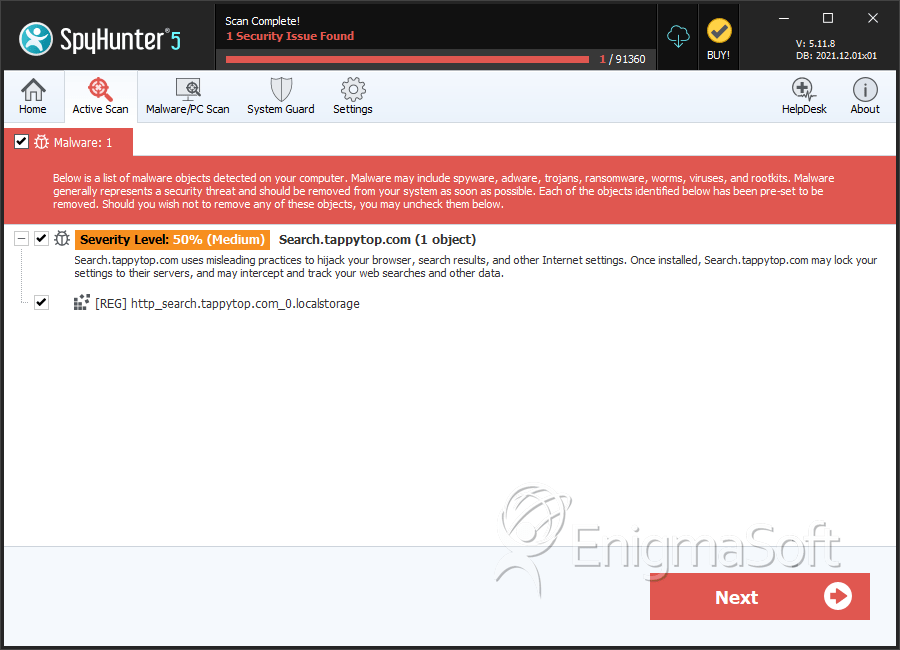
SpyHunter Detects & Remove Search.tappytop.com