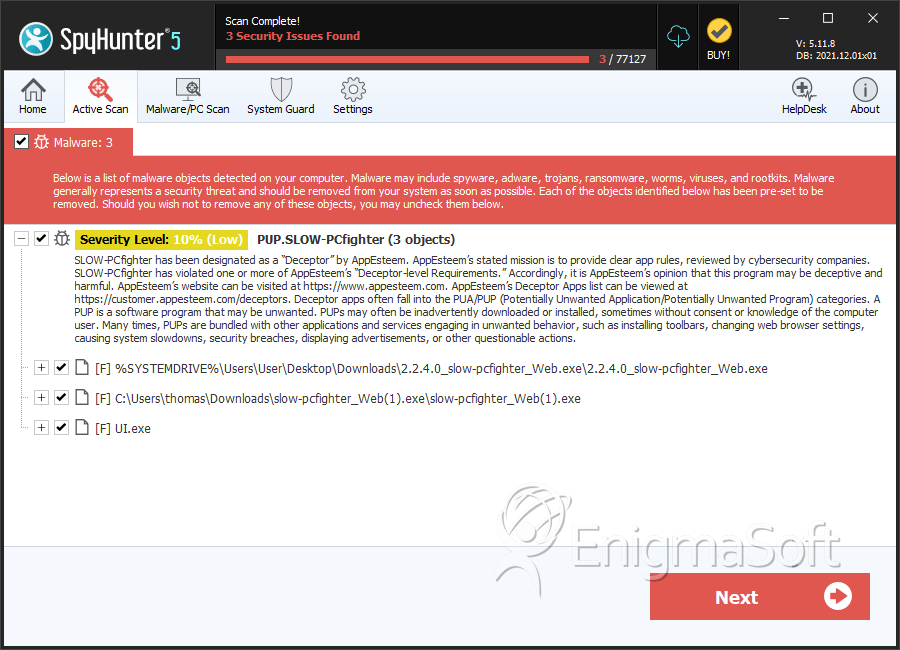
PUP.SLOW-PCfighter
The detection of PUP.SLOW-PCfighter on your system indicates the presence of a potentially unwanted program (PUP) that may be causing performance issues and other problems. It's essential to understand the nature of this threat and take immediate action to remove it and prevent further damage.
Table of Contents
What Is PUP.SLOW-PCfighter?
PUP.SLOW-PCfighter is a type of potentially unwanted program that is designed to deceive users into thinking their computer is infected with malware or is performing poorly. These programs often use misleading tactics to convince users to purchase unnecessary software or services. PUPs can be installed on a system without the user's knowledge or consent, often through bundled software downloads or suspicious websites.
How PUP.SLOW-PCfighter Operates
PUP.SLOW-PCfighter operates by using various tactics to trick users into believing their system is infected or slow. It may display fake scan results, warnings, and alerts, claiming to have detected malware or other issues. In some cases, it may even create fake system crashes or slow down the system to make it appear as though the program is necessary to fix the problems. The ultimate goal of PUP.SLOW-PCfighter is to generate revenue for its creators by selling unnecessary software or services.
Symptoms of Infection
Systems infected with PUP.SLOW-PCfighter may exhibit a range of symptoms, including slow performance, fake scan results, and misleading warnings. Users may also notice unusual pop-ups, ads, or browser redirects. In some cases, the program may even install additional software or toolbars without the user's consent. If you suspect that your system is infected with PUP.SLOW-PCfighter, it's crucial to take immediate action to remove it and prevent further damage.
How to Remove PUP.SLOW-PCfighter
- Boot your system in Safe Mode with Networking to prevent the PUP from loading and to allow for a more effective removal process.
- Perform a full scan of your system using a reputable anti-malware tool, such as SpyHunter, to detect and remove all instances of PUP.SLOW-PCfighter.
- Uninstall any suspicious programs or software that may be related to the PUP. Be cautious when uninstalling programs, as some may be legitimate or required by your system.
- Reset your web browsers, including Chrome, Firefox, and Edge, to their default settings to remove any malicious extensions or add-ons.
- Reboot your system and perform another full scan to ensure that all remnants of PUP.SLOW-PCfighter have been removed.
Conclusion
Removing PUP.SLOW-PCfighter from your system is essential to prevent further damage and performance issues. By following the steps outlined above, you can effectively remove this potentially unwanted program and restore your system to its optimal state. It's also crucial to practice safe computing habits, such as avoiding suspicious downloads and websites, to prevent future infections. Remember to always use reputable anti-malware tools and keep your system and software up to date to protect against the latest threats.
SpyHunter Detects & Remove PUP.SLOW-PCfighter