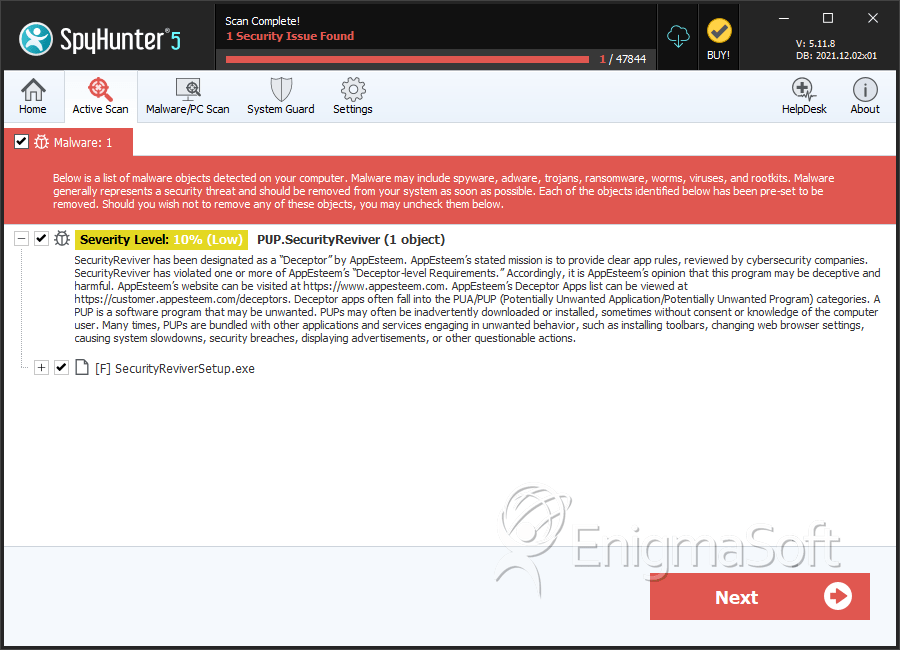
PUP.SecurityReviver
The detection of PUP.SecurityReviver on your system indicates the presence of a potentially unwanted program (PUP) that may be causing issues with your computer's performance and security. It is essential to understand the nature of this threat and take appropriate steps to remove it and prevent future infections.
Table of Contents
What Is PUP.SecurityReviver?
PUP.SecurityReviver is a type of malware that is classified as a potentially unwanted program. This category of threats includes software that may not be malicious in the classical sense but can still cause problems for users. PUPs often sneak onto systems through bundled installations, deceptive downloads, or exploit kits. They can lead to a range of issues, from annoying pop-ups and altered browser settings to more serious concerns like data collection and potential backdoors for more severe malware.
How PUP.SecurityReviver Operates
Once installed, PUP.SecurityReviver may operate in various ways to achieve its goals, which could include displaying unwanted advertisements, modifying browser settings to redirect users to specific websites, or collecting user data for unknown purposes. It might also attempt to persuade users into purchasing unnecessary software or services by fake alerts and warnings. The exact operation can vary, but the common theme among PUPs is their ability to disrupt the normal functioning of a computer and compromise user privacy.
Symptoms of Infection
Symptoms of a PUP.SecurityReviver infection can be subtle at first but may escalate over time. Users might notice an increase in pop-up ads, changes in their browser's homepage or default search engine, slow system performance, or the presence of unfamiliar programs. In some cases, the PUP might generate fake system warnings or alerts to scare users into taking actions that could further compromise their system's security.
- Increased appearance of advertisements in unusual places or quantities.
- Changes to browser settings without user consent.
- Presence of unknown or suspicious programs.
- System slowdowns or increased instability.
How to Remove PUP.SecurityReviver
Removing PUP.SecurityReviver requires a methodical approach to ensure all components of the malware are eliminated. Follow these steps:
- Boot your computer in Safe Mode with Networking to limit the malware's ability to interfere with the removal process.
- Perform a full scan of your system using a reputable anti-malware tool, such as SpyHunter, to detect and remove all traces of the PUP.
- Manually uninstall any suspicious programs that were installed around the time the PUP was detected.
- Reset your web browsers (Chrome, Firefox, Edge) to their default settings to remove any alterations made by the PUP.
- Reboot your computer and perform another full scan with your anti-malware tool to ensure no remnants of the PUP remain.
Conclusion
The removal of PUP.SecurityReviver is crucial to restoring your system's security and performance. By understanding how PUPs operate and following a thorough removal process, you can protect your computer from these and other potential threats. It's also important to adopt preventive measures, such as being cautious with downloads, reading user agreements carefully, and regularly scanning your system for malware, to minimize the risk of future infections.
SpyHunter Detects & Remove PUP.SecurityReviver