PUP.Rave
Threat Scorecard
EnigmaSoft Threat Scorecard
EnigmaSoft Threat Scorecards are assessment reports for different malware threats which have been collected and analyzed by our research team. EnigmaSoft Threat Scorecards evaluate and rank threats using several metrics including real-world and potential risk factors, trends, frequency, prevalence, and persistence. EnigmaSoft Threat Scorecards are updated regularly based on our research data and metrics and are useful for a wide range of computer users, from end users seeking solutions to remove malware from their systems to security experts analyzing threats.
EnigmaSoft Threat Scorecards display a variety of useful information, including:
Popularity Rank: The ranking of a particular threat in EnigmaSoft’s Threat Database.
Severity Level: The determined severity level of an object, represented numerically, based on our risk modeling process and research, as explained in our Threat Assessment Criteria.
Infected Computers: The number of confirmed and suspected cases of a particular threat detected on infected computers as reported by SpyHunter.
See also Threat Assessment Criteria.
| Popularity Rank: | 1,874 |
| Threat Level: | 10 % (Normal) |
| Infected Computers: | 993 |
| First Seen: | July 8, 2026 |
| Last Seen: | October 17, 2026 |
| OS(es) Affected: | Windows |
Security analysts frequently encounter detections that do not necessarily point to highly destructive trojans or ransomware, but rather to borderline programs that exhibit intrusive behaviors. PUP.Rave is one such detection, classifying a specific Potentially Unwanted Program (PUP) that may have compromised a user's system. While not inherently malicious in the same vein as severe cyber threats, PUPs can significantly degrade system performance, compromise user privacy, and create an annoying computing environment. This removal report provides an honest, general overview of the threat and outlines the necessary steps to eradicate it from an affected machine.
Table of Contents
What Is PUP.Rave?
The detection name PUP.Rave is assigned by anti-malware engines to flag software that exhibits behaviors inconsistent with standard, user-requested applications. A PUP typically enters a system through deceptive bundling practices or aggressive marketing tactics rather than direct exploitation. Users often install these programs inadvertently alongside legitimate freeware or shareware. It is important to understand that a PUP detection does not automatically mean the software is a virus. However, it does indicate that the program possesses characteristics that security vendors consider undesirable, such as data tracking, unauthorized system modifications, or resisting standard uninstallation procedures.
How PUP.Rave Operates
Potentially unwanted programs generally operate by embedding themselves deeply into the operating system to maintain persistence. PUP.Rave may achieve this by modifying system settings, altering browser configurations, or scheduling background tasks that automatically relaunch the software if a user attempts to close it. These programs often arrive bundled with third-party installers and may not clearly disclose their installation, effectively bypassing user consent. Once installed, the PUP may communicate with remote servers to download updates, fetch advertisements, or transmit basic telemetry regarding user browsing habits. The primary goal of such software is usually to generate revenue for its developers through forced exposure to advertising or data collection, rather than to cause direct system damage.
Symptoms of Infection
Users affected by PUP.Rave may notice a variety of general system anomalies. Because no specific behavioral telemetry is available for this exact detection, users should look out for common PUP-related symptoms, which include:
- Unexpected changes to the default homepage, search engine, or new tab settings in web browsers.
- An increase in the frequency of pop-up advertisements, banners, or in-text ad links.
- Browser redirection to unfamiliar promotional websites or sponsored portals.
- A noticeable degradation in overall system performance, including slower boot times and general sluggishness.
- The presence of unfamiliar applications or browser extensions that were not intentionally installed by the user.
How to Remove PUP.Rave
To effectively remove PUP.Rave and restore normal system behavior, follow this structured removal process:
- Boot the affected computer into Safe Mode with Networking. This limits the operating system to essential processes and can prevent the PUP from actively blocking removal tools.
- Run a full system scan with a reputable anti-malware tool such as SpyHunter. Allow the software to quarantine or delete any identified threats and associated files.
- Uninstall suspicious programs manually. Access the operating system's control panel or settings menu, review the list of recently installed applications, and uninstall any unrecognized or unwanted software.
- Reset Chrome, Firefox, and Edge browsers to their default settings. This step is critical to remove unauthorized extensions, clear altered search settings, and eliminate any persistent tracking cookies.
- Reboot the computer normally into the standard operating system environment, then run a second anti-malware scan to ensure that no components of the PUP have regenerated.
Conclusion
While PUP.Rave may not present the severe risks associated with ransomware or information-stealing trojans, its presence on a system is a clear indicator of unauthorized system changes and potential privacy intrusions. Addressing this detection promptly is essential to maintaining optimal system performance and ensuring a secure computing environment. By utilizing reputable anti-malware solutions and practicing cautious installation habits, users can effectively remove this unwanted software and prevent similar intrusions in the future.
SpyHunter Detects & Remove PUP.Rave
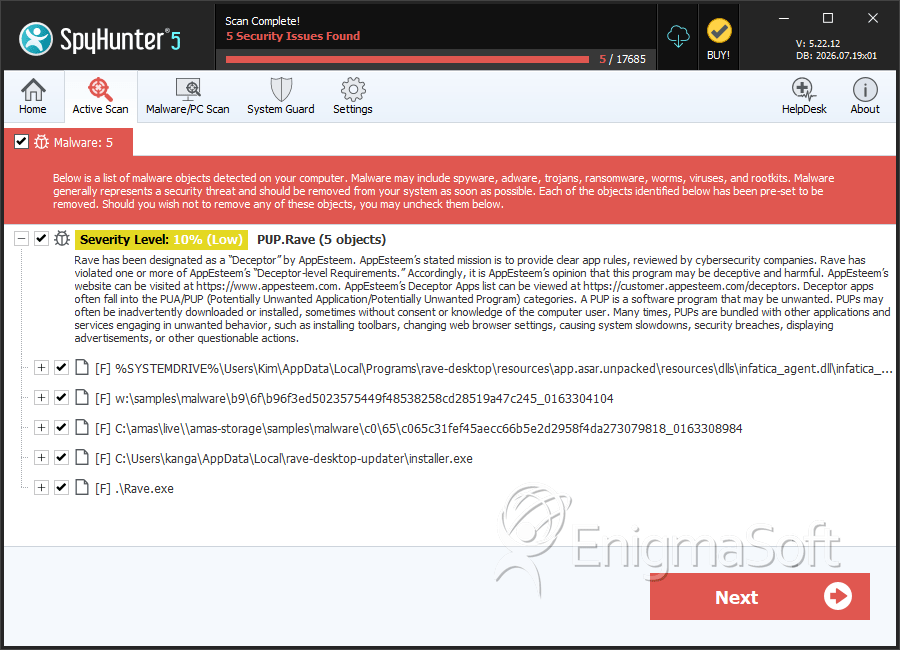
File System Details
| # | File Name | MD5 |
Detections
Detections: The number of confirmed and suspected cases of a particular threat detected on
infected computers as reported by SpyHunter.
|
|---|---|---|---|
| 1. | infatica_agent.dll | 7e2b0d4bdacf0f74ba42b94c18778d86 | 182 |
| 2. | b96f3ed5023575449f48538258cd28519a47c245_0163304104 | 8ef7a95208dbcec05cef8a009e177f04 | 134 |
| 3. | c065c31fef45aecc66b5e2d2958f4da273079818_0163308984 | 375da33e54e7fc04aba305176956094b | 117 |
| 4. | Rave-x64-Setup-1.18.23.exe | 63432a618a2d3364a36c4d792de38127 | 38 |
| 5. | Rave-x64-Setup-1.18.21.exe | 2be5ef3051c209acde7d655b9c69d35c | 36 |
| 6. | installer.exe | 9908ccab2f9e6974a40a10d91020fcaa | 27 |
| 7. | C__Users_aeadmin_AppData_Local_Programs_rave-desktop_Rave.exe | 6c6464e50f2cd630799dc8a945dd4baa | 6 |
| 8. | Rave.exe | 7735cf0f3a5df86c1e2d56cc11d70f78 | 4 |
| 9. | Rave-x64-Setup-1.18.24.exe | 57f827543bbdf932d031fdffa88429da | 3 |
| 10. | Rave-x64-Setup-1.18.25.exe | 5c54a70c0bfdc2dd82ea01546dd7ed20 | 0 |
| 11. | Rave-x64-Setup-1.18.25%20(1).exe | 1ad96ba2158ae7fc4f1a03c00c33cbf7 | 0 |
| 12. | Rave-x64-Setup-1.18.26.exe | 1e65a214b911d0bb40ddce9c65a4d726 | 0 |


