PUP.Max Registry Cleaner
The detection of PUP.Max Registry Cleaner on your system indicates the presence of a potentially unwanted program (PUP) that may be causing issues with your computer's performance and security. It's essential to understand the nature of this threat and take appropriate steps to remove it and prevent future infections.
Table of Contents
What Is PUP.Max Registry Cleaner?
PUP.Max Registry Cleaner is a type of potentially unwanted program that is designed to allegedly clean and optimize the Windows registry. However, in reality, it may not provide any significant benefits and can potentially cause harm to your system. PUPs like PUP.Max Registry Cleaner often sneak onto your computer through bundled software downloads, infected websites, or misleading advertisements.
How PUP.Max Registry Cleaner Operates
Once installed, PUP.Max Registry Cleaner may start scanning your system and reporting false or exaggerated errors to convince you to purchase its full version or other unnecessary software. It may also collect your personal data, such as browsing history and search queries, to display targeted advertisements or sell to third-party companies. In some cases, PUPs can even install additional malware or unwanted programs on your system, leading to further complications.
Symptoms of Infection
Common symptoms of PUP.Max Registry Cleaner infection include slow system performance, frequent pop-ups and advertisements, and unwanted changes to your browser settings or homepage. You may also notice that your system is crashing or freezing more often, or that your antivirus software is detecting and blocking suspicious activity. If you've noticed any of these symptoms, it's crucial to take immediate action to remove the PUP and prevent further damage.
How to Remove PUP.Max Registry Cleaner
- Boot your computer in Safe Mode with Networking to prevent the PUP from loading and interfering with the removal process.
- Download and install a reputable anti-malware tool, such as SpyHunter, and perform a full scan of your system to detect and remove PUP.Max Registry Cleaner and any associated malware.
- Uninstall any suspicious programs or software that you don't recognize or need, as they may be related to the PUP infection.
- Reset your web browsers, including Chrome, Firefox, and Edge, to their default settings to remove any unwanted extensions or add-ons.
- Reboot your computer and perform another full scan with your anti-malware tool to ensure that the PUP has been completely removed.
Conclusion
Removing PUP.Max Registry Cleaner from your system requires careful attention to detail and a comprehensive approach to ensure that all associated malware and unwanted programs are eliminated. By following the steps outlined above and maintaining good computing habits, such as regularly updating your software and avoiding suspicious downloads, you can help protect your system from future PUP infections and keep your personal data safe. Remember to always be cautious when downloading software or clicking on links, and never hesitate to seek professional help if you're unsure about how to remove a potentially unwanted program from your computer.
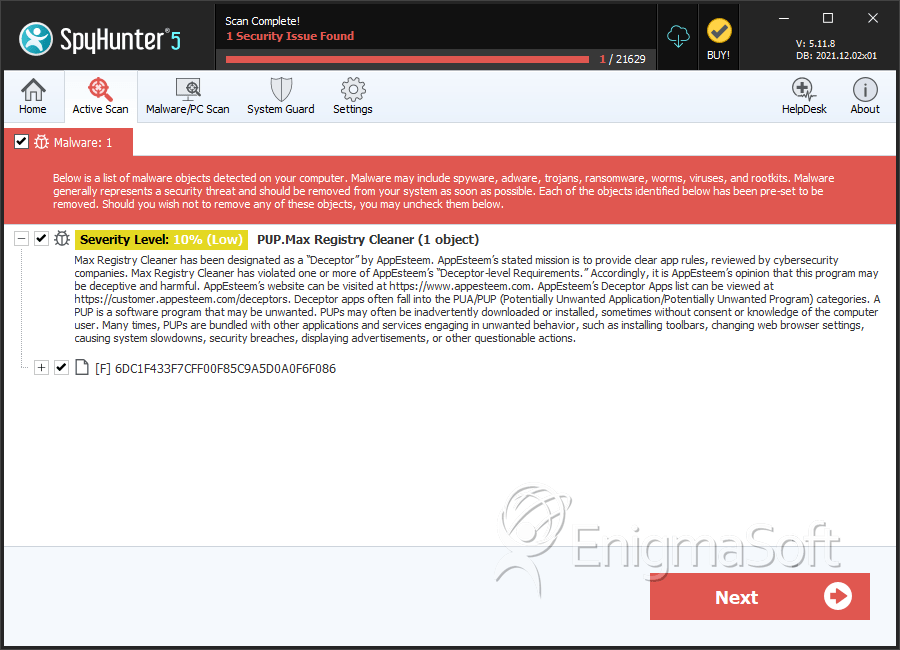
SpyHunter Detects & Remove PUP.Max Registry Cleaner