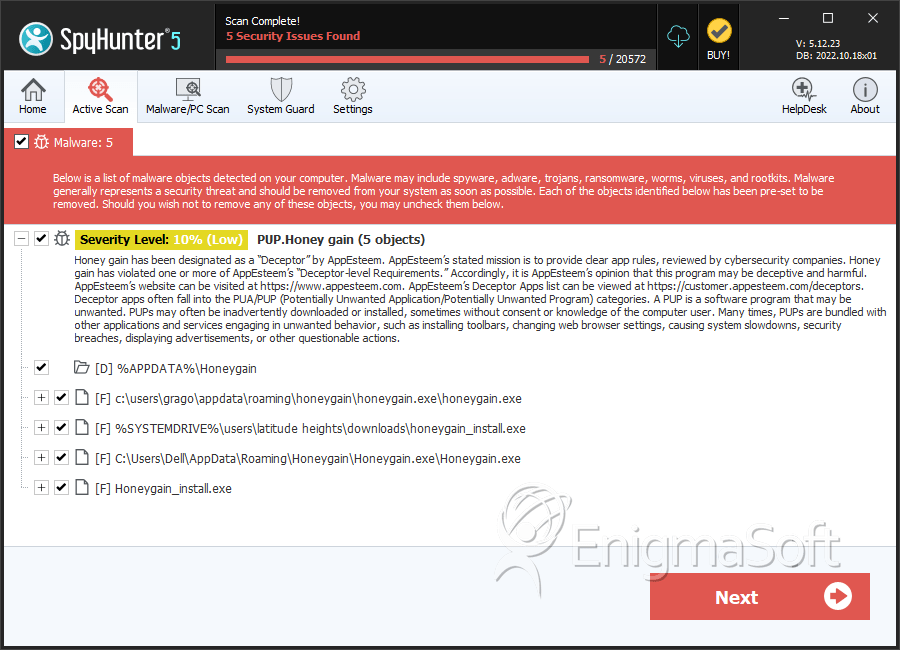
PUP.Honey gain
The detection of PUP.Honey gain on your system indicates the presence of a potentially unwanted program (PUP) that may be compromising your computer's security and performance. It is essential to understand the nature of this threat and take immediate action to remove it and prevent future infections.
Table of Contents
What Is PUP.Honey gain?
PUP.Honey gain is a type of malware that is classified as a potentially unwanted program. This category of threats includes software that may not be malicious in the classical sense but can still cause significant problems for users. PUPs often sneak onto systems through bundled installations, deceptive downloads, or exploits in software vulnerabilities. They can lead to a range of issues, from annoying advertisements and data collection to more severe problems like system instability and security breaches.
How PUP.Honey gain Operates
PUPs like PUP.Honey gain typically operate by integrating themselves into a system in a way that makes them difficult to detect and remove. They may alter system settings, install additional unwanted software, or even hijack certain functions of the operating system or web browsers. The primary goal of many PUPs is to generate revenue for their creators, often through displaying unwanted advertisements, selling user data, or forcing users to purchase unnecessary software or services.
Symptoms of Infection
Identifying a PUP infection can be challenging, as these programs often mimic legitimate software or operate in the background without obvious signs of their presence. However, some common symptoms that may indicate an infection include unexpected pop-ups or advertisements, unfamiliar programs or toolbars in your web browser, significant slowdowns in system performance, or changes in your browser's homepage or search engine without your consent. If you've noticed any of these symptoms, it's crucial to take action to secure your system and protect your personal data.
How to Remove PUP.Honey gain
- Boot your computer in Safe Mode with Networking to limit the malware's ability to interfere with the removal process.
- Conduct a full scan of your system using a reputable anti-malware tool, such as SpyHunter, to detect and remove all components of the PUP.
- Manually uninstall any suspicious programs or applications that you do not recognize or no longer need.
- Reset your web browsers (Chrome, Firefox, Edge, etc.) to their default settings to remove any unwanted changes made by the PUP.
- Reboot your computer and perform another scan with your anti-malware tool to ensure that all traces of the PUP have been removed.
Following these steps should help in removing PUP.Honey gain from your system. However, preventing future infections requires ongoing vigilance, including keeping your operating system and software up to date, being cautious with downloads and email attachments, and regularly scanning your system for malware.
Conclusion
The removal of PUP.Honey gain is a critical step in protecting your computer and personal data from potential harm. By understanding how PUPs operate and taking proactive measures to secure your system, you can significantly reduce the risk of infection and maintain a safe and efficient computing environment. Remember, staying informed and adopting best practices for computer security are key to preventing future malware infections and ensuring your digital safety.
SpyHunter Detects & Remove PUP.Honey gain