PUP.FileZilla
Threat Scorecard
EnigmaSoft Threat Scorecard
EnigmaSoft Threat Scorecards are assessment reports for different malware threats which have been collected and analyzed by our research team. EnigmaSoft Threat Scorecards evaluate and rank threats using several metrics including real-world and potential risk factors, trends, frequency, prevalence, and persistence. EnigmaSoft Threat Scorecards are updated regularly based on our research data and metrics and are useful for a wide range of computer users, from end users seeking solutions to remove malware from their systems to security experts analyzing threats.
EnigmaSoft Threat Scorecards display a variety of useful information, including:
Popularity Rank: The ranking of a particular threat in EnigmaSoft’s Threat Database.
Severity Level: The determined severity level of an object, represented numerically, based on our risk modeling process and research, as explained in our Threat Assessment Criteria.
Infected Computers: The number of confirmed and suspected cases of a particular threat detected on infected computers as reported by SpyHunter.
See also Threat Assessment Criteria.
| Popularity Rank: | 9,912 |
| Threat Level: | 10 % (Normal) |
| Infected Computers: | 1,666 |
| First Seen: | February 28, 2024 |
| Last Seen: | October 10, 2026 |
| OS(es) Affected: | Windows |
FileZilla is a freely available, open-source software offering both FileZilla Client and FileZilla Server components, designed for FTP operations across different platforms. Its client version runs seamlessly on Windows, Linux and macOS. The software supports both FTP and FTPS protocols for secure file transfers. Having been in existence for 23 years, FileZilla offers essential functionalities, including the ability to transfer files through FTP and encrypted FTP, such as FTPS and SFTP, with added support for IPv6. Notably, one of its standout features is the capability to pause and resume file transfers, even when dealing with files exceeding 4GB in size.
Despite its legitimate operation and long-standing reputation, researchers warn users to be careful when installing the application. Indeed, FileZilla has been reported to be offering bundled installers that come with various PUPs (Potentially Unwanted Programs). The installers in question may be labeled as 'sponsored.' PUPs often carry intrusive adware or browser hijacker characteristics.
Table of Contents
Installing PUPs May Cause Serious Privacy and Security Issues
Installing PUPs could lead to significant privacy and security concerns due to their intrusive nature and often questionable intent. PUPs are typically bundled with legitimate software downloads or masquerade as useful tools, but they may exhibit behaviors that compromise user privacy and system security.
When users install PUPs, they unknowingly grant these programs various permissions and access to their devices and personal information. PUPs can track users' browsing habits, collect sensitive data such as login credentials and financial information, and even monitor keystrokes. This information can then be exploited for targeted advertising, identity theft, or other harmful purposes.
Moreover, PUPs may introduce vulnerabilities into the system, facilitating for cyber attackers to exploit weaknesses and gain unauthorized access. They can install additional software without consent, modify system settings, and bypass security measures, leaving the device and the user's data vulnerable to exploitation.
Furthermore, PUPs often employ deceptive tactics to evade detection and removal by security programs, making them challenging to eradicate once installed. They may hide deep within the system, disguise themselves as legitimate processes, or resist uninstallation attempts.
Always Pay Attention When Installing Applications to Avoid Allowing PUPs on Your Devices
Users should always pay close attention when installing applications to avoid inadvertently allowing PUPs onto their devices due to several critical reasons.
Firstly, many software installation processes include bundled offers or optional add-ons, which users may not immediately realize. PUPs often piggyback on legitimate software downloads, leading users to agree to install additional programs alongside the intended software unknowingly. Without careful scrutiny during installation, users may unintentionally grant permission for PUPs to infiltrate their devices.
Secondly, PUPs are notorious for their deceptive tactics and misleading appearances. They may masquerade as useful tools or claim to provide beneficial services, enticing users to install them without fully understanding the potential risks. By exploiting users' trust and lack of attention, PUPs can easily bypass initial scrutiny and gain access to devices where they can then carry out harmful activities.
Moreover, PUPs can compromise users' privacy and security by collecting sensitive data, monitoring online activities and introducing vulnerabilities into the system. Once installed, these programs may track users' browsing habits, harvest personal information, and even open backdoors for cyber attackers to exploit. Without users' awareness, PUPs can silently operate in the background, posing significant risks to both individual users and their devices.
Additionally, PUPs often employ sophisticated techniques to evade detection and removal, making them challenging to eradicate once installed. They may camouflage themselves as legitimate processes, hide within system files, or resist uninstallation attempts, prolonging their presence on users' devices and exacerbating the potential harm they can cause.
In conclusion, users should always remain vigilant and attentive when installing applications to safeguard their devices against PUPs. By carefully reviewing installation prompts, opting out of bundled offers, and scrutinizing the legitimacy of software sources, users can minimize the risk of inadvertently allowing PUPs onto their devices and protect their privacy and security effectively.
SpyHunter Detects & Remove PUP.FileZilla
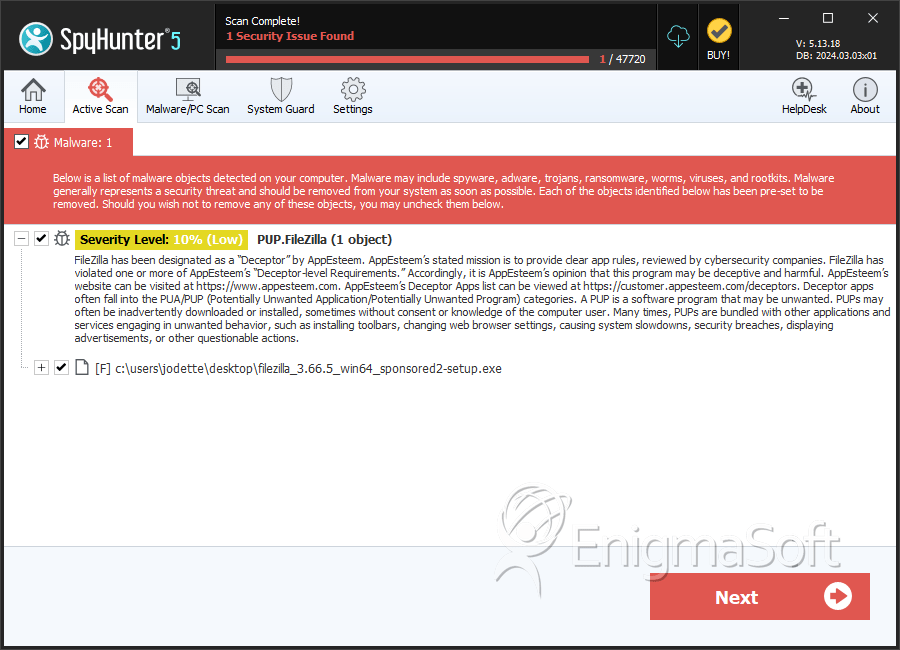
File System Details
| # | File Name | MD5 |
Detections
Detections: The number of confirmed and suspected cases of a particular threat detected on
infected computers as reported by SpyHunter.
|
|---|---|---|---|
| 1. | filezilla_3.66.5_win64_sponsored2-setup.exe | 861c54a22491b35880f4ec629cfd699f | 1,052 |


