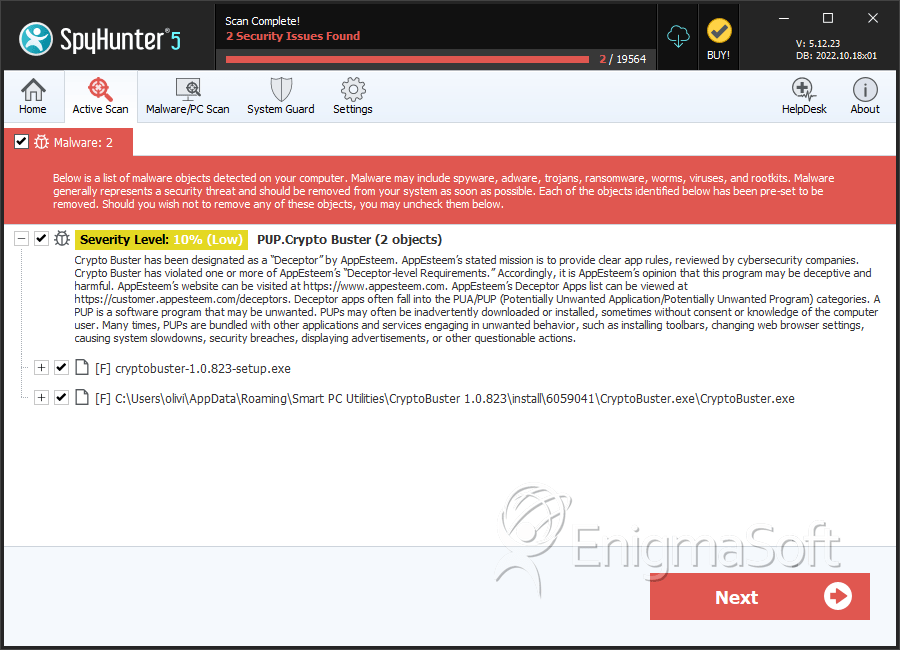
PUP.Crypto Buster
The detection of PUP.Crypto Buster on your system indicates the presence of a potentially unwanted program (PUP) that may be causing issues with your computer's performance and security. It is essential to understand the nature of this threat and take appropriate steps to remove it to prevent any potential harm.
Table of Contents
What Is PUP.Crypto Buster?
PUP.Crypto Buster is a type of malware that is categorized as a potentially unwanted program. This means that while it may not be as harmful as other types of malware, such as viruses or Trojans, it can still cause problems with your system and compromise your privacy. PUPs are often installed unintentionally by users, usually through software bundles or by clicking on suspicious links.
How PUP.Crypto Buster Operates
PUP.Crypto Buster, like other PUPs, operates by installing itself on your system and then performing various unwanted actions. These actions can include displaying advertisements, collecting your personal data, and modifying your system settings. In some cases, PUPs can also install additional malware or software on your system, which can further compromise your security.
It is worth noting that PUPs can be challenging to detect, as they often disguise themselves as legitimate programs or system files. However, by being aware of the symptoms of infection and taking steps to protect your system, you can reduce the risk of falling victim to PUP.Crypto Buster and other similar threats.
Symptoms of Infection
If your system is infected with PUP.Crypto Buster, you may notice various symptoms, including slow system performance, unwanted advertisements, and changes to your system settings. You may also notice that your browser is being redirected to suspicious websites or that your search results are being altered. Additionally, you may see unfamiliar programs or icons on your system, which can be a sign of a PUP infection.
- Unwanted advertisements or pop-ups
- Changes to your system settings or browser configuration
- Slow system performance or crashes
- Unfamiliar programs or icons on your system
- Redirected browser searches or altered search results
How to Remove PUP.Crypto Buster
- Boot your system in Safe Mode with Networking to prevent the PUP from loading and to allow you to download and install removal tools.
- Download and install a reputable anti-malware tool, such as SpyHunter, and perform a full scan of your system to detect and remove PUP.Crypto Buster and any other malware that may be present.
- Uninstall any suspicious programs or software that you do not recognize or that you did not intentionally install.
- Reset your browser settings to their default values, including Chrome, Firefox, and Edge, to remove any changes made by the PUP.
- Reboot your system and perform another scan with your anti-malware tool to ensure that PUP.Crypto Buster and any other malware have been completely removed.
Conclusion
Removing PUP.Crypto Buster from your system requires careful attention to detail and a thorough understanding of the steps involved. By following the guidance outlined above, you can help to ensure that your system is free from this and other similar threats. Remember to always be cautious when installing software or clicking on links, and to keep your anti-malware tools up to date to protect your system from the latest threats.
SpyHunter Detects & Remove PUP.Crypto Buster