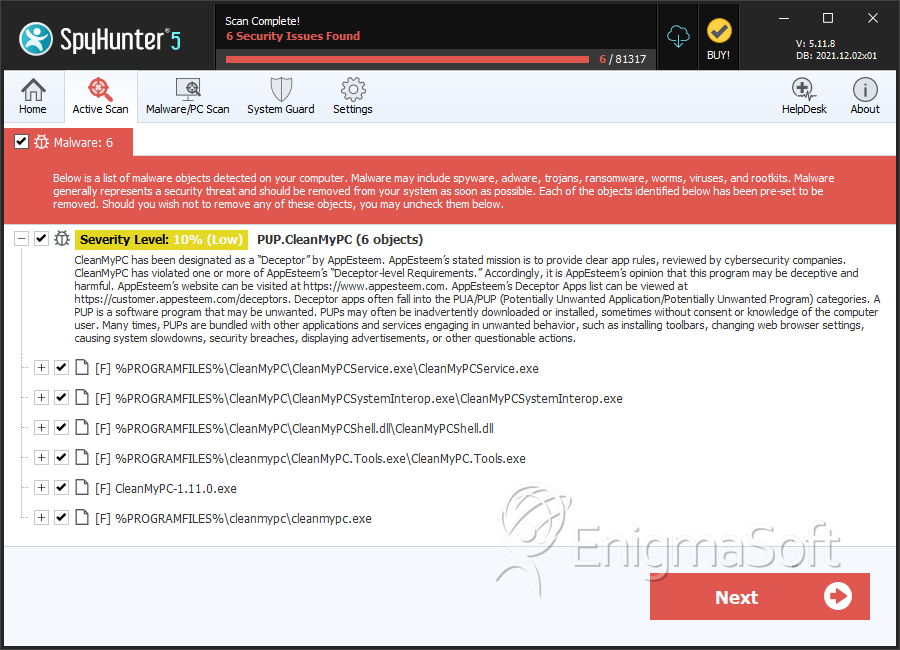
PUP.CleanMyPC
The detection of PUP.CleanMyPC on your system indicates the presence of a potentially unwanted program (PUP) that may be causing issues with your computer's performance and security. It's essential to understand the nature of this threat and take appropriate steps to remove it to prevent further problems.
Table of Contents
What Is PUP.CleanMyPC?
PUP.CleanMyPC is a type of malware that is classified as a potentially unwanted program. This means that while it may not be as harmful as other types of malware, such as viruses or Trojans, it can still cause significant disruptions to your system and potentially lead to more severe issues if left unchecked. PUPs are often installed unintentionally by users, usually as a result of downloading software from untrusted sources or clicking on suspicious links.
How PUP.CleanMyPC Operates
PUP.CleanMyPC, like other PUPs, operates by installing itself on your system and then proceeding to carry out a variety of unwanted actions. These can include displaying unwanted advertisements, collecting user data without consent, and modifying system settings to facilitate further malicious activity. PUPs can also act as a gateway for more severe malware, making it crucial to remove them as soon as they are detected.
Symptoms of Infection
Identifying a PUP.CleanMyPC infection can be challenging, as the symptoms may not always be overt. However, common indicators include an increase in unwanted pop-ups or advertisements, unexpected changes to your browser's homepage or search engine, and a general decline in system performance. If you've noticed any of these symptoms, it's possible that your system is infected with PUP.CleanMyPC or another type of malware.
- Unwanted advertisements or pop-ups
- Changes to browser settings
- Slow system performance
- Unexplained data usage or unexpected charges
How to Remove PUP.CleanMyPC
- Boot your computer in Safe Mode with Networking to prevent the malware from loading and to allow for internet access to download removal tools.
- Perform a full scan of your system using a reputable anti-malware tool, such as SpyHunter, to detect and remove all components of the PUP.
- Uninstall any suspicious programs that were installed around the time the symptoms began. Be cautious and only remove programs you are sure are not needed.
- Reset your web browsers (Chrome, Firefox, Edge, etc.) to their default settings to remove any changes made by the PUP.
- Reboot your computer and perform another scan with your anti-malware tool to ensure that all remnants of the PUP have been removed.
Conclusion
Removing PUP.CleanMyPC requires a combination of understanding the threat, identifying its symptoms, and taking deliberate steps to eradicate it from your system. By following the removal guide outlined above and maintaining good cybersecurity practices, such as regularly updating your software and being cautious with downloads and links, you can protect your system from PUPs and other types of malware. Remember, vigilance and proactive measures are key to ensuring the security and integrity of your computer and personal data.
SpyHunter Detects & Remove PUP.CleanMyPC