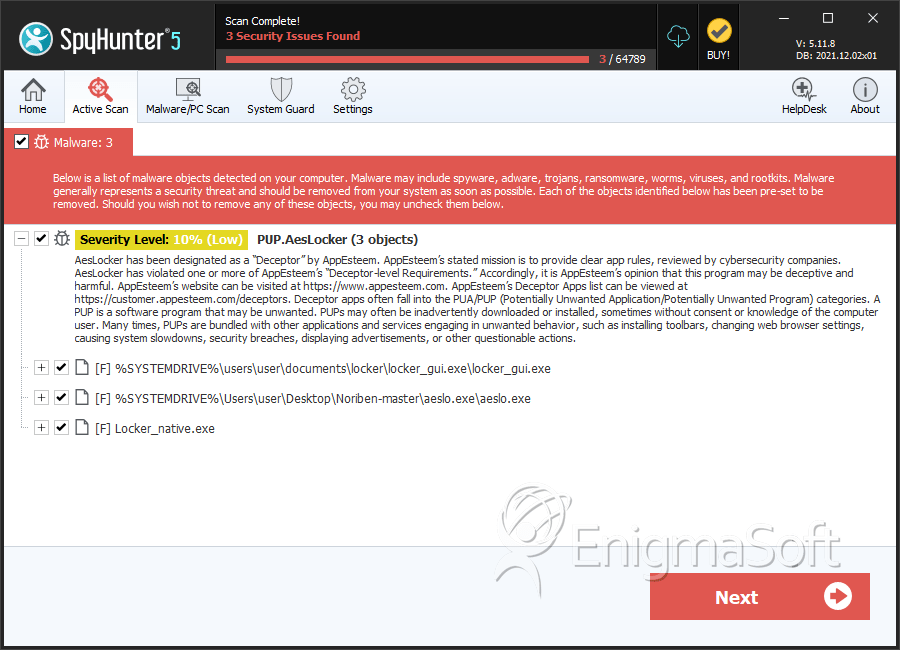
PUP.AesLocker
The detection of PUP.AesLocker on your system indicates the presence of a potentially unwanted program (PUP) that may compromise your computer's security and performance. It is essential to understand the nature of this threat and take immediate action to remove it to prevent further damage.
Table of Contents
What Is PUP.AesLocker?
PUP.AesLocker is a type of malware that is classified as a potentially unwanted program. This category of threats includes software that may not be malicious in nature but can still cause significant disruptions to your system's operation and privacy. PUPs often find their way onto computers through bundled installations, deceptive downloads, or exploits in software vulnerabilities. The "AesLocker" part of the name might suggest an association with encryption or locking mechanisms, but without specific details, it's crucial to approach this threat with a general understanding of PUPs and their potential impacts.
How PUP.AesLocker Operates
PUP.AesLocker, like many PUPs, may operate by installing itself on your computer without your full knowledge or consent. Once installed, it can begin to affect your system in various ways, potentially including altering browser settings, displaying unwanted advertisements, collecting personal data, or even installing additional unwanted software. The exact behavior can vary widely among different PUPs, but the common thread is their ability to compromise your system's integrity and your privacy.
Symptoms of Infection
Symptoms of a PUP.AesLocker infection can include, but are not limited to, an increase in unwanted pop-ups or advertisements, changes to your browser's homepage or search engine, slowdowns in your computer's performance, and the presence of unfamiliar programs or icons. In some cases, you might notice that your browser settings keep changing back to unwanted configurations despite your attempts to reset them. These symptoms can indicate the presence of a PUP and should prompt you to take action to secure your system.
How to Remove PUP.AesLocker
- Boot your computer in Safe Mode with Networking to prevent the malware from loading and to give you a clean environment to work in.
- Download and run a full scan with a reputable anti-malware tool, such as SpyHunter, to detect and remove all traces of PUP.AesLocker and any other malware that might be present.
- Uninstall any suspicious programs that you do not recognize or that were installed around the time your issues began. Be cautious and only remove programs you are certain are unwanted.
- Reset your web browsers (Chrome, Firefox, Edge, etc.) to their default settings to remove any changes made by the PUP. This can usually be done through the browser's settings or options menu.
- After completing the above steps, reboot your computer and run another scan with your anti-malware tool to ensure that all threats have been removed.
Conclusion
The removal of PUP.AesLocker requires careful and thorough action to ensure that all components of the malware are eliminated from your system. By following the steps outlined above and maintaining vigilance in the future, you can help protect your computer from similar threats. Regularly updating your software, being cautious with downloads, and using reputable security software can significantly reduce the risk of PUP infections. Remember, preventing PUPs and other malware from infecting your system in the first place is always preferable to removing them after an infection has occurred.
SpyHunter Detects & Remove PUP.AesLocker