PrivacyShield
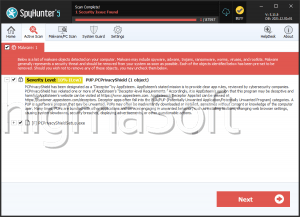
In today's digital landscape, safeguarding your device against intrusive and untrustworthy applications is more crucial than ever. Potentially Unwanted Programs (PUPs) may not always be outright unsafe, but they could introduce security risks, compromise user privacy and degrade system performance. One such application, PrivacyShield, has raised concerns among cybersecurity researchers due to its questionable distribution tactics and potential negative impact.
Table of Contents
PrivacyShield: A Dubious Privacy-Focused Browser
At first glance, PrivacyShield appears to be a web browser designed to enhance user privacy by blocking potential tracking attempts and limiting data exposure. However, despite these claims, cybersecurity experts have flagged it as an unwanted application due to its possible association with unreliable distribution channels.
When users obtain PrivacyShield from unofficial sources, they could inadvertently introduce security threats to their devices. Some installers may bundle the browser with adware, browser hijackers, or even more dangerous malware. These components may lead to intrusive advertisements, unauthorized browser modifications, and potential data collection practices that could put users' privacy at risk.
How PrivacyShield may Impact Your Device and Privacy
While PrivacyShield may not pose a direct security threat when downloaded from an official source, its presence on a device could lead to several concerning issues:
- System Performance Issues: PrivacyShield's installer notes that the application may utilize all system resources. This could result in excessive CPU usage, high memory consumption, increased power drain, and significant slowdowns affecting both the browser and other applications. In extreme cases, users may experience freezes, crashes, or system instability.
- Unwanted Data Collection: If installed through unverified sources, PrivacyShield could harvest sensitive user data, including browsing history, IP addresses, system details, and even login credentials. This data might then be sold to third parties or exploited for malicious purposes.
- Intrusive Advertisements and Redirects: Some versions of PrivacyShield may introduce aggressive advertising tactics, such as pop-ups, in-text ads, and banners. Additionally, users might be subjected to forced redirects to suspicious websites, increasing the risk of phishing attacks or exposure to other harmful content.
How PUPs Like PrivacyShield Get Installed: Deceptive Distribution Tactics
One of the most alarming aspects of PrivacyShield is how it may end up on users' devices without their full awareness. PUPs often rely on deceptive installation methods that exploit user inattention. Some of the most common tactics include:
- Software Bundling: PrivacyShield may be bundled with freeware or pirated software, tricking users into installing it alongside other applications. Many people overlook optional installations, especially when they rush through 'Express' or 'Recommended' setup modes instead of carefully reviewing 'Advanced' or 'Custom' installation options.
- Fake Software Updates and Downloaders: Fraudulent update prompts for browsers, Flash Player, or other commonly used software may push PrivacyShield onto a device. Additionally, P2P networks, third-party downloaders, and unofficial app stores frequently distribute applications bundled with unwanted programs.
- Misleading Advertisements and Push Notifications: PrivacyShield might be aggressively promoted through clickbait ads, deceptive pop-ups, or misleading website banners. Users who access these advertisements may inadvertently trigger automatic downloads or get redirected to questionable installation pages.
- Compromised or Unofficial Installers: Some users might download PrivacyShield from seemingly legitimate but unverified websites, exposing their devices to unwanted modifications. These unreliable installers could modify system settings, hijack browser preferences, or install additional PUPs in the background.
How to Stay Safe and Avoid Unwanted Applications
To minimize the risk of installing PrivacyShield or similar PUPs, follow these best practices:
- Download Only from Official Sources – Always obtain software from verified developers or legitimate app stores to reduce the risk of bundled PUPs.
- Use 'Custom' or 'Advanced' Installation Options – Carefully inspect installation prompts and deselect unwanted programs before proceeding.
- Avoid Clicking on Suspicious Advertisements or Pop-Ups – Be cautious of deceptive banners, misleading warnings, and fake software updates.
- Use Reliable Security Software – Keep an updated antivirus or anti-malware solution to detect and block unwanted applications.
- Regularly Review Installed Programs – Periodically check your installed applications and uninstall unfamiliar or suspicious software to maintain system integrity.
Conclusion: Is PrivacyShield Worth the Risk?
While PrivacyShield presents itself as a privacy-focused browser, the concerns surrounding its distribution methods should not be overlooked. If obtained from an untrustworthy source, it could expose users to security threats, intrusive advertisements, and unwanted system slowdowns.
To maintain a secure and efficient device, users should always be vigilant about what they install, carefully vet software sources, and stay aware of deceptive installation tactics used by PUPs. Cybersecurity awareness is key to keeping your system safe from intrusive and untrustworthy applications.