PaceItApp
Threat Scorecard
EnigmaSoft Threat Scorecard
EnigmaSoft Threat Scorecards are assessment reports for different malware threats which have been collected and analyzed by our research team. EnigmaSoft Threat Scorecards evaluate and rank threats using several metrics including real-world and potential risk factors, trends, frequency, prevalence, and persistence. EnigmaSoft Threat Scorecards are updated regularly based on our research data and metrics and are useful for a wide range of computer users, from end users seeking solutions to remove malware from their systems to security experts analyzing threats.
EnigmaSoft Threat Scorecards display a variety of useful information, including:
Popularity Rank: The ranking of a particular threat in EnigmaSoft’s Threat Database.
Severity Level: The determined severity level of an object, represented numerically, based on our risk modeling process and research, as explained in our Threat Assessment Criteria.
Infected Computers: The number of confirmed and suspected cases of a particular threat detected on infected computers as reported by SpyHunter.
See also Threat Assessment Criteria.
| Threat Level: | 20 % (Normal) |
| Infected Computers: | 4,173 |
| First Seen: | December 30, 2014 |
| Last Seen: | May 30, 2026 |
| OS(es) Affected: | Windows |
The PaceItApp application may promise you that it will optimize your Internet connection, but security experts warn that it is considered as a Potentially Unwanted Program (PUP) with adware functionality. The PaceItApp program may offer limited functionality, and its primary objective is to inject ads in your web browser and monetize your clicks in order to generate pay-per-click revenue for its developers. PaceItApp may install an add-on for your Mozilla Firefox, a Browser Helper Object for Internet Explorer and an extension for Google Chrome. The PaceItApp software can use its browser integration to display contextual and transitional ads as well as pop-up windows that can be related to searches you did on the web. Also, third parties connected to PaceItApp may use tracking cookies to determine what type of ads may attract your attention and are most likely to be clicked. PaceItApp can be downloaded from its official website, and it is most often installed as a drive-by installation of freeware. Many users may not welcome the activities of PaceItApp, and you can use the services of a reliable anti-spyware application to remove PUPs like PaceItApp and adware from your system.
Table of Contents
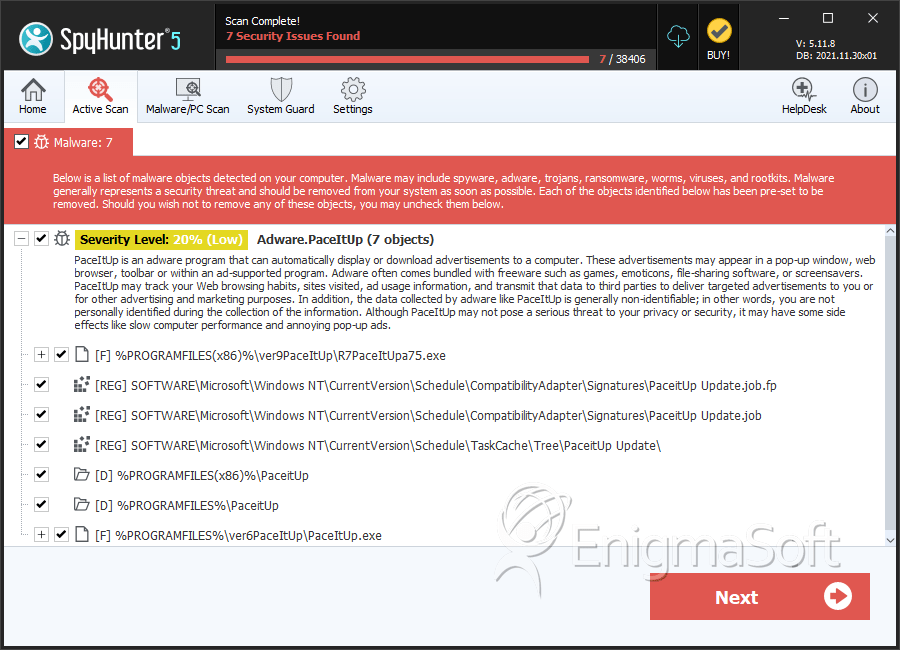
SpyHunter Detects & Remove PaceItApp
File System Details
| # | File Name | MD5 |
Detections
Detections: The number of confirmed and suspected cases of a particular threat detected on
infected computers as reported by SpyHunter.
|
|---|---|---|---|
| 1. | R7PaceItUpa75.exe | 4d96ce6c8eebe1872a05dfcd922d607a | 2,648 |
| 2. | PaceItUp.exe | b58a28174c130921ceab31d015c3eb3c | 1 |
Registry Details
Directories
PaceItApp may create the following directory or directories:
| %PROGRAMFILES%\PaceitUp |
| %PROGRAMFILES(x86)%\PaceitUp |