Desucrypt Ransomware
Threat Scorecard
EnigmaSoft Threat Scorecard
EnigmaSoft Threat Scorecards are assessment reports for different malware threats which have been collected and analyzed by our research team. EnigmaSoft Threat Scorecards evaluate and rank threats using several metrics including real-world and potential risk factors, trends, frequency, prevalence, and persistence. EnigmaSoft Threat Scorecards are updated regularly based on our research data and metrics and are useful for a wide range of computer users, from end users seeking solutions to remove malware from their systems to security experts analyzing threats.
EnigmaSoft Threat Scorecards display a variety of useful information, including:
Popularity Rank: The ranking of a particular threat in EnigmaSoft’s Threat Database.
Severity Level: The determined severity level of an object, represented numerically, based on our risk modeling process and research, as explained in our Threat Assessment Criteria.
Infected Computers: The number of confirmed and suspected cases of a particular threat detected on infected computers as reported by SpyHunter.
See also Threat Assessment Criteria.
| Threat Level: | 100 % (High) |
| Infected Computers: | 4 |
| First Seen: | January 24, 2018 |
| Last Seen: | April 18, 2018 |
| OS(es) Affected: | Windows |
The detection of Desucrypt Ransomware on your system indicates a serious security threat that requires immediate attention. Ransomware is a type of malware designed to encrypt and hold hostage the data on a victim's computer, demanding a ransom in exchange for the decryption key. In this report, we will provide an overview of the Desucrypt Ransomware, its operating methods, symptoms of infection, and steps to remove the malware from your system.
Table of Contents
What Is Desucrypt Ransomware?
Desucrypt Ransomware is a malicious software that uses encryption to lock down files on a compromised computer. The primary goal of this malware is to extort money from the victim by demanding a ransom in exchange for the decryption key. The name "Desucrypt" suggests that it is a type of ransomware, but its exact origins and relationships to other malware families are unclear. Ransomware like Desucrypt can spread through various means, including phishing emails, exploited vulnerabilities, and infected software downloads.
How Desucrypt Ransomware Operates
Once Desucrypt Ransomware infects a system, it typically begins scanning for files to encrypt. It may target common file types such as documents, images, and videos, using encryption algorithms to lock them down. The malware then displays a ransom note, demanding payment in cryptocurrency for the decryption key. The operators of the ransomware may use intimidation tactics, such as time limits for payment, to pressure the victim into complying with their demands. It is essential to understand that paying the ransom does not guarantee that the decryption key will be provided or that the files will be restored.
Symptoms of Infection
Symptoms of a Desucrypt Ransomware infection can include the inability to access files, the presence of ransom notes or messages, and unusual system behavior. Files may be renamed or have new extensions appended to them, indicating that they have been encrypted. In some cases, the malware may also attempt to spread to other systems on the network or via removable drives. It is crucial to act quickly upon noticing these symptoms to minimize the damage and prevent further encryption of files.
How to Remove Desucrypt Ransomware
- Boot your computer in Safe Mode with Networking to prevent the malware from loading and to allow for the installation of removal tools.
- Download and install a reputable anti-malware tool, such as SpyHunter, and perform a full scan of your system to detect and remove the malware.
- Uninstall any suspicious programs that may have been installed without your knowledge, as they could be related to the ransomware infection.
- Reset your web browsers, including Chrome, Firefox, and Edge, to their default settings to remove any malicious extensions or settings that the malware may have altered.
- Reboot your computer and perform another full scan with your anti-malware tool to ensure that all remnants of the malware have been removed.
Conclusion
Removing Desucrypt Ransomware requires careful and immediate action to prevent further damage. By following the steps outlined in this report, you can help ensure the removal of the malware and the recovery of your system. However, the decryption of files without the key provided by the attackers may be challenging and, in some cases, impossible. It is essential to maintain regular backups of important files and to employ preventive measures, such as keeping software up-to-date and being cautious with emails and downloads, to reduce the risk of future ransomware infections.
SpyHunter Detects & Remove Desucrypt Ransomware
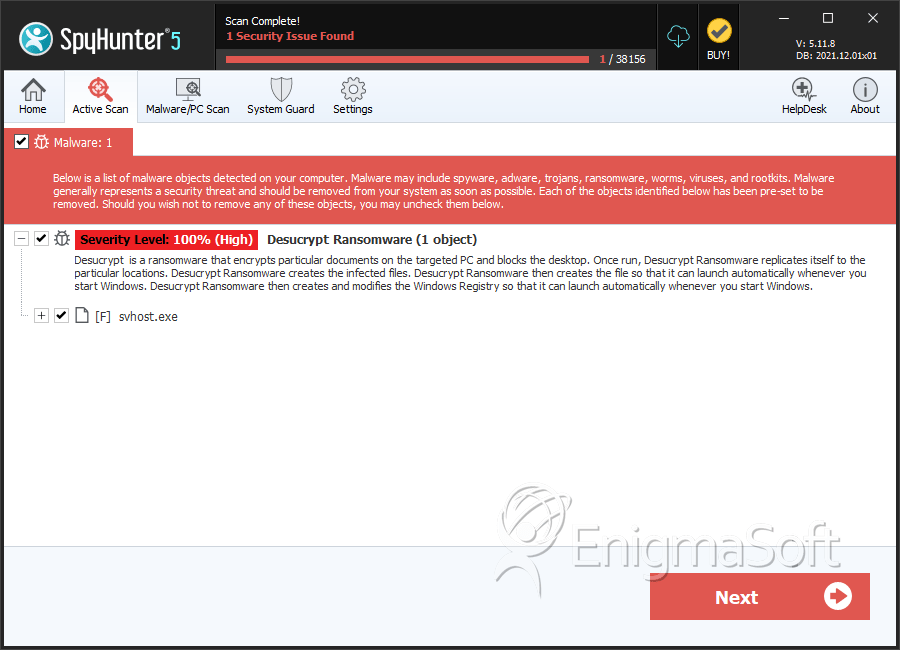
File System Details
| # | File Name | MD5 |
Detections
Detections: The number of confirmed and suspected cases of a particular threat detected on
infected computers as reported by SpyHunter.
|
|---|---|---|---|
| 1. | svhost.exe | c80ea6a8b0c010aed7248d0ae3d1c7ac | 0 |


