ArgusCryptor Ransomware
Threat Scorecard
EnigmaSoft Threat Scorecard
EnigmaSoft Threat Scorecards are assessment reports for different malware threats which have been collected and analyzed by our research team. EnigmaSoft Threat Scorecards evaluate and rank threats using several metrics including real-world and potential risk factors, trends, frequency, prevalence, and persistence. EnigmaSoft Threat Scorecards are updated regularly based on our research data and metrics and are useful for a wide range of computer users, from end users seeking solutions to remove malware from their systems to security experts analyzing threats.
EnigmaSoft Threat Scorecards display a variety of useful information, including:
Popularity Rank: The ranking of a particular threat in EnigmaSoft’s Threat Database.
Severity Level: The determined severity level of an object, represented numerically, based on our risk modeling process and research, as explained in our Threat Assessment Criteria.
Infected Computers: The number of confirmed and suspected cases of a particular threat detected on infected computers as reported by SpyHunter.
See also Threat Assessment Criteria.
| Threat Level: | 100 % (High) |
| Infected Computers: | 65 |
| First Seen: | November 22, 2018 |
| Last Seen: | December 4, 2018 |
| OS(es) Affected: | Windows |
The detection of ArgusCryptor Ransomware on your system indicates a serious security threat that requires immediate attention. Ransomware is a type of malicious software that encrypts your files and demands payment in exchange for the decryption key. It is essential to understand the nature of this threat and take prompt action to remove it and prevent further damage.
Table of Contents
What Is ArgusCryptor Ransomware?
ArgusCryptor Ransomware is a type of malware that uses encryption to lock your files and extort money from you. The goal of the attackers is to deny you access to your data unless you pay the ransom. However, paying the ransom does not guarantee that you will receive the decryption key or that your files will be restored. It is crucial to note that ransomware can spread through various means, including phishing emails, infected software downloads, and exploited vulnerabilities.
How ArgusCryptor Ransomware Operates
ArgusCryptor Ransomware typically operates by scanning your system for files to encrypt. Once the files are encrypted, the malware displays a ransom note demanding payment in exchange for the decryption key. The ransom note may contain instructions on how to pay the ransom and may also include a deadline for payment. The attackers may use various tactics to intimidate you into paying the ransom, including threatening to delete your files or increase the ransom amount.
The encryption process used by ArgusCryptor Ransomware can be complex, making it challenging to recover your files without the decryption key. The malware may also use anti-detection techniques to evade security software and remain hidden on your system. It is essential to be cautious when dealing with ransomware, as it can cause significant damage to your system and data.
Symptoms of Infection
The symptoms of ArgusCryptor Ransomware infection may include locked files, ransom notes, and decreased system performance. You may notice that your files are no longer accessible, and you may receive alerts or messages demanding payment. Your system may also become slower, and you may experience errors or crashes. It is crucial to recognize these symptoms early to minimize the damage caused by the malware.
- Locked files and folders
- Ransom notes or demands
- Decreased system performance
- Error messages or system crashes
How to Remove ArgusCryptor Ransomware
- Boot your system in Safe Mode with Networking to prevent the malware from loading and to allow you to download and install removal tools.
- Perform a full scan of your system using a reputable anti-malware tool, such as SpyHunter, to detect and remove the malware.
- Uninstall any suspicious programs or applications that may be related to the malware.
- Reset your web browsers, including Chrome, Firefox, and Edge, to remove any malicious extensions or settings.
- Reboot your system and perform another full scan to ensure that the malware has been completely removed.
Conclusion
Removing ArgusCryptor Ransomware requires careful attention to detail and a thorough understanding of the malware's operation. It is essential to act quickly to prevent further damage and to minimize the risk of data loss. By following the steps outlined above and using reputable removal tools, you can increase your chances of successfully removing the malware and restoring your system to a safe and secure state. Remember to always prioritize caution when dealing with ransomware and to never pay the ransom unless you have exhausted all other options.
SpyHunter Detects & Remove ArgusCryptor Ransomware
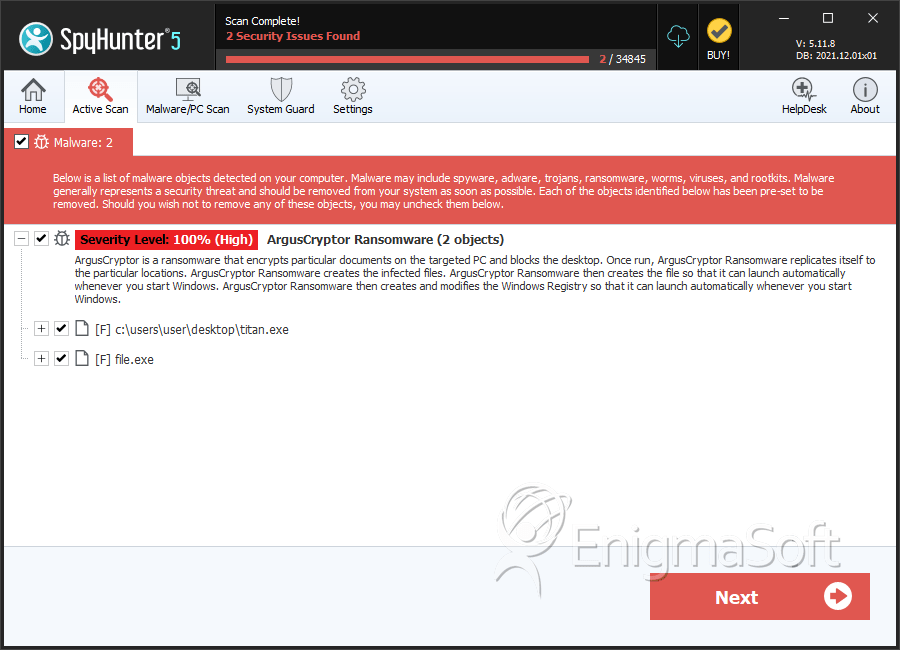
File System Details
| # | File Name | MD5 |
Detections
Detections: The number of confirmed and suspected cases of a particular threat detected on
infected computers as reported by SpyHunter.
|
|---|---|---|---|
| 1. | titan.exe | ebd2adf58da2083688f8c4b8d43396b8 | 1 |
| 2. | file.exe | 668983cf8223a398f4b8a1a4d7cddb7a | 0 |


