Adware.Search Enhancement Tool
Threat Scorecard
EnigmaSoft Threat Scorecard
EnigmaSoft Threat Scorecards are assessment reports for different malware threats which have been collected and analyzed by our research team. EnigmaSoft Threat Scorecards evaluate and rank threats using several metrics including real-world and potential risk factors, trends, frequency, prevalence, and persistence. EnigmaSoft Threat Scorecards are updated regularly based on our research data and metrics and are useful for a wide range of computer users, from end users seeking solutions to remove malware from their systems to security experts analyzing threats.
EnigmaSoft Threat Scorecards display a variety of useful information, including:
Popularity Rank: The ranking of a particular threat in EnigmaSoft’s Threat Database.
Severity Level: The determined severity level of an object, represented numerically, based on our risk modeling process and research, as explained in our Threat Assessment Criteria.
Infected Computers: The number of confirmed and suspected cases of a particular threat detected on infected computers as reported by SpyHunter.
See also Threat Assessment Criteria.
| Threat Level: | 20 % (Normal) |
| Infected Computers: | 3,716 |
| First Seen: | October 27, 2014 |
| Last Seen: | June 6, 2022 |
| OS(es) Affected: | Windows |
The detection of Adware.Search Enhancement Tool on your system indicates the presence of unwanted software that could be compromising your browsing experience and potentially exposing you to more severe security threats. Adware, short for advertising-supported software, is designed to display unwanted advertisements on your computer, often in the form of pop-ups, banners, or sponsored content within websites. Understanding what Adware.Search Enhancement Tool is and how it operates is crucial for effective removal and prevention of future infections.
Table of Contents
What Is Adware.Search Enhancement Tool?
Adware.Search Enhancement Tool is a type of adware that, as suggested by its name, may claim to enhance your search experience but actually serves to inundate your browser with advertisements. This software might promise useful features or tools but primarily exists to generate revenue for its developers through advertisement views and clicks. It can be installed on your system through various means, including bundled software downloads, deceptive advertisements, or exploited vulnerabilities.
How Adware.Search Enhancement Tool Operates
Once installed, Adware.Search Enhancement Tool can significantly alter your browsing experience. It may change your default search engine, homepage, or new tab page to ones that display advertisements or sponsored content. This adware can also track your browsing habits, collecting data on the websites you visit and the searches you perform, which can then be used to tailor advertisements to your interests. This tracking capability raises significant privacy concerns, as your personal browsing data could be shared with third parties or used for malicious purposes.
Symptoms of Infection
Identifying an Adware.Search Enhancement Tool infection can be straightforward if you know what to look for. Common symptoms include an unexpected increase in advertisements while browsing, changes to your browser's settings without your consent, and slower browser performance due to the additional load of adware processes. You might also notice that your search results are being redirected to unfamiliar websites or that your computer is displaying pop-up advertisements even when you're not browsing the internet.
How to Remove Adware.Search Enhancement Tool
- Enter Safe Mode with Networking to prevent the adware from interfering with the removal process. This mode allows your computer to start with minimal drivers and services, making it easier to remove malicious software.
- Perform a full scan of your system using a reputable anti-malware tool, such as SpyHunter. Ensure the tool is updated to the latest version to maximize its effectiveness against the latest threats.
- Uninstall suspicious programs from your computer. Go through the list of installed programs and remove any that you don't recognize or that were installed around the time your issues began.
- Reset your browsers (Google Chrome, Mozilla Firefox, Microsoft Edge, etc.) to their default settings. This step will remove any changes made by the adware, such as altered homepages or search engines.
- Finally, reboot your computer and perform another scan to ensure that all components of the adware have been removed. This step is crucial for verifying that your system is clean and that no remnants of the adware remain.
Conclusion
Removing Adware.Search Enhancement Tool requires a combination of understanding its operation, identifying its symptoms, and taking systematic steps to eradicate it from your system. By following the removal guide outlined above and maintaining vigilance against future infections, you can restore your browsing experience to a safe and ad-free state. Regularly updating your software, avoiding suspicious downloads, and using reputable security tools are key practices in preventing adware and other types of malware from infecting your computer. Stay informed and proactive in protecting your digital environment.
SpyHunter Detects & Remove Adware.Search Enhancement Tool
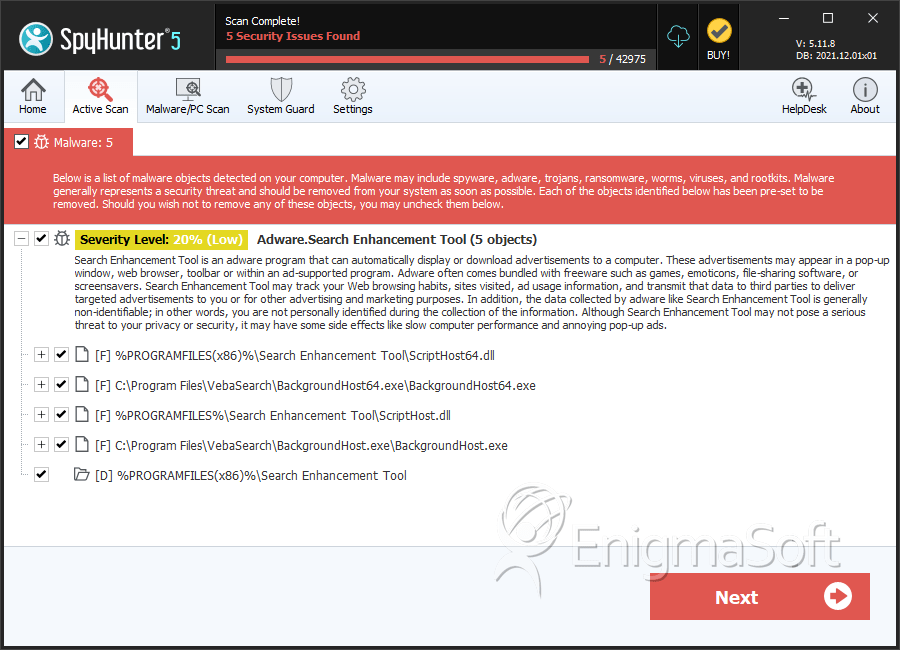
File System Details
| # | File Name | MD5 |
Detections
Detections: The number of confirmed and suspected cases of a particular threat detected on
infected computers as reported by SpyHunter.
|
|---|---|---|---|
| 1. | ScriptHost.dll | 567fb7ccd1a290c5261178d038212c02 | 1,041 |
| 2. | ScriptHost64.dll | f5cbc4de661690ba6f370996ff79b9f7 | 497 |
| 3. | BackgroundHost64.exe | b373b251ea6b928472dfa997df28cf4c | 230 |
| 4. | BackgroundHost.exe | 0b4fea335c3c82a211c1e476ffd49e3f | 121 |
Directories
Adware.Search Enhancement Tool may create the following directory or directories:
| %PROGRAMFILES(x86)%\Search Enhancement Tool |


