Win 7 Security 2013
Threat Scorecard
EnigmaSoft Threat Scorecard
EnigmaSoft Threat Scorecards are assessment reports for different malware threats which have been collected and analyzed by our research team. EnigmaSoft Threat Scorecards evaluate and rank threats using several metrics including real-world and potential risk factors, trends, frequency, prevalence, and persistence. EnigmaSoft Threat Scorecards are updated regularly based on our research data and metrics and are useful for a wide range of computer users, from end users seeking solutions to remove malware from their systems to security experts analyzing threats.
EnigmaSoft Threat Scorecards display a variety of useful information, including:
Ranking: The ranking of a particular threat in EnigmaSoft’s Threat Database.
Severity Level: The determined severity level of an object, represented numerically, based on our risk modeling process and research, as explained in our Threat Assessment Criteria.
Infected Computers: The number of confirmed and suspected cases of a particular threat detected on infected computers as reported by SpyHunter.
See also Threat Assessment Criteria.
| Ranking: | 9,804 |
| Threat Level: | 20 % (Normal) |
| Infected Computers: | 1,678 |
| First Seen: | October 15, 2012 |
| Last Seen: | September 14, 2023 |
| OS(es) Affected: | Windows |
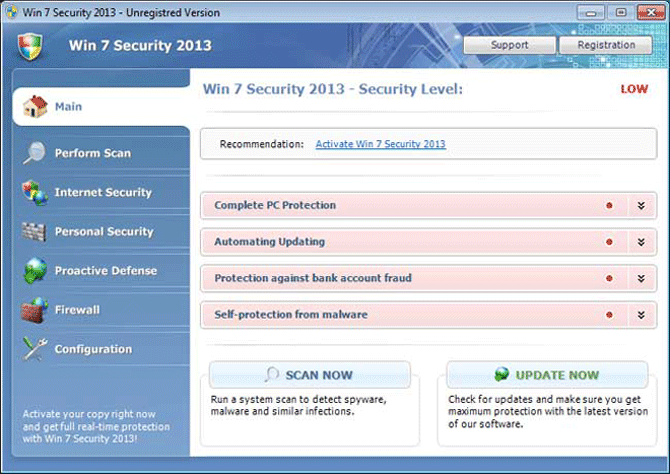
Win 7 Security 2013 Image
Win 7 Security 2013 is a rogue anti-spyware tool that uses misleading techniques to dupe unsuspecting computer users into thinking their PCs are contaminated with various security threats. Then, Win 7 Security 2013 encourages victims to buy the so-called full version to remove detected malware infections and fix other PC problems. At first glance, Win 7 Security 2013 may seem to be a genuine security program but, in reality, it's a counterfeit and worthless security application, which aims at pilfering money from victims. Win 7 Security 2013 uses Trojans to distribute itself to vulnerable machines. While being installed, Win 7 Security 2013 will run automatically every time you start your PC. Win 7 Security 2013 will perform automated bogus computer scans and creates fake malware results to scare victims into believing their computers are infected with numerous malware infections.
Win 7 Security 2013, a member of the FakeRean family has among its numerous clones Antivirus 2008, Windows Antivirus 2008, Vista Antivirus 2008, Antivirus Pro 2009, AntiSpy Safeguard, ThinkPoint, Spyware Protection 2010, Internet Antivirus 2011, Palladium Pro, XP Anti-Virus 2011, CleanThis, PC Clean Pro, XP Home Security 2012, Windows Clear Problems, XP Security 2012, Antivirus PRO 2015.
Win 7 Security 2013 will show falsified security warning messages that also announce PC users about imaginary computer problems. You should not rely on and buy Win 7 Security 2013 because it's an online scam. ESG's malware analysts highly recommend you to remove Win 7 Security 2013 from the corrupted PC with a legitimate anti-malware program.
Table of Contents
File System Details
| # | File Name |
Detections
Detections: The number of confirmed and suspected cases of a particular threat detected on
infected computers as reported by SpyHunter.
|
|---|---|---|
| 1. | %CommonAppData%\[RANDOM CHARACTERS].exe | |
| 2. | %Temp%\[RANDOM CHARACTERS].exe | |
| 3. | %LocalAppData%\[RANDOM CHARACTERS].exe | |
| 4. | %AppData%\Roaming\Microsoft\Windows\Templates\[RANDOM CHARACTERS].exe |
Registry Details
URLs
Win 7 Security 2013 may call the following URLs:
| cobwebcircle.site |



