Antivirus Pro 2009
Threat Scorecard
EnigmaSoft Threat Scorecard
EnigmaSoft Threat Scorecards are assessment reports for different malware threats which have been collected and analyzed by our research team. EnigmaSoft Threat Scorecards evaluate and rank threats using several metrics including real-world and potential risk factors, trends, frequency, prevalence, and persistence. EnigmaSoft Threat Scorecards are updated regularly based on our research data and metrics and are useful for a wide range of computer users, from end users seeking solutions to remove malware from their systems to security experts analyzing threats.
EnigmaSoft Threat Scorecards display a variety of useful information, including:
Ranking: The ranking of a particular threat in EnigmaSoft’s Threat Database.
Severity Level: The determined severity level of an object, represented numerically, based on our risk modeling process and research, as explained in our Threat Assessment Criteria.
Infected Computers: The number of confirmed and suspected cases of a particular threat detected on infected computers as reported by SpyHunter.
See also Threat Assessment Criteria.
| Threat Level: | 100 % (High) |
| Infected Computers: | 36 |
| First Seen: | July 24, 2009 |
| Last Seen: | October 24, 2022 |
| OS(es) Affected: | Windows |
Antivirus Pro 2009, a clone of AntiSpywareXP 2009 and XP AntiSpyware 2009, is a rogue anti-spyware application and part of the Antivirus XP family. Antivirus Pro 2009 is often installed by the Braviax or Zlob Trojan that generates pop up ads displaying false security warnings in order to trick computer users into purchasing their bogus software.
Antivirus Pro 2009's pop up ads may read:
"Trojan detected!
A piece of malicious code was found on your system which can
replicate itself if no action is taken. Click here to have your
system cleaned by Antivirus Pro 2009."
Once the user is infected, Antivirus Pro 2009 may also upload additional rogue registry cleaners or system optimizers and privacy guards.
In addition, Antivirus Pro 2009 is known to create fake malware files to later detect them as malicious. These supposed infections will not be removed unless the user purchases Antivirus Pro 2009's full version of the program. Antivirus Pro 2009 may also cause the user's system to disorder and erase data. Antivirus Pro 2009 will use all means necessary to make the user believe he/she needs to buy this rogue software.
Moreover, Antivirus Pro 2009 may configure itself to launch on every Windows startup. Once it's running, Antivirus Pro 2009 may also hijack the user's Internet Explorer. While the user is surfing the web, he/she will receive a screen stating that there has been insecure Internet activity and that the user is at risk of being attacked by a virus. The user may choose between being redirected to the website unprotected or getting the protection. Whatever the user chooses, he/she will be redirected to a malicious website that sells Antivirus Pro 2009 as a legitimate software.
Don't be tricked by Antivirus Pro 2009's fraudulent tactics and remove the Antivirus Pro 2009 infection right away.
Table of Contents
Aliases
15 security vendors flagged this file as malicious.
| Anti-Virus Software | Detection |
|---|---|
| TrendMicro | TROJ_FAKEAV.ACJ |
| Symantec | Trojan.Fakeavalert |
| Sophos | Troj/FakeVir-HR |
| Panda | Generic Trojan |
| K7AntiVirus | Trojan-PSW.Win32.OnLineGames |
| Ikarus | Trojan-Downloader.Win32.FakeRean |
| Fortinet | Spy/Dloader |
| F-Secure | Trojan-GameThief.Win32.OnLineGames.tuun |
| DrWeb | Trojan.Proxy.4002 |
| ClamAV | Trojan.Spy-58472 |
| CAT-QuickHeal | TrojanGameThief.OnLineGames.t |
| BitDefender | Trojan.Agent.ALHH |
| AVG | Downloader.Generic8.EOS |
| Avast | Win32:Lighty-G |
| Antiy-AVL | Trojan/Win32.OnLineGames |
SpyHunter Detects & Remove Antivirus Pro 2009
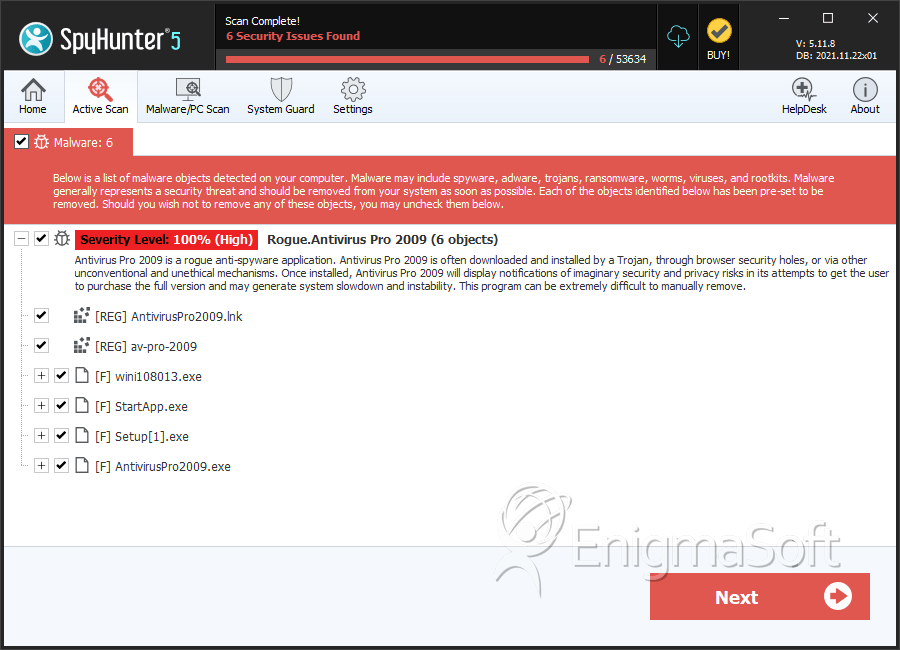
File System Details
| # | File Name | MD5 |
Detections
Detections: The number of confirmed and suspected cases of a particular threat detected on
infected computers as reported by SpyHunter.
|
|---|---|---|---|
| 1. | Antivirus2009ProModule.exe | 76ad9ea2a9a402a9657697d72fc729e6 | 13 |
| 2. | AntivirusPro2009.exe | 7a240b4b947fa684d0b0704ea49d5134 | 1 |
| 3. | wini108013.exe | 1f8cb8e814f65c33264d0958bc16c4b7 | 0 |
| 4. | StartApp.exe | c816d413c0deb8c1f7531c9d21bec605 | 0 |
| 5. | Setup[1].exe | b422311dbdda30b9ad80ac2304e5be57 | 0 |
| 6. | AntivirusPro2009.exe | 3e2f4902ee7b55cd7f9d184f259f4a05 | 0 |
| 7. | AntivirusPro2009.exe | 1e8701a732cfb621bd0737aac3042a94 | 0 |
| 8. | AntivirusPro2009.exe | 5b202510c19d8d783fed43d7642d1af6 | 0 |
| 9. | AntivirusPro2009.exe | 8b81b491843d0c0b680cd4755f5491e5 | 0 |
| 10. | AntivirusPro2009.exe | 69be94fcd3c48e08d8273751e86cf5fd | 0 |
| 11. | AntivirusPro2009.exe | e69ae4bc1266f93a587c5ef6a24f9ddf | 0 |
| 12. | AntivirusPro2009.exe | 2abd315a08145e212b48f8224102db94 | 0 |



