XP Home Security 2012
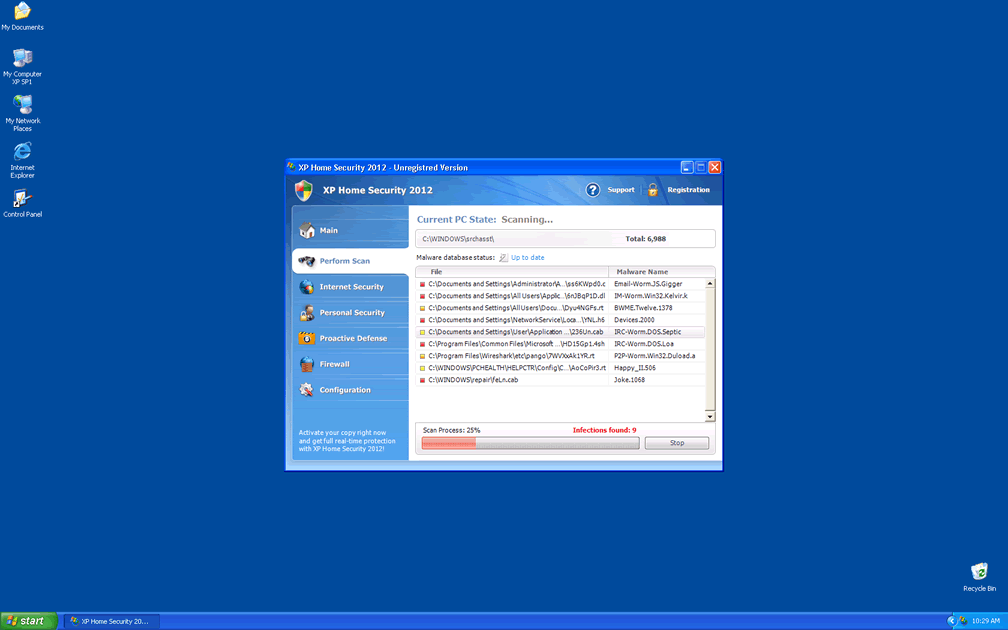
XP Home Security 2012 Image
In early 2011, a malicious file caught the attention of computer security experts worldwide. This file, created in the Russian Federation, is the Ppn.exe file process. This file is a master of disguise, changing its name and appearance to match the operating system it is infecting. XP Home Security 2012 is one of the dozens of masks that this Ppn.exe file can wear to disguise itself. This clever feature makes this rogue anti-spyware program very difficult for security experts.
Table of Contents
The Many Faces of XP Home Security 2012
Like a chameleon, Ppn.exe changes skins constantly. However, all the time it remains the same file process. In some computers, it has also shown up under the name Kdn.exe, which is essentially the same file. To help hide its presence, this program has been known to create additional processes in the Task Manager. All of them with names comprised of three random letters. While it is installing, it will check for the computer user's operating system. Then it will choose from three possible sets of names and skins, one for each of the most common operating systems. These are Windows XP, Windows Vista, and Windows 7. XP Home Security 2012 would be downloaded from the Windows XP set. It has a name and layout that match with what a genuine Windows XP security application would look like. If this program came from the Windows Vista set or the Windows 7 set, it would then be named Vista Home Security 2012 or Win 7 Home Security 2012 respectively. In rare cases, the program can become confused and download a skin from the wrong set. In those cases, in a system running Windows Vista or Windows 7, one would get an XP Home Security 2012 infection.
The XP Home Security 2012 Scam
One of the first actions XP Home Security 2012 will take is altering the registry so that XP Home Security 2012 starts up along with Windows. The next time the computer user starts up the PC, he/her)will be greeted with the XP Home Security 2012 splash screen. This annoying window will prevent access to other parts of the user's computer, claiming XP Home Security 2012 has found security problems. XP Home Security 2012 will show the computer user a genuine-looking system scan. Don't fall for XP Home Security 2012's charm, because all the information in that scan is false. Then, to fix the false security problems XP Home Security 2012 found, it will ask the computer user to enter his/her credit card information. XP Home Security 2012 is made up of Trojans and harmful scripts. This program has no real security capabilities. Because of this, giving XP Home Security 2012 your credit card information does nothing. If you've been tricked by this scam and have already entered your credit card information, call your credit card company to block the charges.
As a rogue security program from the FakeRean family, XP Home Security 2012 has uncountable clones. Among its clones are Antivirus 2008, Windows Antivirus 2008, Vista Antivirus 2008, Antivirus Pro 2009, AntiSpy Safeguard, ThinkPoint, Spyware Protection 2010, Internet Antivirus 2011, Palladium Pro, XP Anti-Virus 2011, CleanThis, PC Clean Pro, Windows Clear Problems, XP Security 2012, Antivirus PRO 2015.
Three Easy Steps to Prevent Being Infected by XP Home Security 2012
- Use a reliable anti-virus and or anti-spyware utility.
- Avoid visiting high-risk websites or clicking on unknown links or banner advertisements.
- Don't download unknown files or email attachments.
XP Home Security 2012 Video
Tip: Turn your sound ON and watch the video in Full Screen mode.
File System Details
| # | File Name |
Detections
Detections: The number of confirmed and suspected cases of a particular threat detected on
infected computers as reported by SpyHunter.
|
|---|---|---|
| 1. | %LocalAppData%\kdn.exe | |
| 2. | %Documents and Settings%\[UserName]\Local Settings\Application Data\[RANDOM CHARACTERS].exe | |
| 3. | %Documents and Settings%\All Users\Application Data\[RANDOM CHARACTERS] | |
| 4. | %Temp%\u3f7pnvfncsjk2e86abfbj5h | |
| 5. | %Documents and Settings%\[UserName]\Local Settings\Temp\[RANDOM CHARACTERS] | |
| 6. | %AllUsersProfile%\Application Data\u3f7pnvfncsjk2e86abfbj5h | |
| 7. | %LocalAppData%\u3f7pnvfncsjk2e86abfbj5h | |
| 8. | %Documents and Settings%\[UserName]\Templates\[RANDOM CHARACTERS] | |
| 9. | %Documents and Settings%\[UserName]\Local Settings\Application Data\[RANDOM CHARACTERS] | |
| 10. | %UserProfile%\Templates\u3f7pnvfncsjk2e86abfbj5h |



