Win 7 Antivirus Plus 2013
Threat Scorecard
EnigmaSoft Threat Scorecard
EnigmaSoft Threat Scorecards are assessment reports for different malware threats which have been collected and analyzed by our research team. EnigmaSoft Threat Scorecards evaluate and rank threats using several metrics including real-world and potential risk factors, trends, frequency, prevalence, and persistence. EnigmaSoft Threat Scorecards are updated regularly based on our research data and metrics and are useful for a wide range of computer users, from end users seeking solutions to remove malware from their systems to security experts analyzing threats.
EnigmaSoft Threat Scorecards display a variety of useful information, including:
Ranking: The ranking of a particular threat in EnigmaSoft’s Threat Database.
Severity Level: The determined severity level of an object, represented numerically, based on our risk modeling process and research, as explained in our Threat Assessment Criteria.
Infected Computers: The number of confirmed and suspected cases of a particular threat detected on infected computers as reported by SpyHunter.
See also Threat Assessment Criteria.
| Ranking: | 5,032 |
| Threat Level: | 20 % (Normal) |
| Infected Computers: | 3,554 |
| First Seen: | December 5, 2012 |
| Last Seen: | September 20, 2023 |
| OS(es) Affected: | Windows |
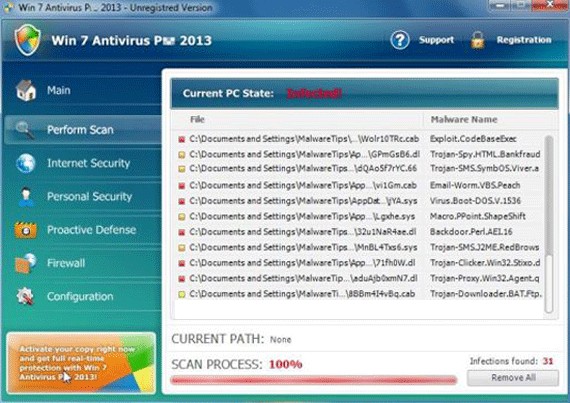
Win 7 Antivirus Plus 2013 Image
Win 7 Antivirus Plus 2013 is part of the notorious family named FakeRean which is also referred to as Braviax. Win 7 Antivirus Plus 2013 and its clones target inexperienced computer users in order to make them victims of a well known online strategy. This strategy consists in convincing the victim to purchase expensive upgrades for a fake security program. To do this, Win 7 Antivirus Plus 2013 spams the victim with constant error messages and alarming, fake system scans indicating that the infected computer is severely infected. Since Win 7 Antivirus Plus 2013 is actually part of a threat attack itself, PC security researchers strongly advise computer users to ignore all instructions from Win 7 Antivirus Plus 2013. Instead, a real anti-malware tool should be used to remove the Win 7 Antivirus Plus 2013 infection from the infected computer.
Table of Contents
Why Win 7 Antivirus Plus 2013 Intrudes into Your Computer
Security researchers have uncovered dozens of clones of Win 7 Antivirus Plus 2013. It is not difficult to recognize these fake security programs because they use similar patterns for their attack. In fact, since their names are very likely generated automatically, it is possible to recognize Win 7 Antivirus Plus 2013 and its clones from their name alone. These fake security programs' names may have three parts:
- Win 7 Antivirus Plus 2013's name begins with a term that corresponds to the victim's operating system. While in this case, the term is 'Win 7', indicates that Win 7 Antivirus Plus 2013 is installed on computers running Windows 7, it may also be 'XP', 'Vista' or Win 8, corresponding to Windows XP, Windows Vista, and Windows 8. When Win 7 Antivirus Plus 2013 is being installed, the Trojan responsible for installing this fake security program detects the victim's operating system and ensures that the variant of this fake security program corresponds to the targeted computer's operating system.
- The operating system variant is followed with a generic term that disguises these fake security programs as security applications. There are dozens of variants with broad terms such as 'security', 'total security', 'anti-spyware', or 'antivirus plus' in this case.
- Finally, the year of release is added to the end of each program's name. Win 7 Antivirus Plus 2013 is part of a large batch of threats that pretend to be the '2013' version of established anti-virus families.
Some examples of the various names that Win 7 Antivirus Plus 2013 clones may have are Antivirus 2008, Windows Antivirus 2008, Vista Antivirus 2008, Antivirus Pro 2009, AntiSpy Safeguard, ThinkPoint, Spyware Protection 2010, Internet Antivirus 2011, Palladium Pro, XP Anti-Virus 2011, CleanThis, PC Clean Pro, XP Home Security 2012, Windows Clear Problems, XP Security 2012, Antivirus PRO 2015.
File System Details
| # | File Name |
Detections
Detections: The number of confirmed and suspected cases of a particular threat detected on
infected computers as reported by SpyHunter.
|
|---|---|---|
| 1. | %UserProfile%\Start Menu\Programs\Win 7 Antivirus Plus 2013\Win 7 Antivirus Plus 2013.lnk | |
| 2. | %UserProfile%\Desktop\Win 7 Antivirus Plus 2013.lnk |
Registry Details
URLs
Win 7 Antivirus Plus 2013 may call the following URLs:
| desktopdefendersurveys.com |



