Vista Antivirus Plus 2013
Threat Scorecard
EnigmaSoft Threat Scorecard
EnigmaSoft Threat Scorecards are assessment reports for different malware threats which have been collected and analyzed by our research team. EnigmaSoft Threat Scorecards evaluate and rank threats using several metrics including real-world and potential risk factors, trends, frequency, prevalence, and persistence. EnigmaSoft Threat Scorecards are updated regularly based on our research data and metrics and are useful for a wide range of computer users, from end users seeking solutions to remove malware from their systems to security experts analyzing threats.
EnigmaSoft Threat Scorecards display a variety of useful information, including:
Ranking: The ranking of a particular threat in EnigmaSoft’s Threat Database.
Severity Level: The determined severity level of an object, represented numerically, based on our risk modeling process and research, as explained in our Threat Assessment Criteria.
Infected Computers: The number of confirmed and suspected cases of a particular threat detected on infected computers as reported by SpyHunter.
See also Threat Assessment Criteria.
| Threat Level: | 20 % (Normal) |
| Infected Computers: | 4 |
| First Seen: | December 5, 2012 |
| Last Seen: | March 12, 2022 |
| OS(es) Affected: | Windows |
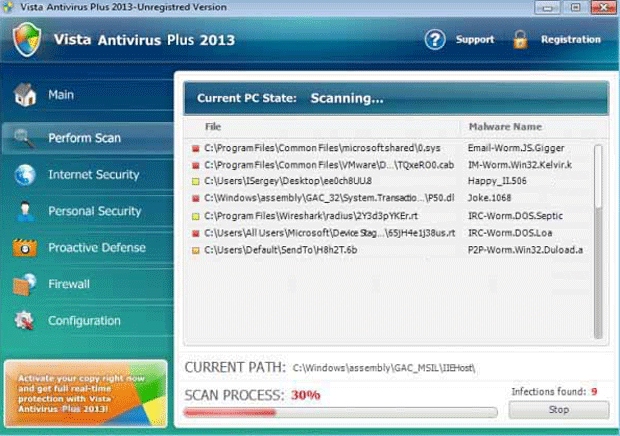
Vista Antivirus Plus 2013 Image
Vista Antivirus Plus 2013 is another one among numerous rogue security applications that belong to the FakeRean or Braviax family of rogue security applications. This notorious family carries out a misleading tactic that criminals use to take advantage of inexperienced computer users. Basically, Vista Antivirus Plus 2013 and its clones pretend to be real security programs in order to prove to PC users that the purchase of an expensive, fake upgrade in order to keep their computers safe from threats. To do this, Vista Antivirus Plus 2013 displays numerous alarming error messages and deliberately causes performance problems on the infected computer. However, since Vista Antivirus Plus 2013 and its clones are actually threats themselves, PC security researchers strongly advise disregarding all messages displayed by these fake security programs and then using a real anti-malware tool to protect your computer.
Table of Contents
Identifying Vista Antivirus Plus 2013 and Its Clones
There are dozens of clones of Vista Antivirus Plus 2013 that use similar names or even different names such as Antivirus 2008, Windows Antivirus 2008, Vista Antivirus 2008, Antivirus Pro 2009, AntiSpy Safeguard, ThinkPoint, Spyware Protection 2010, Internet Antivirus 2011, Palladium Pro, XP Anti-Virus 2011, CleanThis, PC Clean Pro, XP Home Security 2012, Windows Clear Problems, XP Security 2012, Antivirus PRO 2015.
Because of these characteristic naming patterns, which are probably generated automatically, these fake security programs are usually not difficult to recognize. Vista Antivirus Plus 2013 and its clones have names made up of three distinct part:
- The first part of the name will indicate the targeted computer's operating system. This first part can be either 'Vista', 'XP', 'Win 7' or 'Win 8', depending on the infected computer. Vista Antivirus Plus 2013 infects computers with the Windows Vista operating system. During installation, a variant corresponding to the infected computer's operating system is installed.
- This is usually followed by a term designed to convince the victim that Vista Antivirus Plus 2013 is, in fact, a real security program. These are usually broad, generic terms such as 'security', 'anti-malware', 'Internet protection', or – in this case - 'Antivirus Plus'.
- Finally, criminals add the current year to the end of these fake security programs' names. This is done to attempt to convince computer users that these are the latest in an established line of security software. Variants have been released since 2009 and, previously, PC security researchers have encountered Vista Antivirus Plus 2009, 2010, 2011 and 2012. Vista Antivirus Plus 2013 was released in October of 2012 and is part of a large batch of rogue security software claiming to be an update for the coming new year.
File System Details
| # | File Name |
Detections
Detections: The number of confirmed and suspected cases of a particular threat detected on
infected computers as reported by SpyHunter.
|
|---|---|---|
| 1. | %AppData%\Local\[RANDOM CHARACTERS].exe | |
| 2. | %AppData%\Local\[RANDOM CHARACTERS] | |
| 3. | %AppData%\Roaming\Microsoft\Windows\Templates\[RANDOM CHARACTERS] | |
| 4. | %Temp%\[RANDOM CHARACTERS] | |
| 5. | %AllUsersProfile%\[RANDOM CHARACTERS] |



