Vista Antivirus 2013
Threat Scorecard
EnigmaSoft Threat Scorecard
EnigmaSoft Threat Scorecards are assessment reports for different malware threats which have been collected and analyzed by our research team. EnigmaSoft Threat Scorecards evaluate and rank threats using several metrics including real-world and potential risk factors, trends, frequency, prevalence, and persistence. EnigmaSoft Threat Scorecards are updated regularly based on our research data and metrics and are useful for a wide range of computer users, from end users seeking solutions to remove malware from their systems to security experts analyzing threats.
EnigmaSoft Threat Scorecards display a variety of useful information, including:
Ranking: The ranking of a particular threat in EnigmaSoft’s Threat Database.
Severity Level: The determined severity level of an object, represented numerically, based on our risk modeling process and research, as explained in our Threat Assessment Criteria.
Infected Computers: The number of confirmed and suspected cases of a particular threat detected on infected computers as reported by SpyHunter.
See also Threat Assessment Criteria.
| Ranking: | 832 |
| Threat Level: | 20 % (Normal) |
| Infected Computers: | 53,346 |
| First Seen: | October 1, 2012 |
| Last Seen: | September 20, 2023 |
| OS(es) Affected: | Windows |
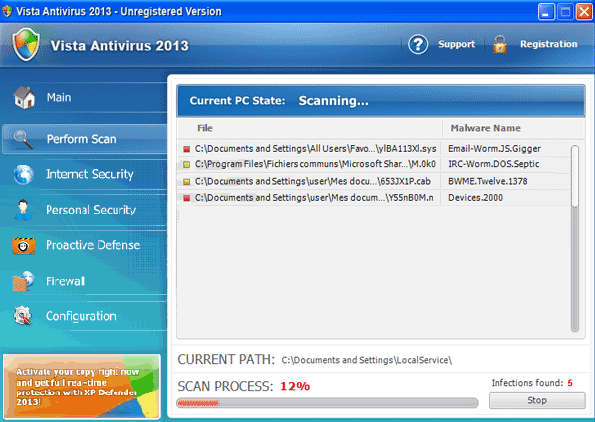
Vista Antivirus 2013 Image
There has been a recent wave of attacks involving fake security programs with the '2013' string appended to the end of each fake security application's name, such as Vista Antivirus 2013. All versions of Vista Antivirus 2013 are considered malware and will cause disruptions in your computer as well as attempting to steal your money. While most fake security programs carry out variants of what is essentially the same scam, one feature of Vista Antivirus 2013 sets it apart from other rogue security applications: Vista Antivirus 2013 can change its name and appearance depending on the victim's operating system.
In fact, these are recently released versions of previous malware programs from the FakeRean family, such as Antivirus 2008, Windows Antivirus 2008, Vista Antivirus 2008, Antivirus Pro 2009, AntiSpy Safeguard, ThinkPoint, Spyware Protection 2010, Internet Antivirus 2011, Palladium Pro, XP Anti-Virus 2011, CleanThis, PC Clean Pro, XP Home Security 2012, Windows Clear Problems, XP Security 2012, Antivirus PRO 2015.
They all consist in the same fake security program released with a new name and interface design each year.While Vista Antivirus 2013 is used to target computers with the Windows Vista operating system, computer users with the Windows XP or Windows 7 operating system will find that XP Antivirus 2013 and Win 7 Antivirus 2013 are installed on their computer respectively. Apart from this slight change to each program's name, Vista Antivirus 2013 and its clones are the same in all other aspects.
The Vista Antivirus 2013 scam is not particularly sophisticated. Basically, criminals will use Vista Antivirus 2013 to convince inexperienced computer users that they need to waste their money on a useless, fake security program. To do this, Vista Antivirus 2013 displays numerous error messages with alarming implications, claiming that the victim's computer has been invaded by Trojans, viruses, spyware and other malware threats. Vista Antivirus 2013 can also cause problems directly, such as causing the infected computer to become slower and to crash frequently, as well as blocking access to the victim's files or to the Internet. If the victim tries to use Vista Antivirus 2013 to fix these supposed malware problems, Vista Antivirus 2013 will display an error message claiming that they can only be removed by upgrading to a premium version of Vista Antivirus 2013. This 'full version' is, of course, not free, despite not having any real anti-malware capabilities.
Table of Contents
File System Details
| # | File Name |
Detections
Detections: The number of confirmed and suspected cases of a particular threat detected on
infected computers as reported by SpyHunter.
|
|---|---|---|
| 1. | %Temp%\[RANDOM CHARACTERS].exe | |
| 2. | %CommonAppData%\[RANDOM CHARACTERS].exe | |
| 3. | %AppData%\Roaming\Microsoft\Windows\Templates\[RANDOM CHARACTERS].exe | |
| 4. | %LocalAppData%\[RANDOM CHARACTERS].exe |
Registry Details
URLs
Vista Antivirus 2013 may call the following URLs:
| newssysstem.net |



