Vista Antispyware 2013
Threat Scorecard
EnigmaSoft Threat Scorecard
EnigmaSoft Threat Scorecards are assessment reports for different malware threats which have been collected and analyzed by our research team. EnigmaSoft Threat Scorecards evaluate and rank threats using several metrics including real-world and potential risk factors, trends, frequency, prevalence, and persistence. EnigmaSoft Threat Scorecards are updated regularly based on our research data and metrics and are useful for a wide range of computer users, from end users seeking solutions to remove malware from their systems to security experts analyzing threats.
EnigmaSoft Threat Scorecards display a variety of useful information, including:
Ranking: The ranking of a particular threat in EnigmaSoft’s Threat Database.
Severity Level: The determined severity level of an object, represented numerically, based on our risk modeling process and research, as explained in our Threat Assessment Criteria.
Infected Computers: The number of confirmed and suspected cases of a particular threat detected on infected computers as reported by SpyHunter.
See also Threat Assessment Criteria.
| Threat Level: | 20 % (Normal) |
| Infected Computers: | 28 |
| First Seen: | October 6, 2012 |
| Last Seen: | June 11, 2022 |
| OS(es) Affected: | Windows |
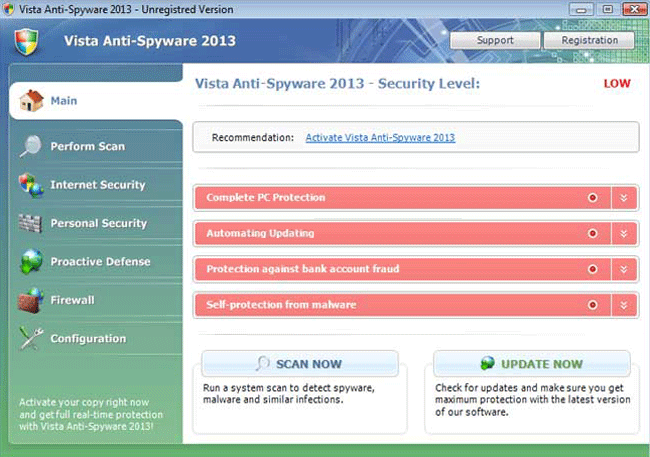
Vista Antispyware 2013 Image
ESG security researchers have received reports of new variants of the FakeRean family of rogue security programs. These newest variants of this dangerous family of malware add the '2013' string to each fake security program's name. Vista Antispyware 2013 is one of dozens of fake security programs released in October of 2012 in anticipation of the coming New Year. The main feature of Vista Antispyware 2013's family of malware is that these fake security programs have the ability to adapt to the operating system being used on the infected computer.
Vista Antispyware 2013 and other malware in this fake security software family are installed with the aid of Trojans typically downloaded as part of social engineering scams. Some examples of Vista Antispyware 2013 family members are Antivirus 2008, Windows Antivirus 2008, Vista Antivirus 2008, Antivirus Pro 2009, AntiSpy Safeguard, ThinkPoint, Spyware Protection 2010, Internet Antivirus 2011, Palladium Pro, XP Anti-Virus 2011, CleanThis, PC Clean Pro, XP Home Security 2012, Windows Clear Problems, XP Security 2012, Antivirus PRO 2015.
Table of Contents
How Vista Antispyware 2013 Adapts to Your Computer’s Operating System
Vista Antispyware 2013 attacks computers that are using the Windows Vista operating system. Vista Antispyware 2013 has the ability to adapt to the victim's computer. If the Windows XP or Windows 7 operating systems are being used on the infected computer, then rather than installing Vista Antispyware 2013, the Trojan responsible for installing these fake security programs will install XP Antispyware 2013 or Win 7 Antispyware 2013 respectively for both of these two operating systems. ESG team of malware analysts considers that Vista Antispyware 2013 poses a severe threat to a computer's security and that you should use a strong anti-malware solution to remove this bogus security program.
Vista Antispyware 2013 has no components that allow Vista Antispyware 2013 to detect or remove malware or spyware in a computer. Rather, Vista Antispyware 2013 is designed to display numerous fake alerts and system error messages that are designed to convince inexperienced computer users that their computer has become invaded with dangerous viruses, spyware and Trojans. Trying to use Vista Antispyware 2013 to remove these nonexistent malware threats from the infected computer is futile. Doing this leads to error messages that prompt the victim to pay for a nonexistent full version of this fake security program. Criminals do this to steal their victims' money as well as to gain unauthorized access to a computer user's credit card. ESG security researchers strongly advise against paying for Vista Antispyware 2013 supposed full version, even if only in an attempt to stop this bogus security program from displaying irritating error messages.
File System Details
| # | File Name |
Detections
Detections: The number of confirmed and suspected cases of a particular threat detected on
infected computers as reported by SpyHunter.
|
|---|---|---|
| 1. | %LocalAppData%\[RANDOM CHARACTERS].exe | |
| 2. | %LocalAppData%\[RANDOM CHARACTERS] | |
| 3. | %Temp%\[RANDOM CHARACTERS] | |
| 4. | %AppData%\Roaming\Microsoft\Windows\Templates\[RANDOM CHARACTERS] | |
| 5. | %CommonAppData%\[RANDOM CHARACTERS] |
Registry Details
URLs
Vista Antispyware 2013 may call the following URLs:
| humisnee.com |